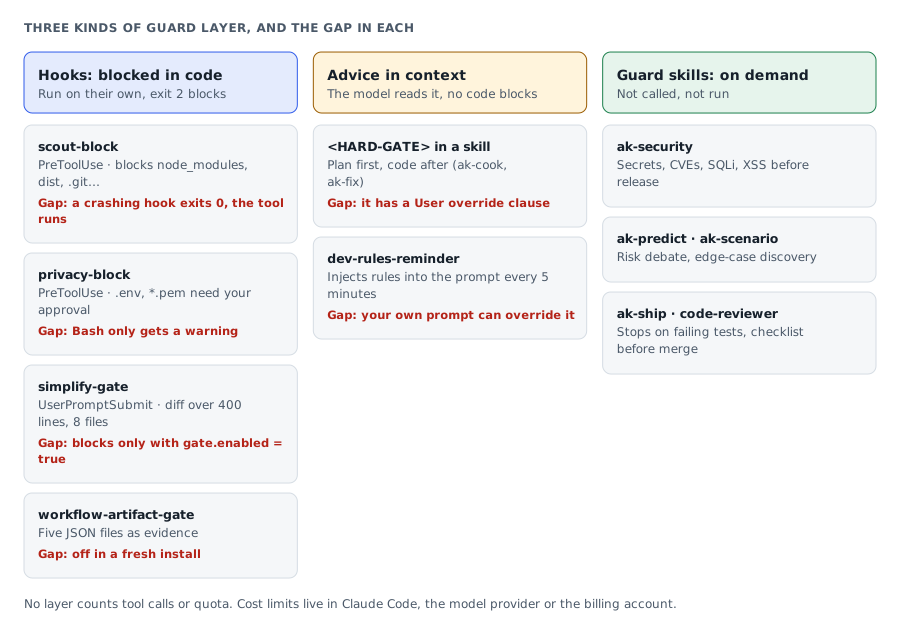
Quick summary: each AgentKit guardrail layer blocks a different kind of risk. Hooks such as
scout-blockandprivacy-blockblock tool calls in code; hard-gates and rules are only instructions; guard skills only run when you invoke them. Knowing which layer actually runs tells you where to audit.
Part 1 explained the Claude Code hook mechanism, the seven guardrail groups and the settings layers. This part goes through each layer in turn, then the gaps and the habits worth keeping. The configuration is a snapshot of claudekit-engineer@2.19.1 (June 2026), rechecked against AgentKit 3.0.0-beta.1 as noted in Part 1.
Disclosure: I maintain AgentKit and have an affiliate relationship with it: the AgentKit link at the end of this post is an affiliate link.
Note: the current AgentKit beta (since 3.0.0-beta.35, October 21, 2026) changed skill names from ak:<name> to ak-<name>, and the commands in this post use the new names: Claude Code calls /ak-plan, Codex calls $ak-plan. On an older version, swap ak- back to ak: to get the matching command.
scout-block: stop reading junk directories
Agents like to read node_modules/, glob **/*.ts at the root (a glob is a path-matching pattern; **/*.ts means every .ts file in every subdirectory), or cat dist/index.js. Each time, tens of thousands of tokens get stuffed into the context, pushing cost up and the quality of later turns down. scout-block.cjs registers on PreToolUse and runs before every Read, Bash, Glob and Grep.
# Baseline .ckignore, handled by pattern-matcher.cjs
node_modules
dist
build
.next
.nuxt
__pycache__
.venv
venv
vendor
target
.git
coverage
One important exception: build commands are allowed through. Commands like npm build, go build, make and docker build still run, even when the build touches node_modules or dist. Block that group too and AgentKit's ship and test flows would trip over themselves at the build step.
Gap 1, when the hook crashes: parse errors all lead to exit 0, so the tool goes through. A buggy hook silently turns off that guard.
privacy-block: block secrets, require explicit approval
When an agent touches .env, id_rsa, *.pem or credentials.yaml, the secret leaks into the transcript. Once it is in the context, it can be logged, quoted back in a reviewer's output, or pasted into a PR.
@@PRIVACY_PROMPT_START@@
{ "type": "PRIVACY_PROMPT", "question": {...}, "options": [...] }
@@PRIVACY_PROMPT_END@@
Claude parses this JSON and calls AskUserQuestion. If the user approves, the hook's message explains how to read the file through the approved path, for example cat ".env" after asking; the code also supports an APPROVED: prefix. The point is that approval must be explicit, not something the model infers.
Gap 2, the Bash exception: privacy-block lets Bash through with only a warning. Anyone who can run Bash can read secrets without going through the approval flow.
If a secret has already leaked: privacy-block only blocks reads. Rotate the credential right away, audit the conversation log, and check git history to see whether the secret was committed.
simplify-gate: block shipping when the diff outgrows its scope
A small task can balloon into a PR that touches too many files: the validation fix, some cleanup, a format change, a few nearby helpers. When you type something like "OK ship", simplify-gate.cjs (registered on UserPromptSubmit) reads git diff HEAD, and only acts when the prompt contains one of ship, merge, pr, deploy or publish.
The default thresholds in simplify.threshold in this version are three numbers:
- Total lines added and removed in the diff above 400.
- Files touched above 8.
- Lines added in a single file above 200.
The gate only blocks when simplify.gate.enabled=true. These thresholds can be overridden in .ck.json.
Gap 3, a misleading default: hooks.simplify-gate = true only lets Claude Code call the script. For the script to actually block a PR that outgrew its scope, you also need simplify.gate.enabled = true. A fresh install does not set this flag, so the gate only runs a light check and never blocks.
// project .ck.json: enable real blocking
{ "simplify": { "gate": { "enabled": true } } }
matchedSeverity() skips phrases like "don't ship" and "ship on", so a prompt like "ship on Friday" slips through. To disable the gate for every session in a scope, set CK_SIMPLIFY_DISABLED=1 in settings.json under the env key.
workflow-artifact-gate: five JSON files as evidence
When you run the full pipeline, each phase leaves behind a JSON file recording its decisions (an artifact), like a receipt after each step. This hook is designed to attach to UserPromptSubmit and PreToolUse(Bash), but it is not in the set of hooks that run after a fresh install; you have to opt in.
| Artifact | Phase | Contents |
|---|---|---|
context-snippets.json | scout, plan | Code snippets that were read |
risk-gate.json | predict | High-risk flag, auto-stop |
verification.json | fix, cook | Five-point checklist |
review-decision.json | code-review | Reviewer verdict |
adversarial-validation.json | adversarial | Adversarial pass |
The gate has two levels. At risky steps like ship, push, PR or deploy, the hook can stop the flow immediately and return the reason to the model (emitBlock()). At lighter steps like finalize or commit, it lets the flow continue but adds a warning to the context so the model can fix things itself (emitSoft()).
Gap 4, this gate is opt-in: workflow-artifact-gate is the strongest artifact check, but a fresh install never calls it. To use it, wire the hook in settings.json and enable it in .ck.json. Skip that and ship, push, PR and deploy are not blocked by this gate.
Hard-gate XML in skill files
Hooks can only block tool calls. Some mistakes are not tool calls but ordering: coding before there is a plan, fixing before scouting. AgentKit handles this by adding a <HARD-GATE> block to the skill's markdown file.
<HARD-GATE>
Do NOT write implementation code until a plan exists
and has been reviewed. Exception: --fast skips research
but still requires a plan step. User override: if user
explicitly says 'just code it', respect their instruction.
</HARD-GATE>
ak-cook and ak-fix each carry several hard-gates like this: plan or scout first, match the exact requirement or find the root cause, no side effects.
Why "hard" is still just an instruction: the word "hard" is misleading, because it is not blocked in code. It is an instruction in the prompt. If the model ignores it, no exit 2 stops it. Wrapping it in XML only gives a stronger signal than an ordinary rule, so the model finds it harder to rationalize a shortcut.
dev-rules-reminder: putting rules into context
dev-rules-reminder.cjs registers on UserPromptSubmit and injects rule text into every prompt. Two layers need to be kept apart here: the hook is the mechanism that injects context, and the rules in CLAUDE.md are the content being injected. In this version, each (sessionId, baseDir) pair is only re-injected after 5 minutes (a TTL) to avoid burning tokens.
| File | Guards against | Trait |
|---|---|---|
review-audit-self-decision | An audit reversing a confirmed decision | Verified decisions stick |
development-rules | Skipping tests, fake data | YAGNI, KISS, DRY |
team-coordination-rules | Two agents editing the same place | Ownership by glob |
commit-messages | Long commit bodies | Single line |
orchestration-protocol | Passing the full history | Context isolation |
Rules are text in the context, not code. Claude can drift if the user's prompt overrides them. In exchange, they are easy to add and edit. This layer suits style conventions better than security guards.
Guard skills: guards the user invokes
These skills only run when you call them:
| Skill | When to use | What it catches |
|---|---|---|
ak-security | Before release | Secrets, known vulnerabilities (CVE, Common Vulnerabilities and Exposures), SQL injection (SQLi), cross-site scripting (XSS), path traversal |
ak-predict | Before a risky feature | Several personas debate, verdict GO, CAUTION or STOP |
ak-scenario | Before implementation | Edge case sweep across many dimensions |
ak-ship | Before a PR | Stops on test failure, never force-pushes |
The code-reviewer agent runs a checklist covering concurrency, error boundaries, API (Application Programming Interface) contracts, backward compatibility, input validation, authentication and authorization, N+1 queries, data leaks, and fact-checking. It is the last guard before merge.
Known gaps
Do not misread what guardrails do. These are the gaps I noted in the configuration above:
- File-access guards live in hooks. A fresh install relies on
scout-blockandprivacy-block, not a separatepermissions.denylist for secrets or heavy directories. - Bash is exempt from
privacy-block. It only warns and skips the approval flow. workflow-artifact-gateis opt-in. The strongest gate does not run until you enable it.simplify-gatedoes not block by default. You have to enable it explicitly.simplify-gatecan be bypassed by phrasing."ship on Friday"is let through..ckignorecan negatenode_modules. Check it directly.- Rules are instructions. Claude can drift.
- HARD-GATE XML is also an instruction. It even has a "User override" clause.
There is also no rate-limit or quota guard. A runaway agent can make thousands of Read, Glob and Bash calls. AgentKit's hooks do not count tool calls and do not stop when you are close to your quota. Quota and cost limits live in Claude Code, the model provider, or your billing account, not in this guardrail layer.
Good habits and common mistakes
This section collects the habits I find worth keeping after reading the hook set closely, along with the places people tend to get wrong.
| Topic | Good habit | Common mistake |
|---|---|---|
| Config | Read both settings.json and .ck.json after installing. | Editing the global config while thinking you are editing the repo's config. |
simplify-gate | To block for real, set gate.enabled = true. | Assuming it is blocking when it is not in blocking mode by default. |
| Failing hooks | Check stderr for hooks that crash silently. | Assuming a failing hook blocks the tool; in practice it usually lets it through. |
| Rules in the prompt | Assuming a rule in the prompt blocks as well as a code hook. | |
| Secrets | When asked to approve reading .env, read the prompt carefully; do not auto-approve. | Counting on privacy-block after the secret is already committed. |
workflow-artifact-gate | Enable it for repos that ship to production. | |
node_modules | Need it? Override it with a project .ckignore. |
Six questions before trusting a guardrail
- Which hooks does
settings.jsonattach to which events? - Which hooks has
.ck.jsondisabled, in both the outer and inner config? - Is the current Claude Code session skipping permission prompts?
- Is there a project
.ckignoreoverride? Isnode_modulesre-allowed with!? - Are the rule files in
CLAUDE.mdcomplete? - Has any hook crashed silently in this session (check stderr)?
Quick glossary
| Term | Short meaning |
|---|---|
| Harness | The orchestration layer between the model and the machine: sends tool commands, manages permissions, runs hooks. Where guardrails attach. |
| Hook | A small script the harness calls at fixed points in the prompt, tool or session lifecycle to step in, check, or record state. |
| Lifecycle event | The points where hooks are called: UserPromptSubmit (prompt received), PreToolUse (before a tool), PostToolUse (after a tool), Stop and SubagentStop (session or subagent ends). |
| Exit code | The number a process returns when it ends. 0 allows, 2 blocks, 1 reports an error without blocking. |
| Fail-open | When a hook errors or crashes, the harness lets the tool run instead of blocking. The guard turns off silently. |
| Transcript | The full record of the conversation between the user and the agent in a session. |
| Context | The information the model "sees" while reasoning. Fill it with junk and cost goes up while quality goes down. |
| Glob | A path-matching pattern. **/*.ts is every .ts file in every subdirectory. |
| Secret | Sensitive data such as API keys, private keys, credentials. Leaking it into the transcript is a risk. |
| LOC | Lines of code, used to measure the size of a diff. |
| Artifact | A JSON file each pipeline phase leaves behind, recording decisions for the next phase to check. |
Read the right layer, trust it the right amount
When an agent has broad permissions, do not conclude "AgentKit is installed, so we are safe". Before trusting a guardrail, check two places: which hooks settings.json wires, and what .ck.json turns on or off.
Each layer protects against a different kind of risk: hooks block tool calls, rules nudge behavior, hard-gates hold the workflow, and guard skills only run when invoked. Knowing which layer is running and which is only an instruction helps you audit the right place, before a bug slips into a PR and on to production.
If you are building your own guardrail system, the patterns in AgentKit are worth studying. If you would rather use its hooks, skills and workflow guardrails as a ready kit instead of assembling each layer yourself, you can look at AgentKit. As disclosed at the top, I maintain AgentKit; if you buy through this referral link, I earn a commission.
Read next: Fable 5 and the unknowns problem shows where these gates sit in a real pipeline, from planning to shipping.
Use this piece in your agent
Get an API keyCopy the text below and paste it into Claude Code, Codex or whichever agent you use. The agent reads the piece and checks it against the repo you have open.
Read "Guardrails in Claude Code and AgentKit (2/2): each guard layer, its gaps and good habits" on modernEngineer and apply it to this repo.
1. Call the content_get tool of the modernengineer MCP server with locale "en", slug "guard-rails-claude-code-agentkit-2-guard-layers". If MCP is not connected or access is refused, read the page https://modernengineer.dev/en/library/guard-rails-claude-code-agentkit-2-guard-layers instead.
2. Summarize the main steps of the piece and point out which apply to this repo.
3. Propose concrete changes and ask me before editing any file.
Connect MCP in Claude Code (once)
claude mcp add --transport http modernengineer \
  https://api.modernengineer.dev/mcp \
--header "Authorization: Bearer <API key>"This piece is open to everyone: without MCP, the agent can still read it straight from the link.
- Version
- v1.0.0
- Updated
- 09/06/2026
- Licence
- All rights reserved
- Slug
- guard-rails-claude-code-agentkit-2-guard-layers