Quick summary: Archify is a skill that helps an AI agent such as Codex or Claude Code write a diagram as typed JSON, check it, and render an HTML page for you to review. Since version 3.1.0 (October 14, 2026), Archify has ten diagram types, and each one answers a different reader question. The agent still reads the code and decides the content; Archify only makes sure the drawing meets the standard. It does not prove that the system works.
Disclosure: I maintain AgentKit and have an affiliate relationship with it. The closing section points to a post about AgentKit's visualization skills.
This guide is for you if you use a coding agent and want system diagrams without drawing them by hand. The hard part is not installing Archify. It is choosing the right diagram type for the question you have, and knowing when a diagram is only a sketch rather than the current state. I use one fictional example, Tiệm bánh Mây (Cloud Bakery), to walk through all ten types, each with a prompt you can use right away.
Code or a requirements brief is enough to draw structure and processing flows. Timeline and Waterfall are different: they need sourced time data such as logs or traces, and without it you must state clearly that the numbers are illustrative. I will separate two things: what Archify does, and which diagram type fits which question.
What Archify does and does not do
Archify does not scan a repository on its own and guess the architecture. Think of the agent as the surveyor and Archify as the drawing standard. The agent reads the source code, separates what is known from what is not, chooses a viewpoint, and writes the content as JSON that follows the schema of each diagram type. Archify checks the schema, the structure, and the layout geometry, then builds the HTML page.
So a diagram that passes every check only means the drawing is valid. It does not prove that the diagram describes the system correctly, and it proves even less that the application works.
You can use Archify in two directions:
- A system that already has code: the agent reads evidence in the repository (files, API (Application Programming Interface) routes, configuration) to describe the current state.
- An idea with no code yet: you provide a requirements brief, and the agent sketches a proposed design.
To keep readers from confusing a drawing on paper with a running system, I use four labels for the basis of each claim:
| Label | Meaning |
|---|---|
CURRENT | What the current source code shows |
OBSERVED | What logs or an experiment show |
PROPOSED | A design for the future, not yet in the code |
UNKNOWN | Where there is not enough evidence to conclude |
This is a convention you ask the agent to follow when writing. It is not a field that Archify checks on its own.
Install Archify for your agent
The fastest way is to install it through the Skills CLI, then open the agent in the project folder and name Archify in your prompt. The command below installs it globally, so it works in every project:
npx skills add tt-a1i/archify -gIf you only want to install it for one project, choose the right agent:
# Codex: the skill lives in .agents/skills/
npx -y skills add tt-a1i/archify --skill archify --agent codex --copy --yes

# Claude Code: the skill lives in .claude/skills/
npx -y skills add tt-a1i/archify --skill archify --agent claude-code --copy --yes
After installing, the doctor command checks Archify's environment (not your application). For example, with the Codex install:
node .agents/skills/archify/bin/archify.mjs doctorTo use it with another agent, change --agent to that agent's name from the list in the installation guide. To make a per-agent install available in every project, add --global. To try it with Codex without a permanent install, run npx skills use tt-a1i/archify@archify --agent codex.
Choose a diagram type by the reader's question
Cloud Bakery is a fictional system used for illustration. Every diagram in the example is PROPOSED; no real application was built or run.
The story is simple: a customer picks and orders cakes on the website, and the system checks the items, creates the order, sends a payment request, notifies the kitchen, and updates the customer on the status. It is one story, but each reader cares about something different, and each concern fits one diagram type:
| Reader question | Diagram type |
|---|---|
| What blocks make up the system? | Architecture |
| What steps does an order go through? | Workflow |
| When a customer clicks to order, which component calls which first? | Sequence |
| Where does customer and order data go? | Data Flow |
| Which states can an order have? | Lifecycle |
| Which tables store the order data, and how do the keys connect them? | ERD |
| Which classes and interfaces make up the payment code? | Class |
| How is the cake ordering feature broken down? | Tree |
| What was the timeline of last night's payment incident? | Timeline |
| Where does one cake order request spend its time? | Waterfall |
The first five types describe structure and processing flows. The last five answer questions about stored data, code, hierarchy, and time. Archify is not for numeric charts or dashboards; for a question like monthly revenue, use a charting tool.
The most common mistake is cramming many questions into one picture. The picture may contain enough information, but the viewer does not know where to start reading. Start from one specific reader question, instead of "draw me a very detailed diagram".
Two ways to start: read existing code or design first
Before choosing a diagram type, you need to know where the agent gets its facts. The two scenarios below differ in their input source, and so they differ in the label attached to the diagram.
Scenario 1: read a repository and draw the current state
When to use it: to help a newcomer get to know a system, to trace the path of a request, or to update architecture docs that have drifted from the code.
The agent needs to read the application's entry points, API routes, services, storage layer, queues, infrastructure configuration, and related tests. Every important block and connection must have evidence, and the type of evidence must match the type of relationship: a direct call, configuration, an event, or dependency injection. A filename does not prove runtime behavior. If a service is declared but you cannot find where it is used, do not connect it yourself; if it cannot be determined, mark it UNKNOWN.
Use the Archify skill to read this repository and draw an Architecture diagram.

Reader question:
Which components does an order-creation request pass through?

Requirements:
- Use only facts with repository evidence.
- List the files read and the evidence for the main nodes/edges.
- Classify CURRENT and UNKNOWN; do not add services on your own.
- Author typed JSON, then run finalize at showcase quality.
- Report the diagram check results and the application's test status separately.
A good output has four things: JSON to review, HTML, the receipt from the run, and a list of places that still lack evidence.
Scenario 2: design a flow before writing code
When to use it: during requirements discovery, when reviewing a technical proposal, or when the whole team needs to agree on how a feature should work.
For Cloud Bakery, you give the agent a short brief: the customer picks cakes, the system checks the items, calls payment, and only then sends the order to the kitchen. The agent helps find the participants, branch points, and missing states. The drawing keeps the PROPOSED label until it is in the code; at that point the parts with code become CURRENT, while test results and OBSERVED behavior are reported separately.
Use the Archify skill to design a PROPOSED Workflow for an online bakery.

Question:
How does an order go from customer confirmation to the kitchen receiving it?

Allowed facts:
- Check items before payment.
- Payment can be accepted or declined.
- Send to the kitchen only after payment is accepted.

State assumptions and UNKNOWN items before authoring JSON.
Do not present a planning sketch as tested behavior.
Archify does not "test run the flow" in the sense of calling an API, a database, or a payment sandbox. To prove the design works, you still need a runnable prototype and suitable unit tests, integration tests, or end-to-end tests.
Five diagram types for structure and processing flows
These five types all describe how a system works or will work. They differ only in viewpoint: blocks, steps, call order, data, or states.
Architecture: a map of the blocks
Architecture answers which blocks make up the system, where the boundaries are, and what the main relationships are. For Cloud Bakery, the main path could be Customer → Website → Order API → Order Data, with payment and the kitchen as secondary branches.
This type fits overview docs, onboarding docs, dependency reviews, dividing responsibilities during deployment, or comparing architecture changes. It is not for narrating every message; that is Sequence's job.
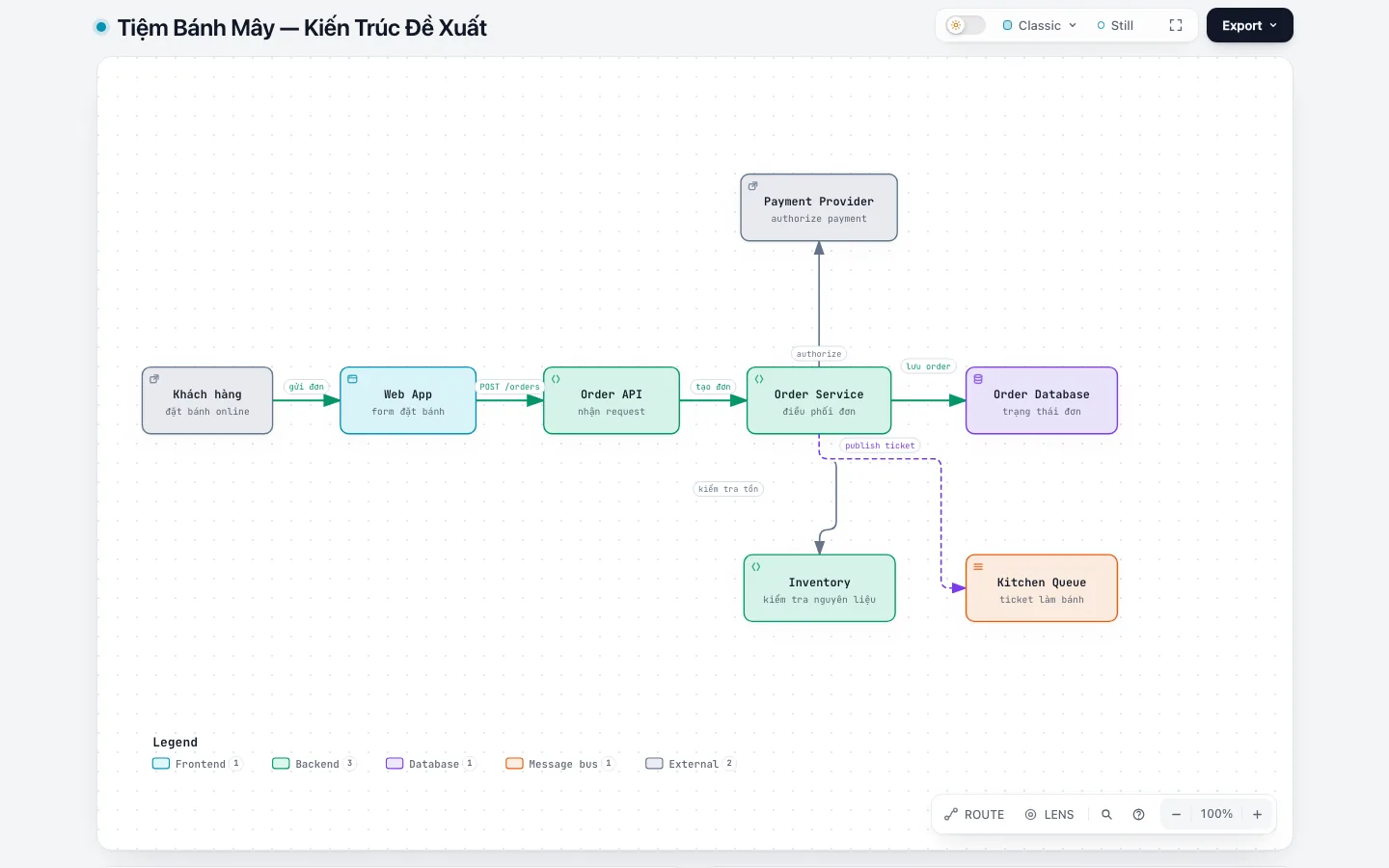
Use Archify Architecture for Cloud Bakery.
Question: which main blocks does a newcomer need to know, and how do they connect?
Keep the main path prominent. Payment and the kitchen are secondary paths.
Label the entire artifact PROPOSED.
Quick check: can the viewer point to each block and say what it is responsible for?
Workflow: a map of the work
If Architecture tells you what the system has, Workflow tells you where a piece of work goes: who does it, what they do, and where it branches. This type fits business processes, CI/CD (Continuous Integration/Continuous Delivery), incident response, approval flows, and runbooks.
At Cloud Bakery, the main path is Check items → Payment → Send to kitchen. Out of stock, declined payment, and refunds are exception branches. In the picture, the main path must stand out more than the error branches.
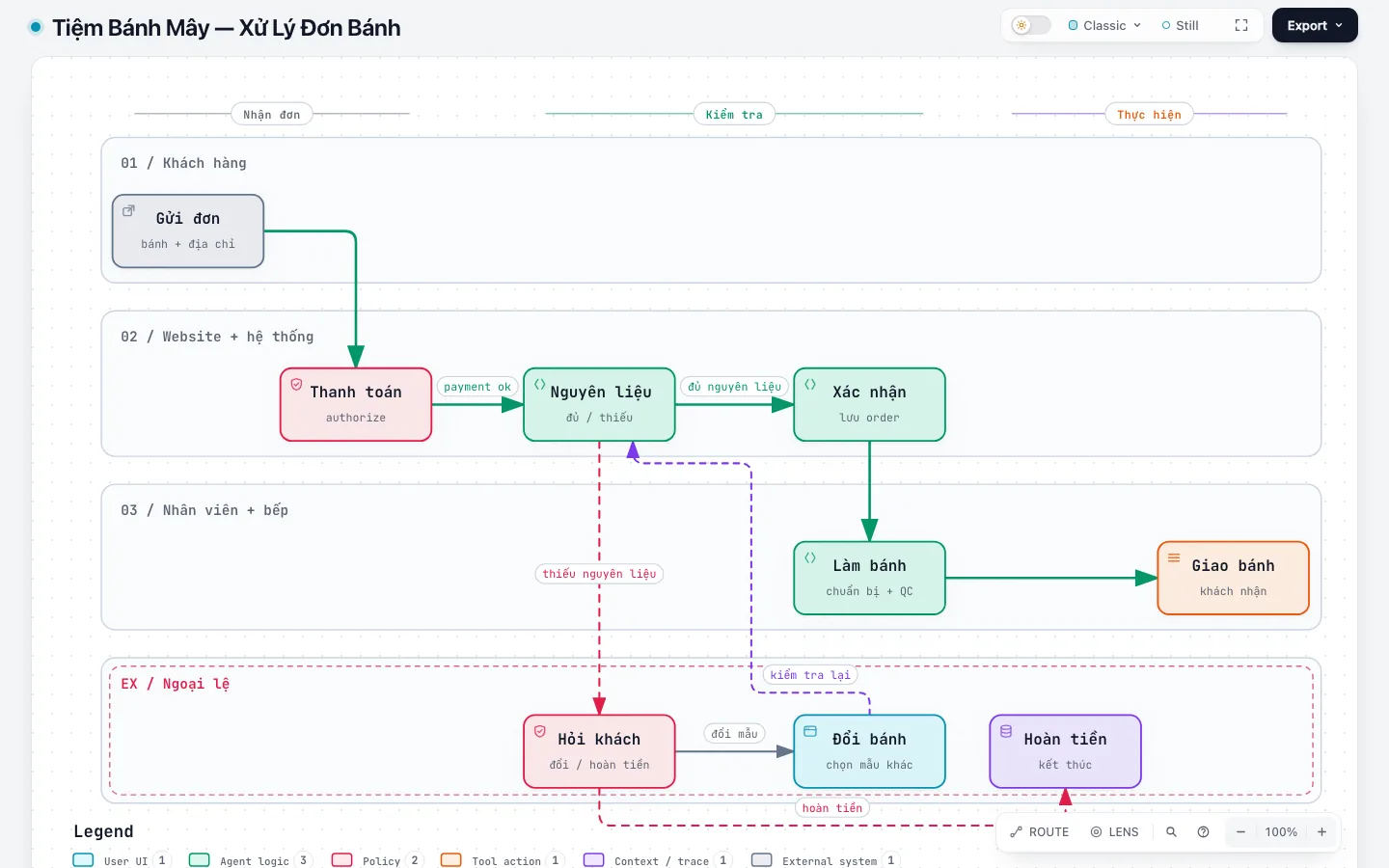
Use Archify Workflow to describe processing one cake order.
Question: where does an operator need to know whether an order continues or stops?
Show the actors, decisions, happy path, and failure paths that are in the brief.
Do not add retries or timeouts without evidence.
Quick check: at each branch point, does the viewer know the condition and the next step?
Sequence: the order of messages
Sequence goes one level deeper than Workflow: which component calls which, which message goes first, and how the result comes back. Use this type when designing API contracts, reading distributed traces, or debugging an integration point. The order in the picture is only as accurate as the evidence behind it, so it must come from source code, traces, or the requirements brief.
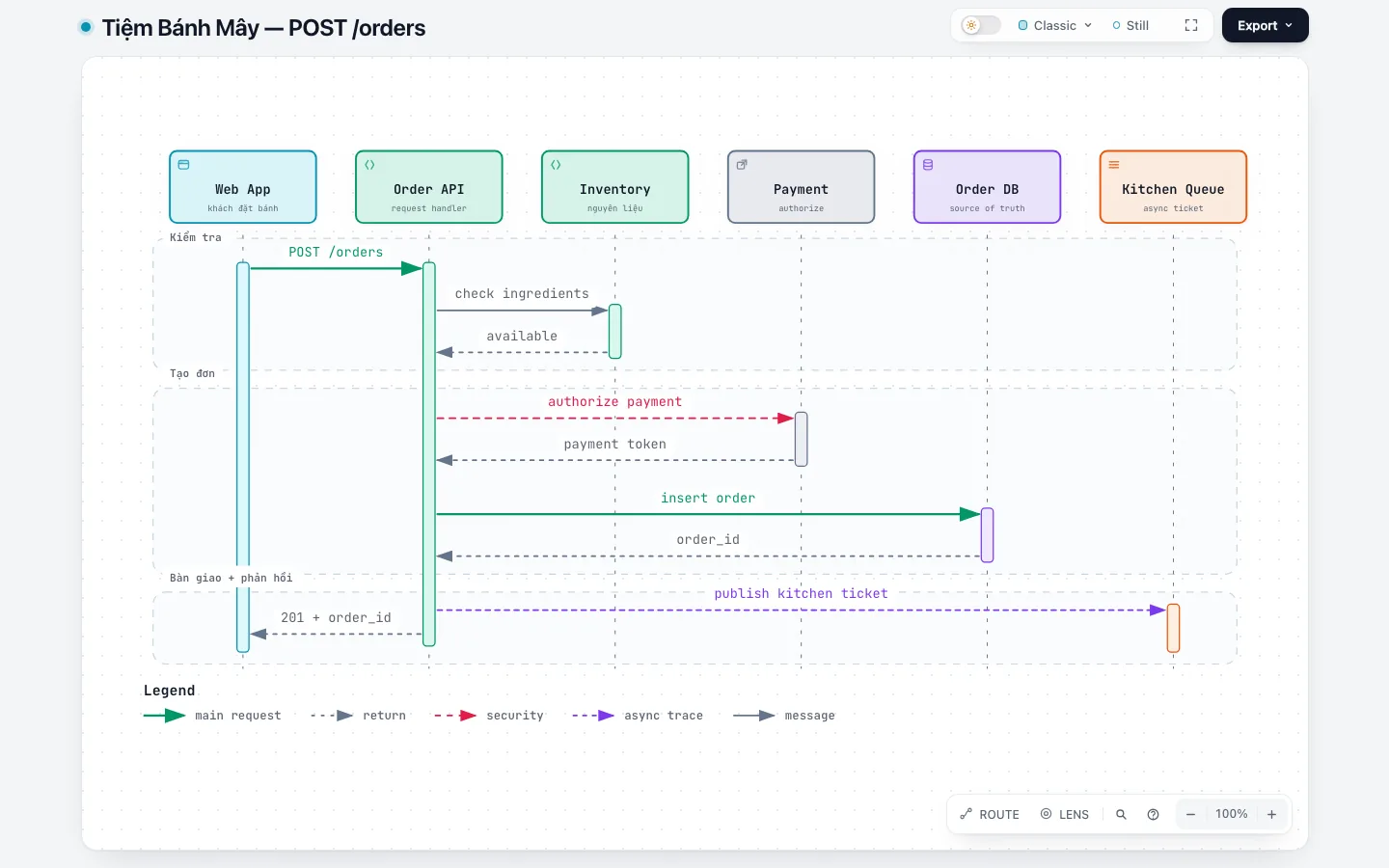
Use Archify Sequence for POST /orders.
Question: from when the customer clicks to order until they receive an order ID, who calls whom and in what order?
Use only participants that appear in the source or the brief.
Mark sync/async and the payment declined branch if there is evidence.
Quick check: can an engineer match each message in the picture to a trace or a piece of handler code?
Data Flow: follow the data
Data Flow does more than show which service connects to which. It focuses on which data is collected, transformed, stored, and which boundaries it crosses.
In the proposed Cloud Bakery design, contact details and order details live in Order Store, the payment request goes to the payment provider, and the kitchen ticket only contains the items and notes, without necessarily carrying all the customer data.
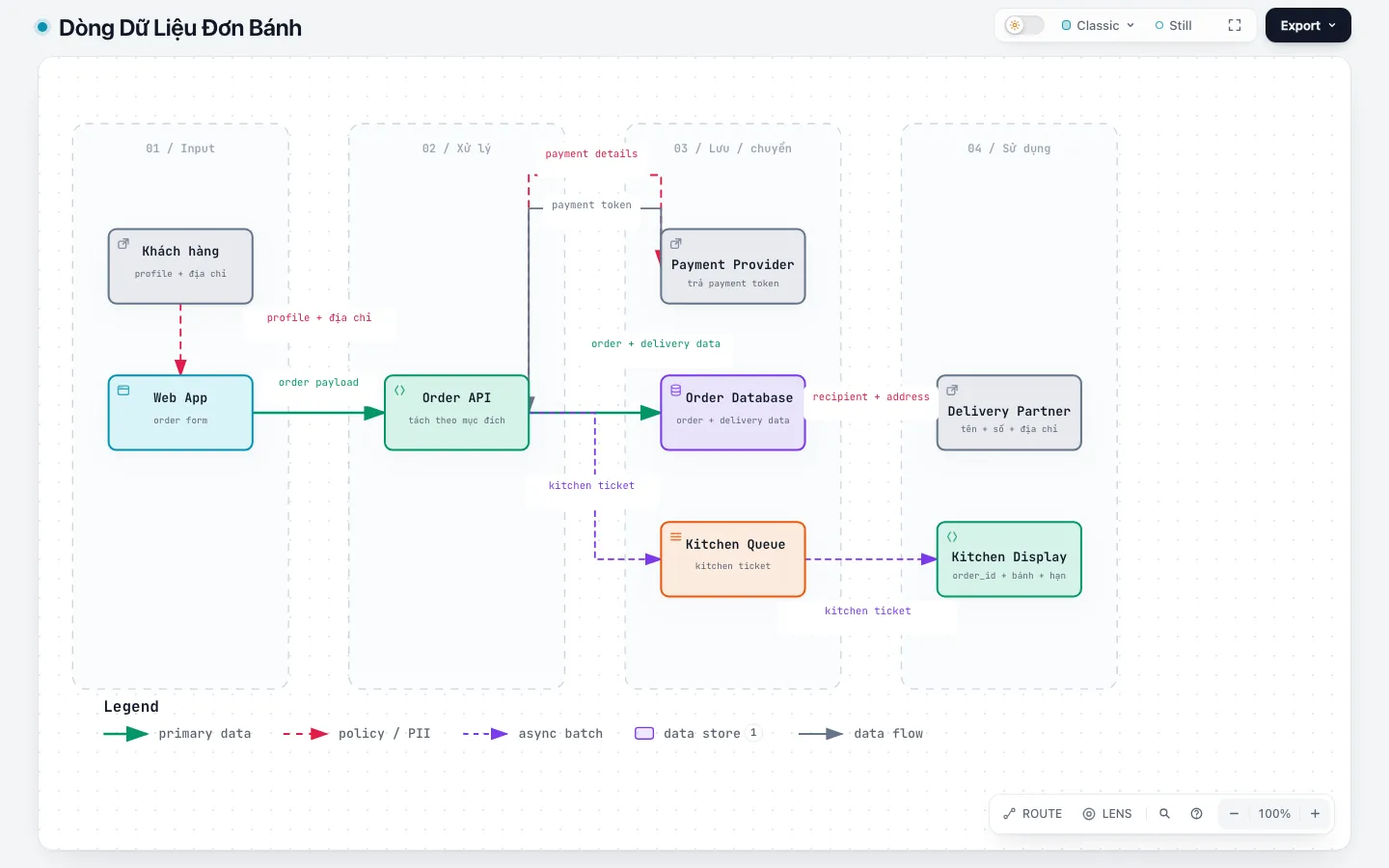
Use Archify Data Flow for one cake order.
Question: where do customer details, order details, and payment results go?
Distinguish source, process, store, and external sink.
Label each flow with the name of the data.
Retention, encryption, or PII without evidence must be marked UNKNOWN.
Quick check: can the viewer see right away which boundaries sensitive data crosses?
Lifecycle: a map of states
Lifecycle answers which states an object can have, and which events or conditions allow it to move from one state to another. For a Cloud Bakery order, the main path could be DRAFT → AWAITING_PAYMENT → CONFIRMED → IN_KITCHEN → READY → COMPLETED, plus paths to CANCELLED, each of which must have a clear condition.
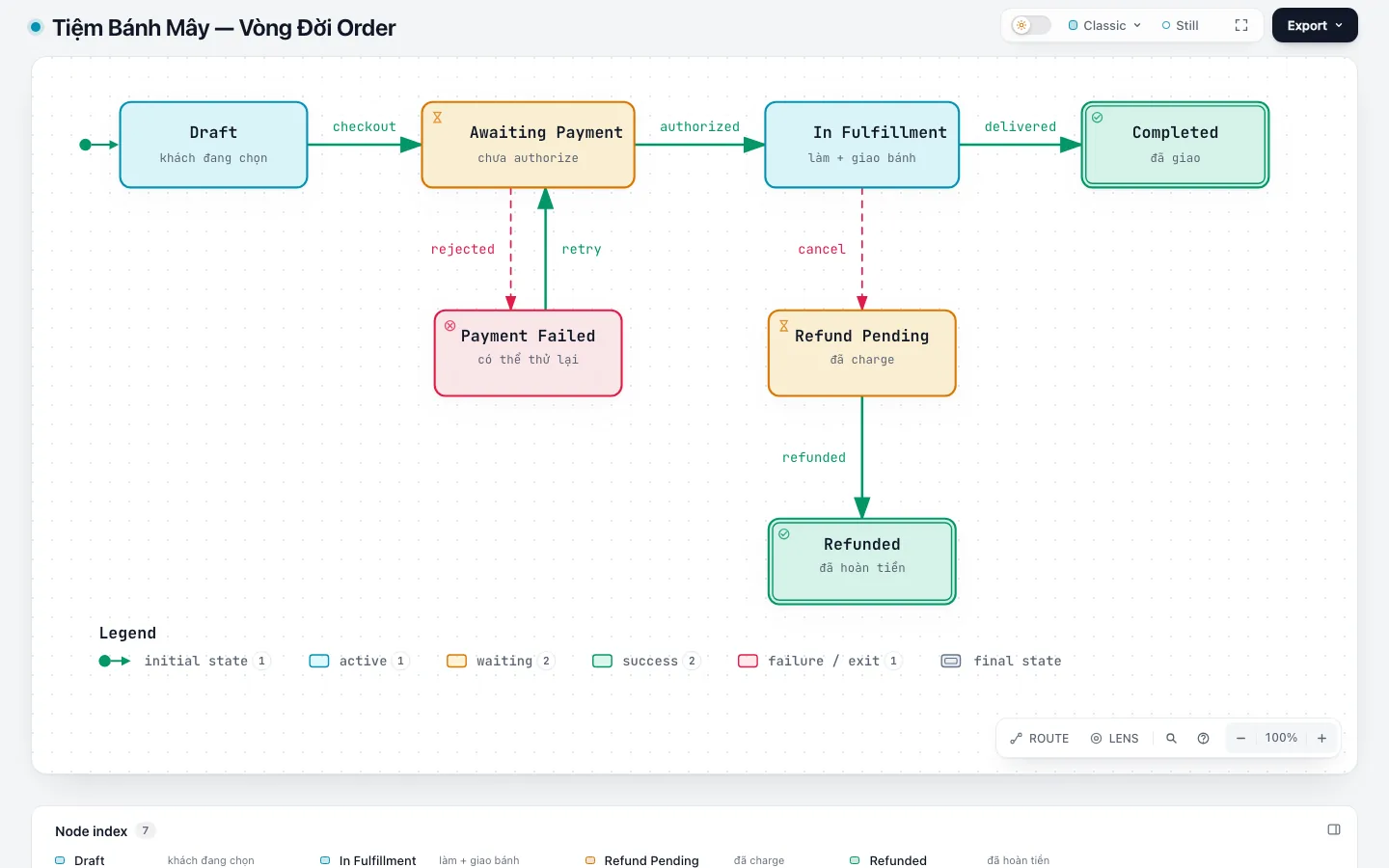
Use Archify Lifecycle for Order.
Question: through which valid paths can a cake order change state?
List the event/guard for each transition.
A state or transition without evidence must be PROPOSED or UNKNOWN.
Quick check: is there any state that cannot be reached from the starting point? Is there any state that is not an end point but gets stuck with no way out?
Five diagram types for data, code, hierarchy, and time
These five types arrived in Archify 3.1.0. They do not draw processing flows. Instead they answer narrower questions: where data lives, how code fits together, what belongs to what, and what happened when.
ERD: a map of data tables
Data Flow tells you where data goes; ERD tells you how it is stored. ERD draws the tables, each column with its SQL type, primary keys, foreign keys, unique keys, and the cardinality and optionality at both ends of each relationship (one to one, one to many, or many to many). For Cloud Bakery, the simplest version is customers, orders, order_items, products, and payments, where order_items connects orders with products.
Archify draws ERDs table first: every real column must appear in the table and cannot be collapsed into a description card. Tables are grouped by functional domain (orders, payments, menu). A large schema, around more than 8 tables or 50 columns, should be drawn first at the standard profile and only raised to showcase once the layout is readable.
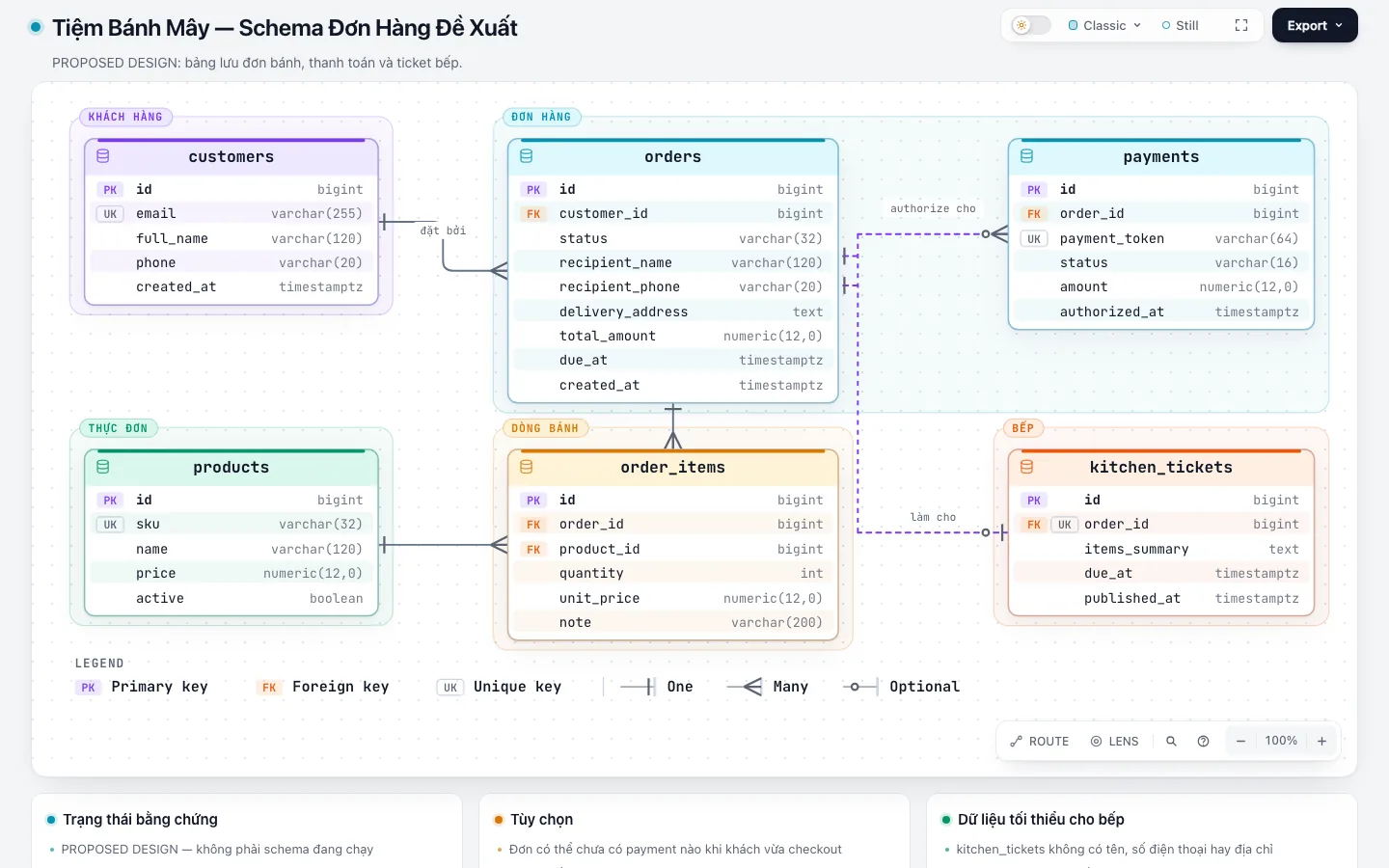
Use Archify ERD for the Cloud Bakery order schema.
Question: which tables hold the data for one cake order, and which keys connect them?
List every column, its SQL type, and the key role of each column.
Each foreign key must state the referenced table.column.
State the cardinality and optionality at both ends of each relationship.
Group tables by functional domain. Label the entire artifact PROPOSED.
Quick check: from one row in payments, can the viewer trace back to the right order and customer?
Class: contracts between types
Class draws classes, interfaces, selected attributes and methods, and the relationships between types: dependency, association, inheritance, interface implementation, and composition. This type fits code design reviews, getting to know a module, or when you want to quickly see which implementations an interface has.
For Cloud Bakery, the proposed design for payments could have a PaymentGateway interface with two implementations for two providers, and OrderService depends on the interface rather than on a concrete class. Only choose attributes and methods that help answer the question; listing all of them turns the picture into a copy of the code.
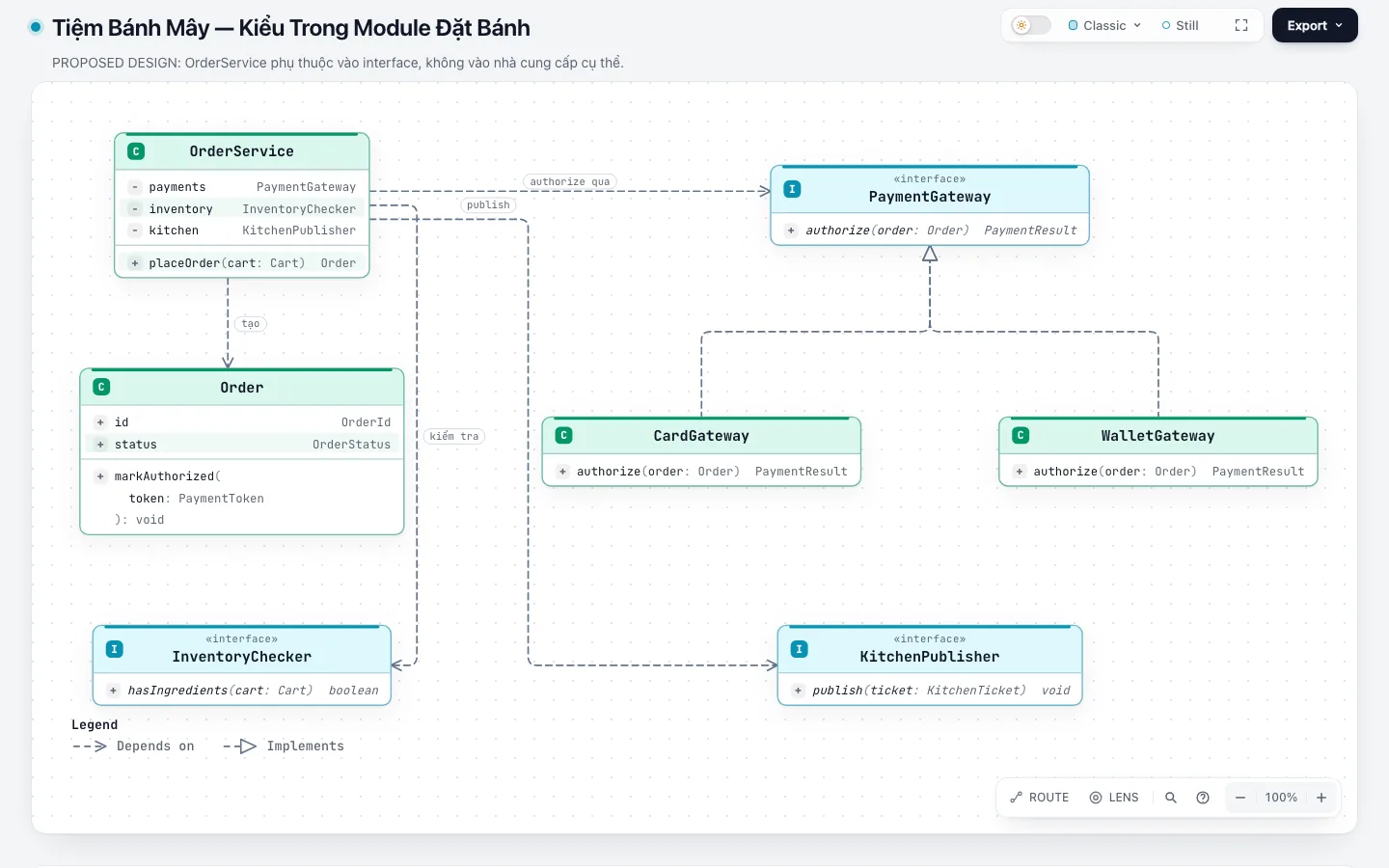
Use Archify Class for the payment module.
Question: which types does OrderService depend on when processing payments?
For a real repository: only draw classes/interfaces that exist in the source, with file/line evidence.
For a new design: propose the minimum types and label them PROPOSED.
Only show members related to the question.
Distinguish inheritance, interface implementation, and dependency.
Quick check: can the viewer point out what needs to change when adding a new payment provider?
Tree: single-parent hierarchy
Tree is for containment structures with a single parent: there is exactly one root node with no parent, and every other node has exactly one parent. A connection in a Tree means "belongs to", not a call. Typical examples are a repository's folder or module tree, the breakdown of a feature, and an org chart. If an element can belong to several groups at once, it is no longer a tree; in that case Architecture or Class fits better.
For Cloud Bakery, a Tree could break the "Online cake ordering" feature into item selection, cart, payment, and order tracking, and then split each branch further into smaller parts.
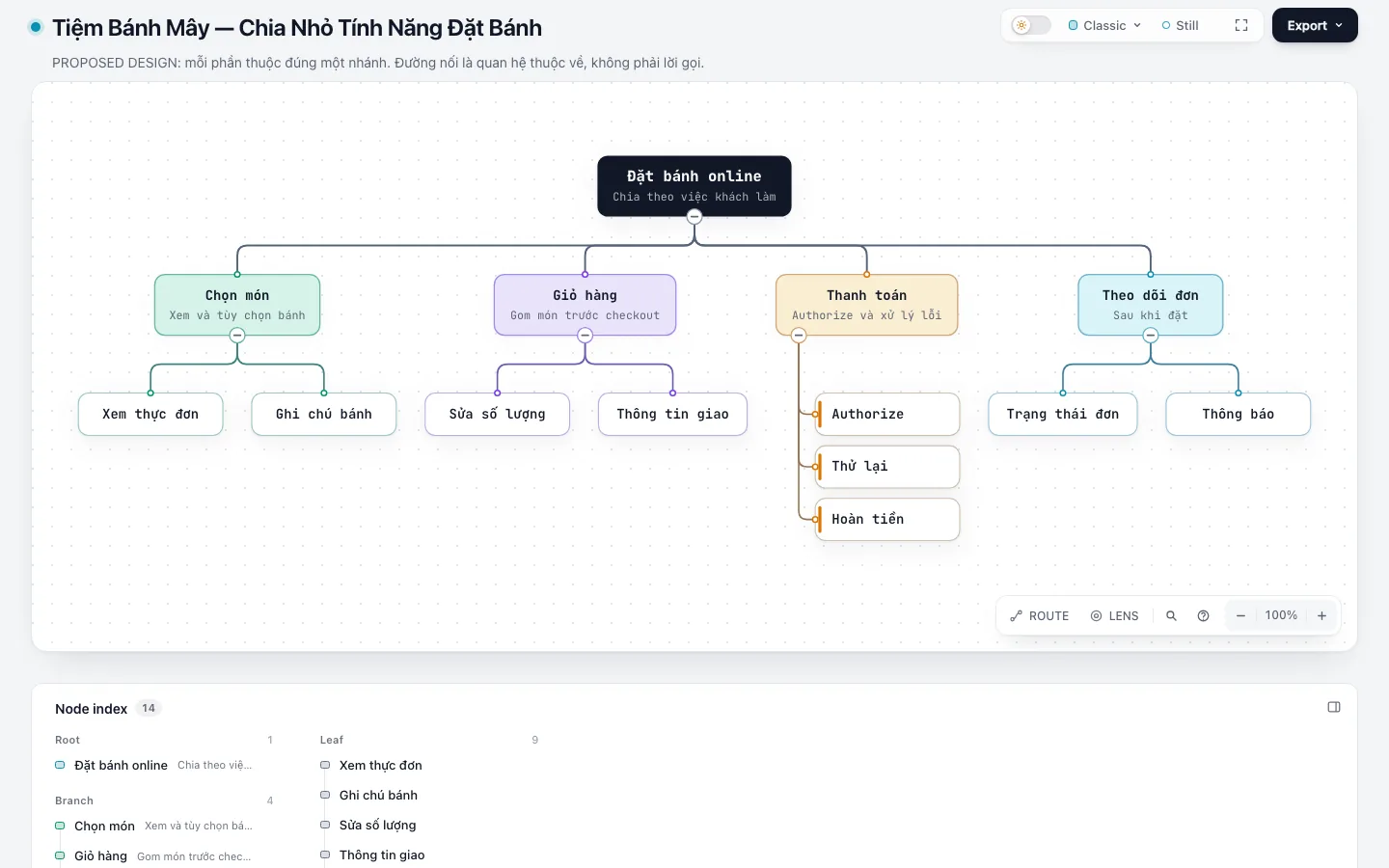
Use Archify Tree to break down the Online cake ordering feature.
Question: which parts make up this feature, and which part belongs to which?
One root node is the feature itself; every other node has exactly one parent.
Label the entire artifact PROPOSED; mark branches with uncertain scope UNKNOWN.
Quick check: is there any node that should belong to two branches at once? If so, this question does not fit a Tree.
Timeline: what happened when
Timeline places time-stamped events on a shared axis, split into lanes by the source of each event (application, payment, on-call responder). By default, long quiet periods are collapsed and marked with an axis break; set layout.breaks: "none" if you need the whole axis on a continuous scale. This type fits postmortems, release history, or reconstructing a sequence of events from logs.
Suppose Cloud Bakery has a payment incident one evening: an alert fires, the on-call responder acknowledges it, the payment provider confirms the error, the team rolls back to the old version, and the system recovers. Each point must have an ISO 8601 time with a time zone. The diagram declares meta.evidence: observed when the points come from logs, alerts, or incident notes; illustrative when the numbers are for illustration, as in this fictional example. If an event's time is unclear, put it in a note instead of placing it on the axis yourself.
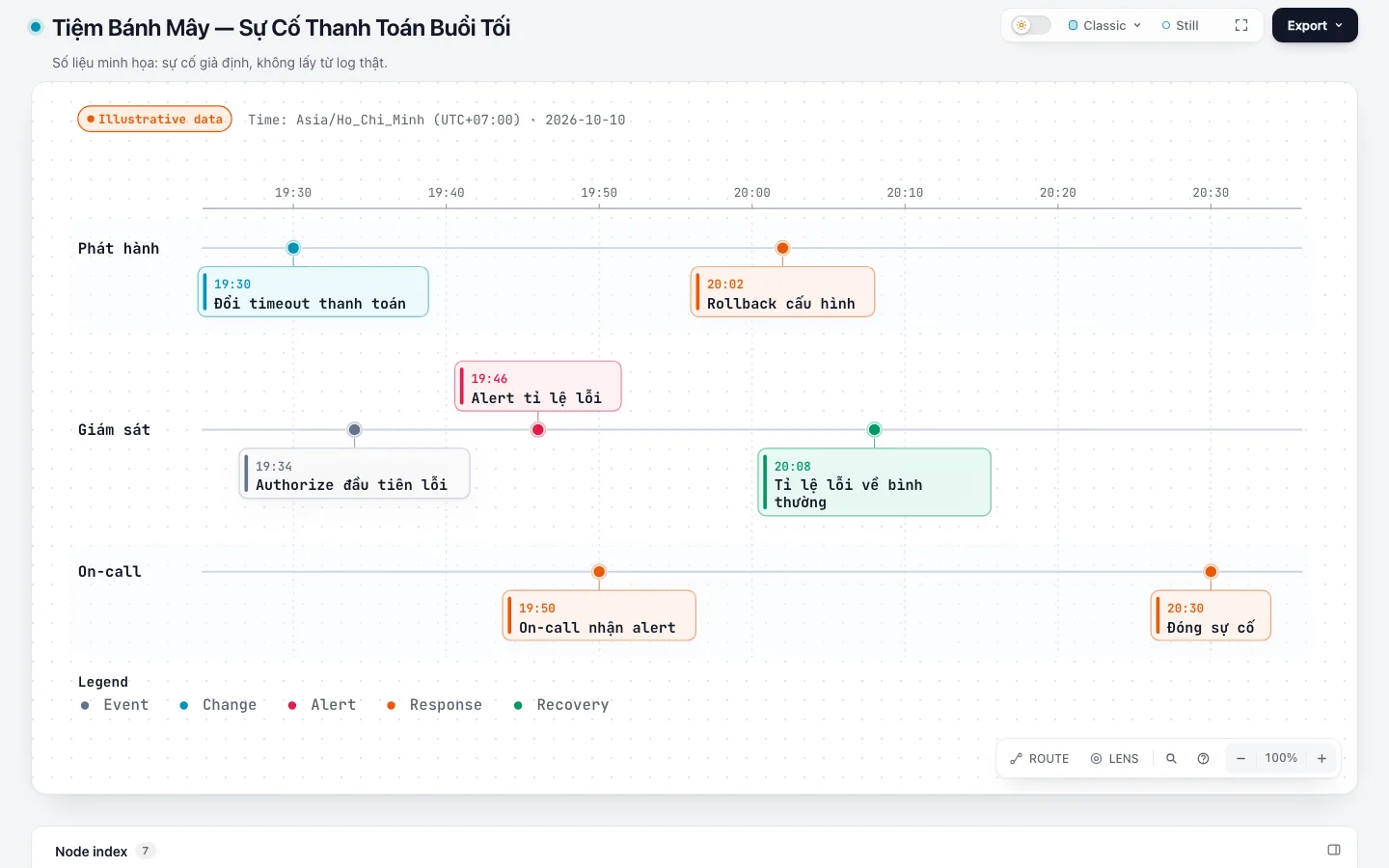
Use Archify Timeline for the Cloud Bakery payment incident.
Question: at what times did the incident start, get detected, and get resolved?
Each event needs an ISO 8601 timestamp with a time zone and a source (log, alert, notes).
Split lanes by event source. Use meta.evidence "observed" only when every point has a source.
Put events with an unclear time in a note; do not make up a timestamp.
Quick check: can the viewer read the gap between when the error started and when it was detected, even when part of the axis is collapsed?
Waterfall: where the time goes
Timeline answers when; Waterfall answers where the time is spent. Waterfall draws the spans of one request or one agent run on a shared time axis: start time, duration, overlap, and parent-child relationships. A parent span's duration already includes its child spans and is not added on top.
For the Cloud Bakery POST /orders request, Waterfall shows how long checking items, writing the order, calling payment, and notifying the kitchen each take, and which steps run in parallel. Waterfall does not draw a critical path or wait time, because the input does not say which step depends on which; two spans that follow each other do not prove that the first one blocks the second. The diagram's author declares meta.evidence: measured when durations come from a trace, logs, a profiling tool, or a measured run, and illustrative when the numbers are filled in by hand. This label appears on the picture but does not by itself prove that the numbers have a source.
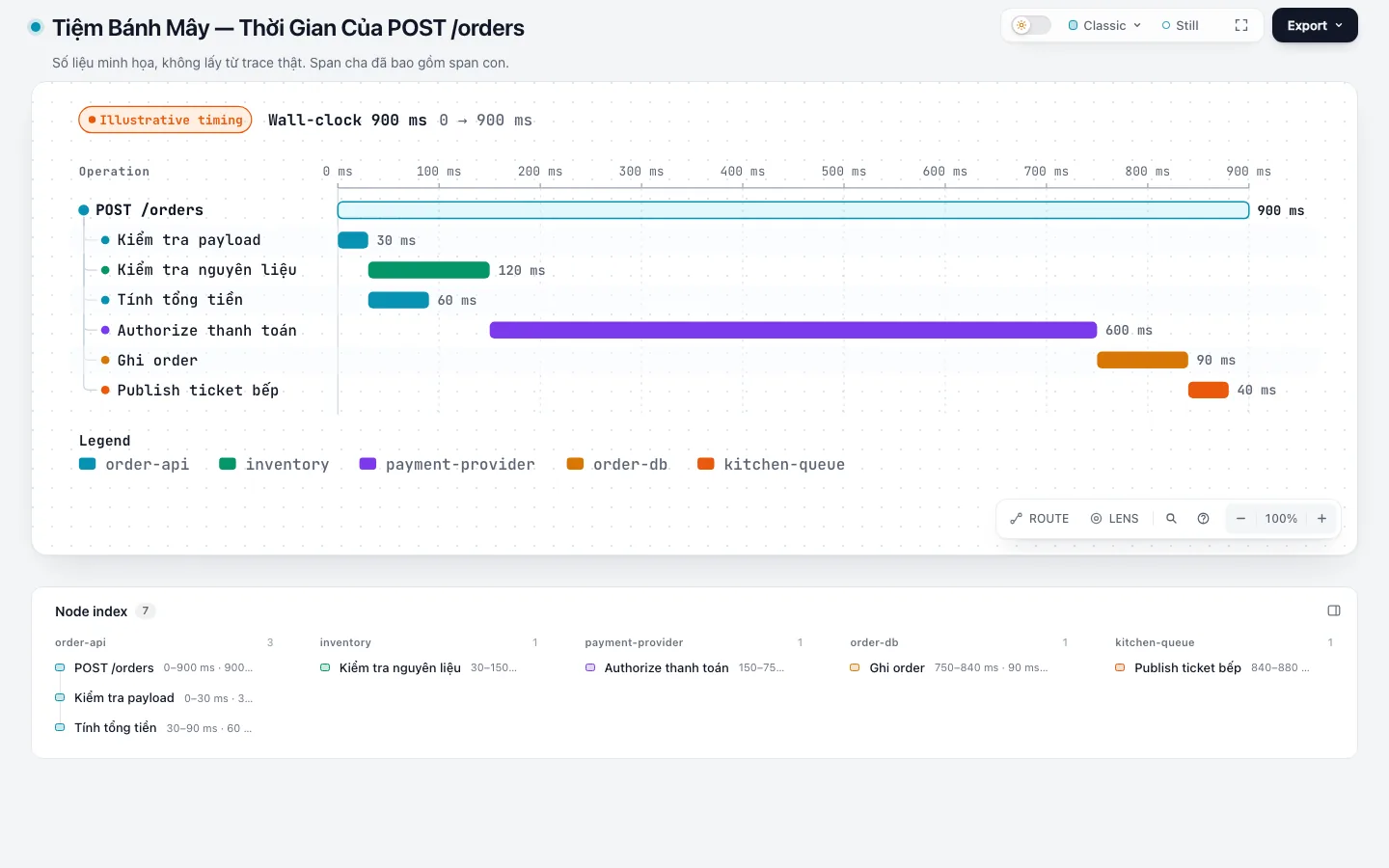
Use Archify Waterfall for one POST /orders request.
Question: in which step does the request spend most of its time?
Use spans from the provided trace; offsets are measured from the trace root.
Declare meta.evidence "measured" only when there are measurements; otherwise use "illustrative".
Do not infer blocking relationships from span order.
Quick check: can the viewer tell apart long spans, overlapping spans, and durations that already include child spans?
From question to checked diagram
Whatever the diagram type, a trustworthy working loop still follows this order:
- A narrow question: one reader question, not "draw everything".
- Bounded evidence or brief: know exactly which facts are allowed.
- Typed JSON: the agent writes a draft that follows the diagram type's schema.
finalize: one command that runs, in order, the checks for the quality profile that the JSON declares inmeta.quality_profileand passes through the--qualityflag (usuallyshowcase; the first pass of a dense ERD can usestandard), builds the HTML, runs strict checks, and checks in a real browser. The command stops at the first step that fails; a nonzero exit code means it is not done.- Visual review (optional):
finalizeonly runs automated checks and does not take screenshots of the diagram. To see how the diagram looks at different screen sizes, also runvisual-checkso Archify captures screenshots in light and dark mode. A diagram only counts as visually reviewed when a real person opens those screenshots and looks at them; until then the receipt still says it is pending (visualReview: "pending").
"Passing finalize at the showcase level" means the diagram clears all 9 of Archify's technical checks, with no layout errors or warnings (overlaps, overflow, connections drawn on top of each other). Warnings about interface translations (i18n/*) do not count. The details are in Archify's delivery contract.
These checks only answer the question "is the drawing correctly formatted and does it display well", not "does the drawing match the system". A diagram can pass every check and still draw a service wrong. So when the agent reports results, ask it to separate three answers: whether the automated checks passed, whether a person has reviewed it visually, and whether the application has been tested.
Command details can change between versions, so always check against the SKILL.md of the version you have installed.
The Cloud Bakery demo set
The demo set is public in the archify-tiem-banh-may-demo repository: source JSON, HTML, and light and dark screenshots at 1440×900 and 2048×1320 for all ten diagram types.
All ten diagrams were rerun with Archify 3.1.0 on October 17, 2026. All of them passed finalize at the showcase level with no errors or warnings, and visual-check reported no overflow. The receipts still say visualReview: "pending" because that is the job of the person viewing the screenshots, not of the tool. Timeline and Waterfall use illustrative data.
When you upgrade Archify, do not assume old JSON still works. JSON written for Archify 2.16 does not pass the 3.1.0 checks right away: meta.output becomes required, and Lifecycle moves to a new schema with mainPath and automatic layout. After each upgrade, rerun finalize on old JSON before trusting the diagrams. All of this is only evidence about the diagram creation process, not about the application.
Six common mistakes
| Mistake | How to avoid it |
|---|---|
| A good-looking diagram with made-up structure | Ask the agent to cite evidence for each block and connection; mark missing parts UNKNOWN. |
| One picture answers too many questions | One diagram type per question; the selection table above is the starting point. |
| Calling a sketch the current architecture | Put PROPOSED right in the title, the subtitle, and the handoff. |
| Treating diagram checks as application tests | Report two separate statuses: diagram checks and application checks. |
| Turning illustrative numbers into measurements | Do not infer durations from code; declare the correct meta.evidence for Timeline and Waterfall. Do not infer blocking relationships from span order, and do not add a parent span's duration to its child spans. |
| Reading stale HTML after a failed run | The old file may still be at the output location. Only trust the result of the latest successful finalize run. |
Reusable prompt template
Use the Archify skill to draw a [TYPE] for [PROJECT/FLOW].

Reader question:
[ONE NARROW QUESTION]

Allowed evidence:
[FILE/PATH/LOG/BRIEF]

Classify CURRENT / OBSERVED / PROPOSED / UNKNOWN.
Do not add facts on your own. Author typed JSON, then run finalize with a quality that matches
meta.quality_profile (usually showcase).
Report separately: the automated check results, whether it has been reviewed visually,
and application test evidence if any.
Do not equate diagram checks with application tests.
Official sources and further reading
- Archify on GitHub
- Archify Guide
- Archify changelog
- Official examples for the five new types: ERD, Class, Tree, Timeline, Waterfall
Which diagram type to start with
If you pick only one criterion, pick by the question the reader has: to know what the system has, use Architecture; to know where the work goes, use Workflow; to know where the data lives, use ERD; to know where the time goes, use Waterfall. Start with one diagram, run finalize, open the screenshots and look at them, and only then add a second diagram.
If you need to choose between other skills for diagrams and UI, see the guides for ak-preview, ak-diagram, ak-tech-graph, and ak-frontend-design.
Use this piece in your agent
Get an API keyCopy the text below and paste it into Claude Code, Codex or whichever agent you use. The agent reads the piece and checks it against the repo you have open.
Read "Archify with AI agents: choosing and using ten diagram types" on modernEngineer and apply it to this repo.
1. Call the content_get tool of the modernengineer MCP server with locale "en", slug "archify-ai-agent-scenario-guide". If MCP is not connected or access is refused, read the page https://modernengineer.dev/en/library/archify-ai-agent-scenario-guide instead.
2. Summarize the main steps of the piece and point out which apply to this repo.
3. Propose concrete changes and ask me before editing any file.
Connect MCP in Claude Code (once)
claude mcp add --transport http modernengineer \
  https://api.modernengineer.dev/mcp \
--header "Authorization: Bearer <API key>"This piece is open to everyone: without MCP, the agent can still read it straight from the link.
- Version
- v1.0.0
- Updated
- 01/09/2026
- Licence
- All rights reserved
- Slug
- archify-ai-agent-scenario-guide


