Quick summary: The cmux skill is a single entry point for everything you do with cmux. When you call
$cmux, the skill works out which area the request belongs to (workspaces, browser, settings, customization, diagnostics, Markdown) and opens only the companion skill for that area. Before any change, it asks cmux who is calling and what is already open. Every new layout opens in the background with--focus false, so the pane you are typing in is never taken from you.
cmux is a macOS terminal app from Manaflow. It organizes work into four nested levels, window, workspace, pane, and surface, and ships a CLI that scripts or agents can drive from inside. When you run several agents at once, that CLI is handy, but it can also get in the way: one agent opens a pane and pulls you away from where you were typing, or sends a command to a workspace with a similar name.
Disclosure: I maintain AgentKit and have an affiliate relationship with it: the AgentKit link in this post is an affiliate link; buying through it gets you 30% off.
Note: the current AgentKit beta (since 3.0.0-beta.35, October 21, 2026) changed skill names from ak:<name> to ak-<name>, and the commands in this post use the new names: Claude Code calls /ak-plan, Codex calls $ak-plan. On an older version, swap ak- back to ak: to get the matching command.
The cmux skill in the Subscriber bundle is based on the original cmux skill from Manaflow (licensed GPL-3.0-or-later). I keep the CLI behavior unchanged and add safety layers so that coordinating many workspaces and many agents is more reliable. I will go from how the skill routes requests, through the safety rules, to a product lifecycle and multi-runtime scenarios. Commands and behavior in this post follow the contract in cmux/SKILL.md, the documentation that ships with the skill, and the official cmux docs.
One entry point, seven skills
The bundle has one root skill, cmux, and six companion skills. When you call $cmux (in Codex) or the cmux slash command (in Claude Code), the root skill reads the request and opens exactly one matching companion. It opens more only when your request genuinely spans several areas.
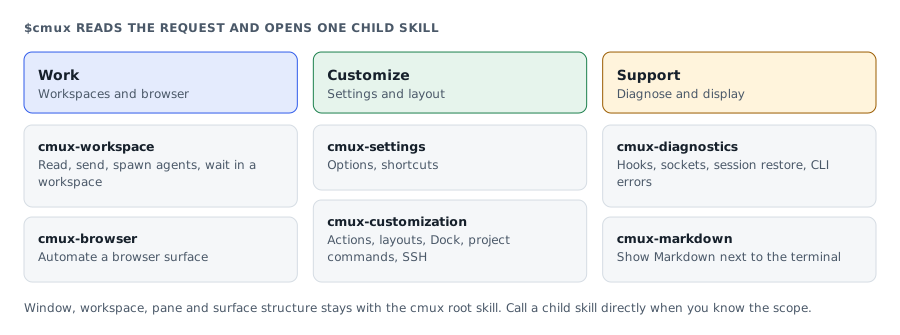
| You need to | Handled by |
|---|---|
| Work with the caller's workspace or a named workspace: read, send, spawn agents, wait | cmux-workspace |
| Automate a browser surface | cmux-browser |
| Change a preference or shortcut | cmux-settings |
| Actions, layouts, Dock, project commands, SSH workflows | cmux-customization |
| Hooks, socket, session restore, notifications, CLI errors | cmux-diagnostics |
| Render a Markdown file next to the terminal | cmux-markdown |
| Window, workspace, pane, and surface structure | The root cmux skill itself |
The skill does not pick up general multi-agent work, or "workspace" in the everyday sense, when the request does not explicitly involve cmux.
You can also call a companion directly when you already know the scope, for example $cmux-browser for browser-only work or $cmux-diagnostics for a health check. Use $cmux when you want the root to decide, or when the request deliberately spans several areas. Either way, the shell commands underneath always start with cmux or scripts/cmuxw.sh.
Opens when your account has subscriber access
This guide is for subscribers
Once your account has access, the full piece, the interactive visual and the agent call all open.
- Sign in or create a modernEngineer accountReading access belongs to your account email.
- Choose a plan on the pricing page1, 3 or 12 months, paid by VietQR bank transfer. Access opens about a minute after the money arrives.
- Or redeem a Facebook subscriber codePeople supporting the page on Facebook get an activation code by message each month.
Already a subscriber? Sign in to read.
Use this piece in your agent
Get an API keyCopy the text below and paste it into Claude Code, Codex or whichever agent you use. The agent reads the piece and checks it against the repo you have open.
Read "The cmux skill: coordinate several agents in your terminal without stealing focus" on modernEngineer and apply it to this repo.
1. Call the content_get tool of the modernengineer MCP server with locale "en", slug "cmux-skill-workflow". If the modernengineer MCP server is not connected, stop and walk me through connecting it from https://modernengineer.dev/en/mcp.
2. Summarize the main steps of the piece and point out which apply to this repo.
3. Propose concrete changes and ask me before editing any file.
Connect MCP in Claude Code (once)
claude mcp add --transport http modernengineer \
  https://api.modernengineer.dev/mcp \
--header "Authorization: Bearer <API key>"Reading the full piece over MCP needs an API key from a subscriber account or one that bought this guide. Without access, the agent only gets the opening.
- Version
- v1.0.0
- Updated
- 10/08/2026
- Licence
- GPL-3.0-or-later
- Slug
- cmux-skill-workflow


