This piece comes with a file pack you can run right away.See the files
Interactive version
This piece comes with an interactive page: diagrams, scenarios and sample sessions. The link is created fresh on every click.
In short: Herdr Cook Plan runs an AgentKit plan you already have (
plan.mdand thephase-*.mdfiles) through Herdr. Each phase goes to a new agent in its own pane, in sequence or in parallel as dependencies allow. The coordinator dispatches, verifies and commits; it never implements. It is the Orca Cook Plan variant for people who run Herdr instead of Orca. The guide is open to everyone, and the skill files (version 1.0.0) are a free download once you sign in.
Note: the current AgentKit beta (since 3.0.0-beta.35, October 21, 2026) changed skill names from ak:<name> to ak-<name>, and the commands in this post use the new names: Claude Code calls /ak-plan, Codex calls $ak-plan. On an older version, swap ak- back to ak: to get the matching command.
Why this skill
Running a whole multi-phase plan in one session breaks in predictable ways:
- Compaction stacks up. A long plan fills the context again and again. Each auto-compaction swaps detail for a summary: file paths, decisions, constraints, half-finished reasoning. Later phases rest on a lossy summary, quality slides, and the agent may redo finished work or skip a step it thinks it already did.
- Noise rides along. Logs, failed attempts and debugging from phase 1 are still in the context when phase 4 starts.
- It grades its own work. The agent that wrote the code also decides it is done. A quiet terminal gets read as success.
- You become the dispatcher. Typing “continue”, answering questions, spotting stalls, remembering which phase comes next.
What the skill does instead:
- Every phase starts with a clean context. A worker that runs low leaves notes and hands off to a fresh attempt.
- The coordinator stays light. State lives on disk (checkpoint, ledger, lease), so recovery is exact.
- “Done” means evidence: a completion report, an in-scope diff and passing checks, verified by a different agent.
- One commit per phase, plus an append-only ledger.
- Parallel when it is safe. Phases that write the same files run in sequence.
- You are asked only about real decisions. With
--autothe coordinator decides within the plan and logs why. It never widens scope, publishes or runs destructive operations on its own.
What you get
- The
herdr-cook-plan1.0.0 skill files:SKILL.md, references (dispatch,mailbox,supervision,recovery,runtimes,selection,omp), thecheck-run-closed.pyscript, the OMP Context Guard extension and tests. - The bilingual overview page with an illustrated run, the steps, flags and Context Guard (the “Interactive” tab).
The files are for your own use; please do not share them. The free download stays at version 1.0.0. Subscribers install the files straight from their agent over MCP and get every later release without downloading it again by hand. The herdr-cook-plan repo on GitHub is the public edition (MIT), provided as is; the edition in this guide is the maintained edition, where improvements land first.
Six steps in every run
- Check the gates. Running inside a Herdr pane, Herdr 0.9.1 or later, integration
current. - Plan the waves. A table of execution waves; at most two workers run in parallel by default.
- Dispatch. A new pane and a new agent for every attempt. The brief is loaded from a checked file.
- Supervise. Sweep the mailbox and wait on each worker. An idle terminal is not success; a timeout is not consent.
- Accept and commit. Write the intent to the checkpoint first, commit only the phase's paths, record
phase-acceptedwith the SHA, close the pane. - Close the run.
implementation-summary.md,check-run-closed.py,run-completed, and the lease is released last.
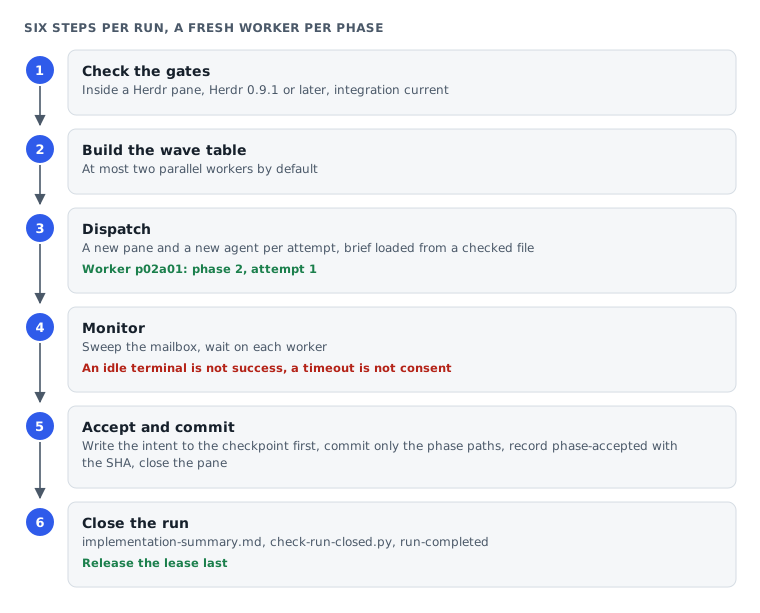
Workers are named by phase and attempt: p02a01 is phase 2, attempt 1. A replacement gets p02a02, so it can never pick up an answer meant for the old attempt.
Before you install
The skill runs on macOS and Linux.
- Herdr 0.9.1 or later. Invoke the skill inside a Herdr pane (
HERDR_ENV=1). - The Herdr agent skill. Drop
-gto install it per project:
``bash npx skills add herdrdev/herdr --skill herdr -g ``
- Integration
currentfor each worker runtime. Check, then install it for any runtime that is not current:
``bash herdr integration status herdr integration install <kind> ``
- AgentKit Engineer Kit in the worker's runtime, since workers run
ak-cook:ak kit init engineer --target <runtime> --yes. Get AgentKit through my referral link for 30% off. - Python 3, and Git is strongly recommended: with Git, every accepted phase becomes its own commit.
Install from the file pack
Subscribers who connected the modernEngineer MCP server can skip the manual steps: paste the prompt from the file pack section into your agent, which downloads, installs and updates the skill when a new version is out.
Download the file pack at the end of this guide and unzip it. The skill folder is herdr-cook-plan/herdr-cook-plan/ inside the zip. Copy the whole folder into your runtime's skills folder:
| Runtime | Per project | Global |
|---|---|---|
| Claude Code | .claude/skills/ | ~/.claude/skills/ |
| Codex | .agents/skills/ | ~/.agents/skills/ |
| OMP | .omp/skills/ | ~/.omp/agent/skills/ |
| Pi | .pi/skills/ | ~/.pi/agent/skills/ |
| Cursor | .cursor/skills/ | ~/.cursor/skills/ |
| Grok CLI | .grok/skills/ | ~/.grok/skills/ |
A global install for Claude Code:
unzip herdr-cook-plan-v1.0.0.zip
mkdir -p ~/.claude/skills
test ! -e ~/.claude/skills/herdr-cook-plan &&
  cp -R herdr-cook-plan/herdr-cook-plan ~/.claude/skills/
Run the skill's tests to check the files are intact:
python3 herdr-cook-plan/herdr-cook-plan/tests/instruction-contract.test.py
node --test herdr-cook-plan/herdr-cook-plan/tests/context-guard.test.mjs
On OMP: start the coordinator with the guard
Nothing registers the guard automatically. Start the coordinator with the extension; the coordinator adds the same extension to every OMP worker it launches:
omp --extension ~/.omp/agent/skills/herdr-cook-plan/extensions/context-guard.mjsDo not use --no-extensions: it also disables Herdr's own OMP integration, and worker states stop being trustworthy.
Calling it
Open a Herdr pane, start your coordinator agent, and point it at the plan. Pass a plan file, or a directory containing plan.md:
| Runtime | Syntax |
|---|---|
| Claude Code, Cursor, Grok CLI | /herdr-cook-plan plan.md --auto |
| OMP, Pi | /skill:herdr-cook-plan plan.md --auto |
| Codex | $herdr-cook-plan plan.md --select-agent --auto --advice |
Flags
Orchestration flags
| Flag | Meaning |
|---|---|
--runtime <kind> | The worker runtime for the whole run, by Herdr agent kind (omp, claude, codex...). Defaults to the coordinator's own kind. Accepts --runtime=omp and --runtime=current; --kind is not accepted. |
--model <id> | The primary worker model, passed through the kind's native arguments. The coordinator reads the kind's --help first and never invents a flag. |
--select-agent | Asks once for the worker runtime and model before the first dispatch, then keeps the choice for every phase, repair and recovery. --auto does not answer it. |
--auto | The coordinator decides in-plan approvals and records why. Workers never get cook's --auto; they still ask through the mailbox. It never covers scope expansion, publishing, deployment or destructive operations. |
--omp-advisor all|none|<phase,...> | OMP's own advisor per OMP worker. A phase list also covers those phases' repairs and replacement workers. |
--parallel | A scheduling preference, not forwarded to workers. Dependencies and overlapping writes still run in sequence; at most two workers by default. |
Passed down to ak-cook: --advice turns on AgentKit's advisory protocol (kongming checkpoints) for every phase and repair; --tdd and other cook flags are checked against the cook installed in the worker's runtime, then passed through.
--advice and --omp-advisor are independent and can run together. Your global OMP config is never edited; disabling the advisor for one run uses a run-local overlay.
Recovery and Context Guard
Every runtime recovers from files (checkpoint, per-attempt brief, mailbox, lease) within the same session. OMP also has Context Guard: it anchors each session to its role and run, and demands recovery after a compaction, a fallback, a restart, a model change or context nearing the limit. It never changes models, runs commands, writes the checkpoint or dispatches workers. Check it with /herdr-cook-context-status. The guard is unit-tested; I have not yet observed it under a real compaction.
If Orca Cook Plan's guard is also in the session, the Herdr checkpoint wins; if the Orca guard is active, the coordinator stops and asks you.
Known limits
- One worker runtime per run; runtimes cannot be assigned per phase.
- The automatic guard exists only on OMP.
- Live smoke testing is limited to one two-phase run with OMP workers. Other worker runtimes and a full cook end to end are unverified.
- Workers may write extra
plans/journals/*outside their scope. - For Claude Code and Codex,
ak-cookhas to be probed on the machine before the first dispatch.
Herdr and AgentKit are separate projects with their own terms.
Files for this piece
Files includedThe pack is the tested part of the piece: download it, change a few lines, and run it. Pick the install route that suits you.
Download and install
- Press Download the files. Each press makes a fresh link that expires after 15 minutes.
- Unzip it. You get one outer folder with pack.json, and inside it one or more skill folders, each holding a SKILL.md.
- Copy every one of those skill folders, side by side, into .claude/skills/ (Claude Code) or .agents/skills/ (Codex), in the project or in your home folder to use them everywhere. Don't copy the outer folder that holds pack.json.
- If no folder directly inside the outer one holds a SKILL.md, install the pack by following the guide.
Install over MCPSubscriber
For subscribers: paste one instruction into your agent and it downloads, unzips and installs the pack, and the same for every update.
See the Subscriber planUse this piece in your agent
Get an API keyCopy the text below and paste it into Claude Code, Codex or whichever agent you use. The agent reads the piece and checks it against the repo you have open.
Read "Herdr Cook Plan: a fresh worker for every phase, the coordinator only herds" on modernEngineer and apply it to this repo.
1. Call the content_get tool of the modernengineer MCP server with locale "en", slug "herdr-cook-plan". If MCP is not connected or access is refused, read the page https://modernengineer.dev/en/library/herdr-cook-plan instead.
2. Summarize the main steps of the piece and point out which apply to this repo.
3. Propose concrete changes and ask me before editing any file.
Connect MCP in Claude Code (once)
claude mcp add --transport http modernengineer \
  https://api.modernengineer.dev/mcp \
--header "Authorization: Bearer <API key>"This piece is open to everyone: without MCP, the agent can still read it straight from the link.
- Version
- v1.0.0
- Updated
- 26/10/2026
- Licence
- All rights reserved
- Slug
- herdr-cook-plan