This piece comes with a file pack you can run right away.See the files
Visual pages
This piece comes with two visual pages. Overview is a quick read, and Step by step is an interactive diagram of every decision.
In short: Orca Cook Plan runs an AgentKit plan you already have through Orca. The coordinator orders phases by dependency, gives each phase to a fresh worker session running
ak-cook, asks you when a decision is needed, checks the evidence and checkpoints. The guide is free to read; buying the files gets you the skill (version 1.2.3) for Claude Code, Codex, Cursor, Grok CLI, Pi or OMP, plus the overview page and an interactive diagram of how a run works.
Note: the current AgentKit beta (since 3.0.0-beta.35, October 21, 2026) changed skill names from ak:<name> to ak-<name>, and the commands in this post use the new names: Claude Code calls /ak-plan, Codex calls $ak-plan. On an older version, swap ak- back to ak: to get the matching command.
Running a whole multi-phase plan in one session tends to go wrong in the same three ways: workers ask about things outside the scope, the coordinator loses track of progress after compaction, and every run starts by rediscovering the project's tools. Orca Cook Plan splits the work: the coordinator only coordinates, each phase runs in its own worker session, and the plan stays the anchor.
What the skill fixes
- Stays in scope. With
--auto, the coordinator decides within the plan you gave it. Proposals to widen the scope are recorded and never block the running phase. - Remembers pending work. A checkpoint keeps the Run, Task/Dispatch, decisions, evidence and next step. After compaction or a fallback, the coordinator recovers in the same session and Run and checks Orca so it never dispatches twice or reruns an accepted phase.
- Uses the tools you have. Workers get the project's entrypoint, commands, working directory and checks. A fix that was verified once is reused by later workers.
- Picks runtime and model.
--select-agentasks once per Run, finds the CLIs in the worker's environment and checks the integration before running.
The guide comes with the full overview page (the “Overview” tab) and an interactive diagram of the coordinator, worker and advisor (the “Step by step” tab). The diagram labels are in Vietnamese.
What you get
- The
orca-cook-plan1.2.3 skill files:SKILL.md,README.md, references (recovery,runtimes,selection,omp), the runtime discovery script, the OMP Context Guard extension and tests. - The overview page with the flags, Context Guard and the skill's changelog.
- The interactive diagram of the three roles.
The files are for your own use; please do not share them. Subscribers download the files with their plan without buying them separately, and can install them over MCP so their agent picks up new versions.
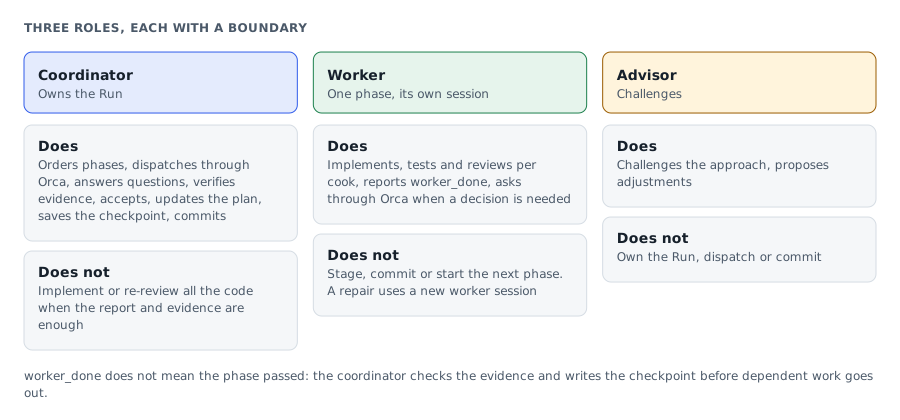
Three roles
| Role | Does | Does not |
|---|---|---|
| Coordinator | Owns the Run: orders phases, dispatches through Orca, handles questions, checks evidence, accepts results, updates the plan and saves the checkpoint. Commits in Git, or records file-scope evidence when the workspace has no Git. | Implement, or re-review all the code when the report and evidence are enough. |
| Worker | Does one phase in its own session: implements, tests and reviews per cook, then reports worker_done. Prefers the project's tools and asks through Orca when a decision is needed. | Stage, commit or start the next phase. A repair uses a new worker session. |
| Advisor | Challenges the approach and suggests changes. | Own the Run, dispatch or commit. |
worker_done does not mean the phase passed. The coordinator checks the evidence, accepts the phase and writes the checkpoint before dispatching anything that depends on it. A phase with no changes is recorded instead of producing an empty commit.
Before you install
- Orca. The coordinator uses Orca to create Tasks, open worker sessions and track progress.
- AgentKit Engineer Kit in the worker's runtime, since workers run
ak-cook. For OMP:ak kit init engineer --target omp --yes. Get AgentKit through my referral link for 30% off. - The runtimes you plan to use: OMP if you want Context Guard, or Claude Code, Codex, Cursor, Grok CLI, Pi. The coordinator and workers can use different runtimes.
- Python 3, and Node.js for the OMP extension.
Install from the file pack
Subscribers who connected the modernEngineer MCP server can skip the manual steps: paste the prompt from the file pack section into your agent, which downloads, installs and updates the skill when a new version is out.
Download the file pack at the end of this guide and unzip it. The skill folder is orca-cook-plan/orca-cook-plan/ inside the zip. Copy the whole folder, including extensions/ and references/, into your runtime's skills folder:
| Runtime | Per project | Global |
|---|---|---|
| Claude Code | .claude/skills/ | ~/.claude/skills/ |
| Codex | .agents/skills/ | ~/.agents/skills/ |
| OMP | .omp/skills/ | ~/.omp/agent/skills/ |
| Pi | .pi/skills/ | ~/.pi/agent/skills/ |
| Cursor | .cursor/skills/ | ~/.cursor/skills/ |
| Grok CLI | .grok/skills/ | ~/.grok/skills/ |
A global install for Claude Code:
unzip orca-cook-plan-v1.2.3.zip
mkdir -p ~/.claude/skills
test ! -e ~/.claude/skills/orca-cook-plan &&
  cp -R orca-cook-plan/orca-cook-plan ~/.claude/skills/
If the target already has orca-cook-plan, stop and diff before replacing it.
Using orca-cook-plan across several projects or worktrees with Claude Code or Codex? Let your agent install and update AgentKit and skill packs through MCP shows how to have your agent keep one master copy, link it into each project and update it when a new version is out.
One more step on OMP
Copying the skill folder does not load Context Guard by itself. Add a loader file in the same scope:
| Scope | Skill | Loader |
|---|---|---|
| Project | .omp/skills/orca-cook-plan/ | .omp/extensions/subscriber-orca-cook-plan.js |
| Global | ~/.omp/agent/skills/orca-cook-plan/ | ~/.omp/agent/extensions/subscriber-orca-cook-plan.js |
The loader contains:
export { default } from "../skills/orca-cook-plan/extensions/context-guard.mjs";Open a new OMP session and call the skill. The extension starts idle; the coordinator configures and activates it when a Run starts. Check that it loaded with /orca-cook-context-status. Do not load a second copy through --extension. If you remove the skill, remove the loader too, or OMP fails on the import.
Calling it
Open a new session in the project and call the skill with the real plan path (absolute or relative, optionally prefixed with @):
| Runtime | Syntax |
|---|---|
| Claude Code, Cursor, Grok CLI | /orca-cook-plan plan.md --auto |
| Pi, OMP | /skill:orca-cook-plan plan.md --auto |
| Codex | $orca-cook-plan plan.md --auto |
Some combinations (OMP syntax):
/skill:orca-cook-plan plan.md --advice --auto
/skill:orca-cook-plan plan.md --runtime omp --omp-advisor all --advice --auto
/skill:orca-cook-plan plan.md --runtime omp --omp-advisor phase-02,phase-04 --auto --tdd
/skill:orca-cook-plan plan.md --select-agent --parallel --auto
Without flags, workers use the current runtime and cook's default mode, and decisions that need approval go to you through the coordinator.
Flags
There are two layers: orchestration flags handled by Orca Cook Plan, and flags passed down to ak-cook for each phase. These are skill-invocation conventions, not a CLI parser; the coordinator checks them against the real cook in the worker's runtime before dispatching.
Orchestration flags
| Flag | Meaning |
|---|---|
--runtime <agent-id> | The worker's runtime; the coordinator's runtime does not change. Defaults to the current one. Accepts --runtime omp, --runtime=omp, --runtime=current. |
--select-agent | Asks for the runtime and primary model before the first dispatch and keeps the choice for the Run and recovery. --auto still waits for this answer. |
--auto | The coordinator decides in-plan approvals. Workers do not get cook's --auto and still ask through Orca. It never widens scope, skips access checks, publishes or deploys. |
--omp-advisor | OMP workers only: all, none, or phases such as phase-02,phase-04 (their repairs included). |
--parallel | Prefers running independent phases in parallel. Dependencies and write conflicts still hold; at most two workers by default. |
Flags passed to ak-cook
| Flag | Meaning |
|---|---|
--advice | AgentKit's advisory workflow (kongming) for every phase and repair. Independent of --omp-advisor; both can be on. |
--tdd | Tests for current behavior first, checked again after implementing. |
--interactive | The full workflow with review gates; questions still go through the coordinator. |
--fast | Skips research: scout, plan, code. It does not skip review or tests, or widen the phase. |
--no-test | Skips cook's test step. The report must say what was not verified. |
--yagni | Lets cook consider cutting scope the outcome does not need, never a plan acceptance criterion. |
--skip-journal | Skips the automatic journal entry at finalize. |
Context Guard (OMP only)
The guard is an extension on OMP sessions. While active, it reminds the session of its role, Run and checkpoint; asks for a checkpoint when telemetry reaches the context threshold; asks for recovery after compaction or a fallback; and blocks every tool except reading and writing the checkpoint when the session runs a model outside its role's allowedModels. It never changes models, saves the checkpoint itself or wakes a stopped runtime.
Claude Code, Codex, Cursor, Grok CLI and Pi still get the workflow, the checkpoint and the recovery guide, without a hook that watches the context. If the coordinator runs Codex and the workers run OMP, only the OMP workers have the guard.
Common questions
Does the coordinator continue if I answer late? The skill stores the question with the pending work. When you answer, or the session recovers, the coordinator applies that decision and continues. It does not wake a runtime that has exited.
Does compaction or a fallback start a new coordinator? No. The coordinator re-reads the checkpoint, checks the Run, Task, Dispatch, pending questions and evidence, and continues in the same session and Run. If it cannot recover, it reports the blocker and the checkpoint path.
When can a worker be replaced? Only when recovery inside the worker's session cannot continue. The new worker finishes the remaining acceptance work of the same Task; it does not redo the phase.
Why is the guard idle in OMP? Loaded is not active. Idle is normal before a Run starts or after it ends. unknown telemetry means not enough data, not plenty of context left.
Known limits
The skill has been checked for logic, an OMP smoke test and some Orca lifecycles. I have not run a full cook end to end on all six runtimes, on native Windows, or with a real exhausted quota or full context. Model fallback is managed by your runtime and its configuration. Never read silence as done.
Files for this piece
Files includedThe pack is the tested part of the piece: download it, change a few lines, and run it. Pick the install route that suits you.
Download and install
- Press Download the files. Each press makes a fresh link that expires after 15 minutes.
- Unzip it. You get one outer folder with pack.json, and inside it one or more skill folders, each holding a SKILL.md.
- Copy every one of those skill folders, side by side, into .claude/skills/ (Claude Code) or .agents/skills/ (Codex), in the project or in your home folder to use them everywhere. Don't copy the outer folder that holds pack.json.
- If no folder directly inside the outer one holds a SKILL.md, install the pack by following the guide.
The guide is free to read. The files come with the purchase, or with a Subscriber membership along with every other pack.
Install over MCPSubscriber
For subscribers: paste one instruction into your agent and it downloads, unzips and installs the pack, and the same for every update.
See the Subscriber planUse this piece in your agent
Get an API keyCopy the text below and paste it into Claude Code, Codex or whichever agent you use. The agent reads the piece and checks it against the repo you have open.
Read "Orca Cook Plan: run an AgentKit plan through Orca, one fresh worker session per phase" on modernEngineer and apply it to this repo.
1. Call the content_get tool of the modernengineer MCP server with locale "en", slug "orca-cook-plan". If MCP is not connected or access is refused, read the page https://modernengineer.dev/en/library/orca-cook-plan instead.
2. Summarize the main steps of the piece and point out which apply to this repo.
3. Propose concrete changes and ask me before editing any file.
Connect MCP in Claude Code (once)
claude mcp add --transport http modernengineer \
  https://api.modernengineer.dev/mcp \
--header "Authorization: Bearer <API key>"This piece is open to everyone: without MCP, the agent can still read it straight from the link.
- Version
- v1.0.0
- Updated
- 01/11/2026
- Licence
- Subscriber-only; redistribution prohibited
- Slug
- orca-cook-plan