Quick summary: I use Mise to create three separate commands:
pi-dev(upstream Pi with a few extensions),pi-ak(Pi with AgentKit), andpi-omp(Oh-my-pi with AgentKit). Each one has its own settings, login, and session directories, so trying one runtime does not break the one you use every day. The fastest path is Pi Profile Manager, and this guide also covers a manual install. You do not need all three.
I built these profiles because I wanted to try Oh-my-pi and AgentKit while keeping my everyday Pi setup untouched. Before that, everything lived in $HOME/.pi/agent, so a single package install or settings change hit my main working setup too.
Disclosure: I maintain AgentKit and have an affiliate relationship with it: the AgentKit link in this post is an affiliate link; buying through it gets you 30% off. On Oh-my-pi I am an independent researcher with no commercial relationship. Pi Profile Manager is my own repo.
pi-dev  → upstream Pi + a few selected extensions, no AgentKit
pi-ak   → upstream Pi + AgentKit Engineer + a few selected extensions
pi-omp  → Oh-my-pi + AgentKit Engineer
Pick pi-dev if you only need Pi and extensions. Pick pi-ak or pi-omp when you already have access to AgentKit Engineer Kit. The wrapper commands call the runtime directly through Mise.
What I installed on 2026-08-23 on macOS Apple Silicon: Pi
0.84.2, Oh-my-pi17.4.0, Mise2026.8.3, Node24.16.0(npm11.13.0), the AgentKit CLI beta of that time, and AgentKit Engineer on thebetachannel for thepiandomptargets. At the October 2026 review, the Inside OMP series was already running on OMP 18.x. The commands below put versions in variables so you can pin the release you want.
Before you start: what Pi and Oh-my-pi are
Pi and Oh-my-pi (OMP) are two different agent harnesses that run in the terminal. They are not AI models. The harness sits between you and the model: it gathers context, provides tools, runs tool calls, and stores the session.
Request → harness → model → tool call → result → sessionUpstream Pi: small core, pick the parts
Pi is a minimal, extensible agent harness. The core provides the coding loop and basic tools. Extensions, skills, prompt templates, themes, and Pi packages are added as needed.
Pi fits you if you:
- Want to stay close to upstream and choose each extension yourself.
- Prefer a small setup where it is obvious which package provides which capability.
- Want standalone Pi (
pi-dev) or Pi with AgentKit (pi-ak).
The trade-off: you choose, pin, and check extension compatibility yourself.
Oh-my-pi: a fork with a lot built in
Oh-my-pi is an independent fork of Pi with a "batteries included" approach. OMP builds in many coding capabilities, such as LSP (Language Server Protocol), a debugger, a browser, and subagents, instead of asking you to assemble every part.
OMP fits you if you:
- Want a coding harness with many capabilities built in.
- Want something closer to an IDE inside the terminal.
- Accept a larger surface and a fork's own release cycle.
In this guide, pi-omp pairs OMP with AgentKit. OMP is not an extension installed into Pi, and omp is not another mode of the pi executable:
| Upstream Pi | Oh-my-pi | |
|---|---|---|
| Executable | pi | omp |
| Approach | Small core, add extensions yourself | Fork with many capabilities built in |
| User state in this guide | $HOME/.pi/profiles/... | $HOME/.omp/profiles/... |
| Matching profiles | pi-dev, pi-ak | pi-omp |
The two tools share an origin and some concepts, but they have their own CLI, configuration, releases, and compatibility. Do not assume a Pi extension works on OMP unless its author says it does.
The other layers in this setup
Extensions add tools or UI to the harness. AgentKit adds a structured set of skills, agent definitions, rules, and runtime integrations. Mise sits on the outside and picks the right environment before Pi or OMP starts:
pi-dev / pi-ak / pi-omp
          ↓
      Mise environment
          ↓
      Pi or OMP
          ↓
      its own profile root
Why several profiles
If everything lives in the default $HOME/.pi/agent, one package install, settings change, or AgentKit trial can affect the setup you use every day. A profile gives each setup its own user-level root, so you can try or upgrade one runtime without overwriting the other.
Which profile to pick
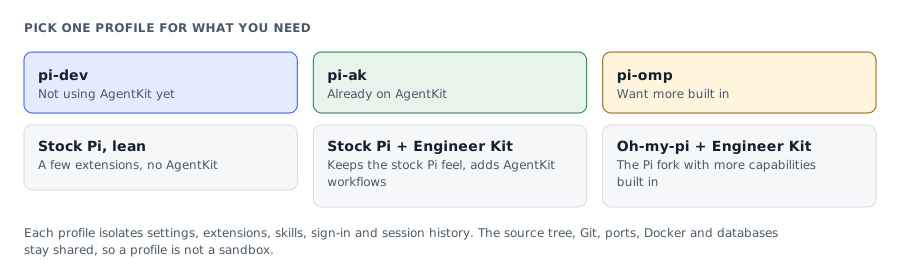
| Need | Profile |
|---|---|
| Lean Pi with a few extensions, no AgentKit | pi-dev |
| Pi with Engineer Kit and AgentKit workflows | pi-ak |
| Oh-my-pi with Engineer Kit | pi-omp |
If you do not use AgentKit yet, start with pi-dev. If you do, pick pi-ak to keep the upstream Pi experience, or pi-omp for OMP with more built in. You do not need to keep all three profiles if you do not use them.
What a profile isolates
| Isolated per profile | Still shared |
|---|---|
| Settings, packages, extensions, skills | Source tree and Git index |
| Login state, if you log in separately | Process filesystem and network permissions |
| Session history | Ports, Docker, databases, and caches |
| User-level agent and runtime assets | Project .pi, .omp, .agents, AGENTS.md |
So a profile is not a process sandbox and does not isolate the workspace. If several agents edit code at once, you still need Git worktrees and separate names for ports, databases, or Docker projects.
Opens when your account has subscriber access
This guide is for subscribers
Once your account has access, the full piece, the interactive visual and the agent call all open.
- Sign in or create a modernEngineer accountReading access belongs to your account email.
- Choose a plan on the pricing page1, 3 or 12 months, paid by VietQR bank transfer. Access opens about a minute after the money arrives.
- Or redeem a Facebook subscriber codePeople supporting the page on Facebook get an activation code by message each month.
Already a subscriber? Sign in to read.
Use this piece in your agent
Get an API keyCopy the text below and paste it into Claude Code, Codex or whichever agent you use. The agent reads the piece and checks it against the repo you have open.
Read "Run Pi and Oh-my-pi (OMP) side by side with three isolated Mise profiles" on modernEngineer and apply it to this repo.
1. Call the content_get tool of the modernengineer MCP server with locale "en", slug "pi-agent-profiles-with-mise". If the modernengineer MCP server is not connected, stop and walk me through connecting it from https://modernengineer.dev/en/mcp.
2. Summarize the main steps of the piece and point out which apply to this repo.
3. Propose concrete changes and ask me before editing any file.
Connect MCP in Claude Code (once)
claude mcp add --transport http modernengineer \
  https://api.modernengineer.dev/mcp \
--header "Authorization: Bearer <API key>"Reading the full piece over MCP needs an API key from a subscriber account or one that bought this guide. Without access, the agent only gets the opening.
- Version
- v1.0.0
- Updated
- 23/08/2026
- Licence
- Subscriber-only; redistribution prohibited
- Slug
- pi-agent-profiles-with-mise