Read in 2 minutes: In Claude and Claude Code, an MCP (Model Context Protocol) server can now ship skills that tell the agent how to use its tools (public beta), take long jobs through Tasks, and stop to ask the user through Elicitation (both generally available).
- File Uploads has only been announced as rolling out soon, and its repository says plainly that it is an experimental extension, not part of the MCP specification.
- Ship how to use a tool, not just the tool: the procedure can be maintained with the server instead of copied into each project's
CLAUDE.md.- Long work needs a tracking handle and its own status, including failure, cancellation and a client that doesn't know whether the job finished.
- Put the check where the action runs: the server decides which conditions let a dangerous action proceed, rather than relying on the model remembering a prompt.
- What to watch: a server can change its skills at any time, and
claude -p, GitHub Actions and the Agent SDK don't support MCP skills yet.If you do only one thing: Open
/mcpand type/to see which servers publish skills, then consider anaskrule through/permissionsfor any server whose skills you haven't read or verified. See "What should you do about this change this week?"
On November 24, 2026, Anthropic published MCP servers can now ship skills, run tasks, and more with Claude. If you use Claude Code with a few MCP servers, this one deserves attention. For most people, an MCP server has mainly been a place that hands tools to an agent. Now a server can also send instructions for using those tools and take part in work that spans many turns.
The change also raises a question of control. If a server can update instructions that the agent reads and follows, who decides which instructions to trust? If a server is running a long job and then needs a confirmation, what happens once you have closed Claude Code?
Anthropic's announcement describes what is now possible, but to decide whether to use it I wanted the conditions and limits in the specs. This article checks the announcement against the MCP and Claude Code documentation as of November 26, 2026, then looks at what is worth learning for anyone who works with coding agents. It is an analysis from documentation: I have not run these features myself, so every statement about behavior comes from the docs or from Anthropic. I will separate what Anthropic announced, what the specs require and what you have to watch yourself.
What did Anthropic announce?
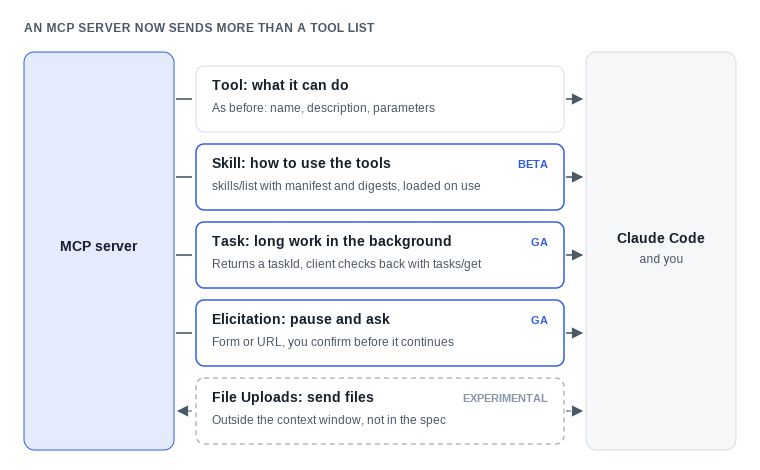
Anthropic announced four MCP-related capabilities, but they are not at the same release stage. Skills over MCP is in public beta, Tasks and Elicitation are generally available (GA), and File Uploads has only been announced as rolling out soon.
| Feature | What it does | Status on November 26, 2026 | Plans and scope |
|---|---|---|---|
| Skills over MCP | The server provides instructions for using its tools | Public beta in Claude and Claude Code | On by default for Pro, Max, Ultra; Team once an admin turns it on; Enterprise coming soon per the announcement |
| Tasks | The server accepts long jobs and returns a handle to track them | GA in Claude and Claude Code | Pro, Max, Ultra; rolling out to Team and Enterprise |
| Elicitation | The server asks the user something while it works | GA in Claude and Claude Code | Pro, Max, Ultra; rolling out to Team and Enterprise |
| File Uploads | Sends files straight to the server without putting their content in the context window | Rolling out soon in Claude and Claude Code | Pro, Max, Ultra and eligible Team and Enterprise plans (coming soon) |
The sources disagree on Enterprise. Anthropic's announcement lists Skills over MCP on Enterprise as "coming soon", while the Claude Code documentation tells an Owner of a Team or Enterprise organization how to turn the feature on in settings. Because the two describe Enterprise differently, neither one alone settles it.
According to Anthropic, Shopify, HubSpot, Atlassian and Carta are examples of Skills over MCP, with Carta listed as coming soon. ZoomInfo uses Tasks for account and contact research that used to take many prompts. For Elicitation, Anthropic cites Supabase, Railway and GitHub asking for confirmation before actions with real consequences.
Anthropic frames the direction as Claude working with a server more like it works with another agent: learning from it, delegating to it, and exchanging input and files along the way.
I read this as a shift in who is responsible for what. Beyond a list of tools, a server now also supplies how to use them, takes work to run in the background, and asks the user to decide before it continues. That does not mean every MCP server is now an autonomous agent.
To make this concrete, I will use one hypothetical scenario throughout. You have an MCP server that manages a database. It ships a skill for safe migrations, accepts a large backup job to run in the background, and asks for confirmation before running DROP TABLE. This illustrates the mechanisms; it is not a workflow verified on Supabase or any specific server.
How does Skills over MCP work?
Skills over MCP lets a server publish skills (reusable instruction packages for a specific job) that the client can find and load when needed. A skill uses the Agent Skills format: a SKILL.md file and optional supporting files. MCP adds a way to distribute those files from a server.
According to Anthropic, tool names and descriptions tell Claude what a server can do, but they don't explain how to handle specific use cases. That is why the company is bringing skills closer to tools.
Take the database server's SQL tool. Its description can tell the agent how to send a statement and read the result. But to migrate a table that already holds data, the agent also needs to know the order of checks, backups and confirmations. Procedural guidance like that fits a skill better than a single tool description.
How does a skill get from the server to the client?
According to the MCP Skills extension, the extension is named io.modelcontextprotocol/skills. A server that supports it must implement skills/list to list skills and skills/get to look up one skill by URI. File contents are read through resources/read.
The basic flow:
- The client connects to a server that supports the Skills extension.
- The client calls
skills/listto get the skills, their metadata and a manifest (the list of files in each skill). - When it needs content, the client uses
resources/readto fetch the file. - The agent uses the loaded instructions for the task at hand, within the host's permissions and limits.
The manifest holds each file's URI, byte size and SHA-256 digest (hash). The host must not retrieve file contents ahead of need, including on connection, listing or approval: approval binds to the manifest without fetching files.
This follows the progressive disclosure principle in the Agent Skills spec: metadata such as the name and description, around 100 tokens per skill, loads at startup; the SKILL.md body, recommended under 5,000 tokens, loads only when the skill is activated.
That is the difference from putting every instruction in the prompt up front. A server with many procedures doesn't have to fill the context window with all of them before you need any.
Still, by that principle, the metadata of every skill loads at startup. Connect many servers with many skills and the metadata adds up in the context window. Loading on demand reduces what goes in up front; it doesn't remove the context cost.
Reading a file is also different from activating a skill. Per the spec, reading SKILL.md through resources/read does not activate it. To activate a skill, the host routes the content through its own skill-loading path, where it is verified and approved (when approval is required) before it enters the model's context.
How do you use it in Claude Code?
According to the Claude Code MCP documentation, Skills over MCP requires Claude Code v2.1.331 or later.
A server skill is named <server>:<skill>. For example, a pdf skill on a server named docs runs as /docs:pdf. You can find skills by typing /, or with /skills.
Unlike skills stored in your project folder, an MCP skill travels with the server. Anthropic says that when the server updates a skill, users don't reinstall anything. In the database example, when the server's provider changes the migration guidance, the version your client receives can change too.
This keeps guidance next to the tool, but it also raises the question of how far to trust remote content. Permissions and trust need their own look; a skill being well formed is not enough.
If you are new to MCP, Connect modernEngineer to Claude and ChatGPT, no coding needed walks through connecting a server. Skills over MCP is an extra layer on top of that connection.
Tasks: long work no longer keeps the agent waiting
Tasks lets an MCP server accept a long job and return a taskId for the client to track, instead of holding the tool call open until the job ends. The client checks status with tasks/get and fetches the result when the server is done.
According to the MCP Tasks extension, an MCP task has five states:
| State | Meaning |
|---|---|
working | The server is working on it |
input_required | The server needs more input |
completed | The job finished |
failed | The job failed |
cancelled | The job was cancelled |
The last three are terminal. input_required is not a failure: the server is waiting for information or a decision before it continues.
Say the agent calls a tool to back up a large database. With a synchronous call, the client waits for the server to answer, and on a long job the connection timeout can become a problem. With Tasks, the server accepts the job and returns a taskId first. The agent carries on with other work and checks the backup later.
A tracking handle separates the life of the job on the server from the client's connection. The work can continue on the server without the client keeping a tool call open the whole time.
Claude Code has two mechanisms worth telling apart
The Claude Code MCP documentation describes two behaviors related to background work.
First, an MCP tool call in the main conversation that runs longer than two minutes can be moved to a background task by Claude Code. The threshold is set by the CLAUDE_CODE_MCP_AUTO_BACKGROUND_MS environment variable. This kind of task doesn't survive exiting the session.
Second, MCP Tasks is a server-side extension and requires Claude Code v2.1.304 or later. The server returns a taskId and manages the job itself. An MCP task on a remote server can keep running after you exit Claude Code. To follow it again, resume the same session interactively (claude --resume, claude --continue or /resume) and keep the server's name and connection settings unchanged.
Two exceptions are easy to trip over. A stdio server's process stops when Claude Code exits, even though /tasks says its tasks keep running; unless the server's documentation says the work outlives the process, let the task finish or stop it before you exit. And in VS Code and the Desktop app, MCP tasks need Claude Code v2.1.331 or later; a task that asks a question is cancelled unless an Elicitation hook accepts the request.
Don't treat the two as the same thing. A tool call that Claude Code moved to the background doesn't mean the server implements the Tasks extension.
Claude Code lists tasks in /tasks, and pressing x asks to stop one. But per the spec, cancellation is cooperative. The server can acknowledge the request while the work keeps going or finishes.
That detail has real consequences. If you asked to cancel a task that changes data, don't assume the data is untouched.
Another case is the status "outcome unknown.". According to the docs, calling the tool again can repeat the work. For actions such as creating resources or updating data, ask the server how far the earlier call got instead of rerunning it.
If you are writing an MCP server
Not every tool needs Tasks. The server decides which requests become tasks, and it must not return a task to a client that hasn't declared support for the extension.
On an HTTP connector, the server also has to answer within the request's time limit. The Claude Code docs put it plainly: accept the job and answer first, then do the work.
So a long-running tool needs its whole lifecycle designed: accepting, reporting status, finishing and handling cancellation.
Elicitation and File Uploads: servers can ask people and receive files
Elicitation lets a server ask the user for information or a confirmation while it works. File Uploads is about sending files straight to a server without passing their content through the model. The two serve different purposes and are not equally mature.
Elicitation: ask at the point of decision
According to the MCP Elicitation spec of July 28, 2026, there are two modes:
- Form mode: The server requests structured data against a flat schema. The client shows a form for the user to fill in.
- URL mode: The server sends the user to a page outside the client, such as a sign-in page. Apart from the URL itself, what the user enters there doesn't pass through the client.
The spec forbids using form mode to ask for passwords, API keys, access tokens or payment details. Those must go through URL mode.
The client must also show which server is asking, and give the user a way to decline or cancel.
According to Anthropic, Supabase uses Elicitation to confirm costs before creating a paid project and to ask for confirmation before destructive SQL. Railway asks before deleting a service; GitHub requires typing the repository name before an agent deletes it.
Back to the hypothetical database. The agent is about to run DROP TABLE. Instead of hoping the agent remembers to ask, the server can request a form that confirms the table name. Without a matching confirmation, the server doesn't proceed.
The decision now sits where the action runs. The agent can still plan and propose, but the server controls the conditions under which a dangerous action happens.
How do Tasks and Elicitation work together?
An MCP task doesn't have to run straight through. When it needs more from the user, the server can move the task to input_required and send inputRequests.
The client collects the user's answer and sends it back with tasks/update. The server can then continue.
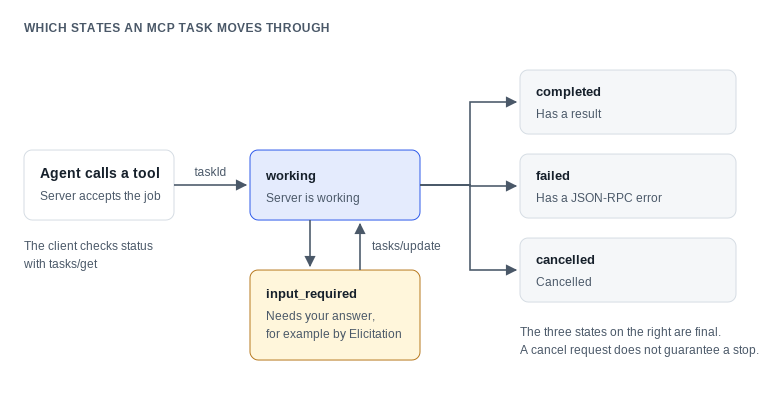
In the backup and migration example, the server can run the long job first and stop to ask only when it reaches a decision it can't make itself. The agent doesn't sit waiting, and the user doesn't have to answer every question before the work starts.
File Uploads is not as mature
According to Anthropic, File Uploads sends PDFs, spreadsheets or images to a server without putting their content through the model's context window. The technical goal is out-of-band transfer, keeping file bytes out of JSON-RPC messages.
One point needs a careful read. Anthropic's announcement groups the new capabilities as "part of the open MCP spec and its extensions". The File Uploads repository, however, says plainly that it is an experimental extension, not part of the MCP specification, not yet proposed as a SEP, and subject to breaking changes.
The two statements work at different levels. Anthropic's sentence can be read as describing the general direction of the MCP ecosystem. When you decide whether to build on File Uploads, the repository's technical status is the one to go by.
So don't treat File Uploads as stable as Tasks and Elicitation just because all three appear in the same announcement.
What can engineers using coding agents learn from this?
The three principles I take away are: put usage guidance next to the tool, give long work a tracking handle, and place the check where the dangerous action runs. If you write a server, these are three things to design in from the start. If you only use other people's servers, they are three criteria for judging a server before it goes into your workflow.
Ship how to use a tool, not just the tool
When a tool needs a specific procedure, a name and description usually don't carry the designer's intent.
You can write a migration checklist, put it in each project's CLAUDE.md, or paste it into the prompt every time. That works, but when the guidance changes, the copies drift apart.
Skills over MCP offers another distribution path: the server that provides the tool also provides the guidance. The procedure can be maintained with the server instead of in copies across users' projects.
If you design a server, ask: does this tool have use cases that need several checks, conventions or a combination of tools? If so, that is a candidate for a skill.
Not every tool needs a skill. A simple tool with a good description doesn't need a folder of instructions just to match the new feature.
Long work needs a tracking handle and its own status
A long operation shouldn't depend on how long the client can hold a connection.
The principle is to separate accepting a request from completing it. The server accepts the job, returns a handle, updates status and lets the client check back.
This fits jobs such as large backups, data processing or long research. But don't design only the path to completed. Plan for failure, for a user who wants to cancel, and for a client that doesn't know whether the job finished.
If the server doesn't know how to handle a repeated request, retrying after an unknown outcome can cause more damage. That is why status and the ability to check on the work matter as much as running in the background.
Put the check where the action runs
A prompt can tell the agent to always ask before deleting data. But for a dangerous action, don't rely only on the model remembering the instruction.
Elicitation gives the server a way to ask during the work. The server still has to decide which conditions let the action proceed, rather than treating a form shown by the client as enough.
In Cognitive surrender: keeping your judgment when agents do the work, I wrote about keeping your judgment while working with agents. Elicitation adds a design angle: human decisions should become concrete stopping points in the system, not just reminders in a prompt.
What should you check before you turn on and trust a server?
Check two limits: how far to trust skills delivered from a remote server, and which environments support the new extensions today. A server can change its skills at any time, and a skill that matches its digest is not necessarily trustworthy. Many Claude Code environments also can't use the new capabilities yet.
Digests check consistency, not safety
Under the Skills extension, the host must check file contents against the URIs and digests in the manifest. A persisted approval must bind to the full set of file URIs and digests. If a file is added, changed or removed, the approval for the old version no longer applies and has to be requested again.
That makes changes visible. But the Skills spec itself draws the line: a digest proves the content matches the server's manifest, not that the content can be trusted.
In other words, it follows that a server controlled by an untrusted party could still publish a manifest and digests that match the malicious files it serves.
This is the prompt injection problem: untrusted instructions placed in context to steer the agent. The more a skill can direct the agent to call tools or run code, the more its origin and permission limits matter.
The spec requires hosts to treat skill content as untrusted input, keep track of the originating server, and never silently swap skills that share a name. Running host-side code or granting permissions through allowed-tools needs separate review for each skill.
By default, Claude Code doesn't ask before every skill load
Skills over MCP requires Claude Code v2.1.331 or later. In those versions, according to the docs, auto mode is the default. A classifier decides whether a skill loads without reading it, and there is no approval prompt as in Manual mode.
In Manual mode and acceptEdits, Claude Code prompts you. "Allow this version" skips the prompt until the skill's files on the server change.
The auto mode classifier doesn't read the skill body, and the server can change the skill at any time. So auto mode is not a reliable content check before the agent takes instructions from a server.
Anthropic warns in the Claude Code MCP documentation that skills can direct Claude to run code, that servers can change skills at any time, and that you should add only servers you trust.
Anthropic doesn't scan every MCP skill
According to the Claude Code docs, Anthropic scans skills from third-party Directory connectors added on claude.ai. An Enterprise custom connector can also be scanned when the organization turns scanning on.
That doesn't cover every server. A Directory server added with claude mcp add, for example, is outside the scanning described above.
So a server connecting successfully to Claude Code is not evidence that Anthropic has checked its skills.
Use permission rules to limit skills
Claude Code supports permission rules for skills, deny, ask and allow, by server name or by specific skill. In the terminal, you add rules with /permissions.
| Rule | Meaning |
|---|---|
deny with Skill(mcp__docs__*) | Blocks the docs server's skills, including typed skill commands |
ask with Skill(mcp__docs__*) | Prompts each time Claude loads one of these skills on its own |
deny with Skill(docs:pdf) | Blocks only the docs server's pdf skill |
For an unfamiliar server, I lean toward ask rather than allowing all its skills. According to the Claude Code docs, an ask rule requires your approval every time, even in auto mode and bypassPermissions. A connector set to "Restrict to Ask" behaves the same way.
If you already know a skill shouldn't be used in your environment, deny is the clearer choice.
Three details can make a rule protect less than you think:
- Connector and plugin servers carry a prefix, such as
claude_ai_Docsfor a connector named Docs orplugin_my-plugin_docsfor thedocsserver frommy-plugin; spaces and punctuation other than-become_. A rule written with the short name won't match. askapplies when Claude loads a skill itself. Typing a skill's command at the prompt doesn't need approval.- A
denyon skills still lets Claude read the server's ordinary resources. To block resource reads, including supporting files of allowed skills, also denyReadMcpResourceTool.
Permission to use a skill doesn't replace tool permissions or server-side checks. A skill being allowed doesn't mean every action it describes should be allowed.
Supported environments are still narrow
According to the Claude Code docs (read on November 26, 2026), MCP skills need v2.1.331 or later, a Fable model or Opus 4.8, Sonnet 5, Haiku 5.5 or later, and a direct connection to Anthropic with feature flag fetching on. If you set a variable such as DISABLE_TELEMETRY, check the Features row in /status. With an API key or Console login, MCP skills are still rolling out (off for now) and claude.ai connectors don't load.
MCP skills are not supported in:
- Cloud sessions and remote-control server mode.
claude -p, GitHub Actions and the Agent SDK.- Servers in the Desktop app: connectors, Desktop extensions and servers from
claude_desktop_config.json. - Connections through a cloud provider, a custom
ANTHROPIC_BASE_URL,apiKeyHelperandANTHROPIC_AUTH_TOKEN. - Organizations with a compliance setting such as HIPAA or ZDR (zero data retention).
If you are choosing a model for your workflow, see Which Claude model should you use: Fable 5.2, Opus 5.5, Sonnet 5.5 or Haiku 5.5?. For MCP skills, check the requirements against the exact Claude Code version and environment you use.
Per the Skills extension spec, SDK and host support is still being implemented. In Claude Code, each server currently shows at most 100 skills. Scanned skills are limited to 100 KB per text file and 400 KB per skill.
Tasks has its own limits. A one-shot claude -p "<prompt>" run gets no MCP tasks; claude -p gets them only when it reads --input-format stream-json with CLAUDE_AUTO_BACKGROUND_TASKS=1. In such a claude -p run or an Agent SDK session, if a task needs to ask through Elicitation, Claude Code asks the server to cancel the task without running Elicitation hooks or the Agent SDK's onElicitation callback.
In an interactive session, you can install an Elicitation hook to auto-respond to requests without showing a dialog. Having a hook doesn't mean every environment runs it.
The practical upshot: don't build a CI pipeline that depends on MCP skills, and don't assume an MCP task can stop to ask a person in a non-interactive run. Check what the client actually supports before choosing a mechanism.
Frequently asked questions
A few remaining questions about local skills, existing servers and access.
How is an MCP skill different from a skill in the project's .claude/skills/?
Both use the Agent Skills format with a SKILL.md file. A skill in .claude/skills/ lives in the project and is managed as a local file, while an MCP skill is delivered by a server and can change when the server updates.
That difference in lifecycle also draws a different trust boundary: with an MCP skill, you have to consider the server's origin and whether to accept instructions from a remote source.
Do I have to change my existing MCP server?
No. An existing server can keep providing tools without implementing the new extensions.
To distribute skills, the server implements the Skills extension with the skills/list, skills/get and resources/read methods. In Claude Code's troubleshooting section, the docs say that if a connected server's /mcp page shows no Protocol row, confirm the server supports MCP revision 2026-07-28 or later.
To use Tasks, the server implements the extension and returns tasks only when the client declares support. Don't automatically turn every old tool call into a task.
Does Elicitation replace the agent's permission prompts?
No. Elicitation is how a server asks the user, through the client, while it handles a request. Client tool permissions control which tools the agent may use.
They guard two different boundaries. The client can allow a tool call, and the server can still require confirmation before a destructive action.
My connector has tools but no skills. Why?
Having tools doesn't mean a connector serves MCP skills. During the beta, Anthropic keeps skills off for some connectors, and according to the docs no setting changes that.
Check your Claude Code version and model requirements, and ask the connector's provider whether it supports Skills over MCP.
For Team and Enterprise, the Claude Code docs say MCP skills stay off until an Owner turns on "Skills over MCP" in Organization settings > Connectors, and the organization's Skills setting must also be on. For other servers, the docs point to setting disableDirectMcpSkills: false in managed settings. For Enterprise, keep in mind the mismatch between the announcement and the docs noted at the start.
What should you do about this change this week?
You don't need to rebuild your MCP servers or move your whole workflow to Tasks. If you use Claude Code, I think three small steps are enough to tell whether this change matters for your setup.
- Check what is connected: Check your Claude Code version and model, open
/mcpto see servers and the Protocol row, then type/(or/skillsin the terminal and VS Code) to find available skills. Tell apart servers that only provide tools from servers that publish skills. - Control unfamiliar skills: For a server whose skills you haven't read or verified, consider an
askrule through/permissions. Check the server's origin and tool permissions before letting the agent follow instructions sent from a remote source. - Review your design if you write servers: Pick one tool that needs a usage checklist and see whether it should become a skill. For a long-running tool, consider accepting the job and returning a tracking handle. If a tool can delete data or incur cost, decide where the server must ask the user to confirm.
Use this piece in your agent
Get an API keyCopy the text below and paste it into Claude Code, Codex or whichever agent you use. The agent reads the piece and checks it against the repo you have open.
Read "Skills over MCP, Tasks and Elicitation: the new mechanisms and the risks for coding agent users" on modernEngineer and apply it to this repo.
1. Call the content_get tool of the modernengineer MCP server with locale "en", slug "skills-over-mcp-tasks-elicitation". If MCP is not connected or access is refused, read the page https://modernengineer.dev/en/library/skills-over-mcp-tasks-elicitation instead.
2. Summarize the main steps of the piece and point out which apply to this repo.
3. Propose concrete changes and ask me before editing any file.
Connect MCP in Claude Code (once)
claude mcp add --transport http modernengineer \
  https://api.modernengineer.dev/mcp \
--header "Authorization: Bearer <API key>"This piece is open to everyone: without MCP, the agent can still read it straight from the link.
- Version
- v1.0.0
- Updated
- 26/11/2026
- Licence
- All rights reserved
- Slug
- skills-over-mcp-tasks-elicitation