This part assumes you have read Part 1 and know the steps in Part 2; it only covers how to split the work and what to prompt the agent with.
Most of the VPS work can be delegated to an agent (Claude Code, Codex, Cursor, or ChatGPT itself once Harness is connected). The dashboard work cannot: DNS, the Access app, Managed OAuth, the ChatGPT connector and the GitHub App all need you to click.
Split the work before delegating
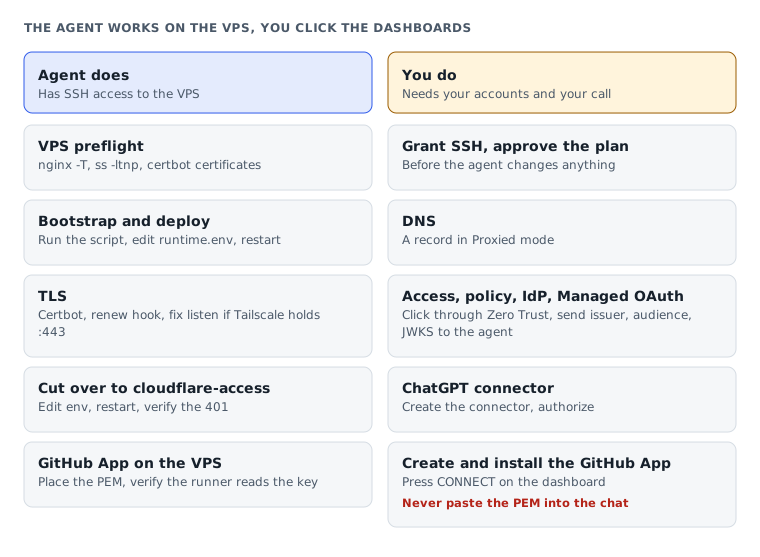
| Step | Agent does | You do |
|---|---|---|
| VPS preflight | nginx -T, ss -ltnp, certbot certificates, check ports/conflicts | Grant SSH |
| Bootstrap + deploy | Run bootstrap, edit server_name and runtime.env, set up the egress firewall, deploy the same SHA twice | Approve the plan before it changes anything |
| TLS | Certbot, renew hook, fix listen if Tailscale holds :443 | Nothing |
| DNS | Instructions only | Create the Proxied A record |
| Access app + policy + IdP | Instructions only | Click through the Zero Trust dashboard |
| Managed OAuth + redirect URI | Instructions only | Click through app → Advanced settings → Managed OAuth |
Cut over to cloudflare-access | Edit env, deploy the same SHA again, verify the 401 | Send issuer/audience/JWKS; create the service token and write the canary-credentials file yourself |
| ChatGPT connector | Instructions only | Create the connector, authorize |
| GitHub App (private repo) | Edit env, deploy again, verify the runner reads the key | Create the App, install it, copy the PEM to the VPS yourself (never paste it into chat), press Connect GitHub App on the dashboard |
Opens when your account has subscriber access
This guide is for subscribers
Once your account has access, the full piece, the interactive visual and the agent call all open.
- Sign in or create a modernEngineer accountReading access belongs to your account email.
- Choose a plan on the pricing page1, 3 or 12 months, paid by VietQR bank transfer. Access opens about a minute after the money arrives.
- Or redeem a Facebook subscriber codePeople supporting the page on Facebook get an activation code by message each month.
Already a subscriber? Sign in to read.
Use this piece in your agent
Get an API keyCopy the text below and paste it into Claude Code, Codex or whichever agent you use. The agent reads the piece and checks it against the repo you have open.
Read "Self-hosting Cloud Harness MCP for ChatGPT (3/3): Hand the setup to an AI agent" on modernEngineer and apply it to this repo.
1. Call the content_get tool of the modernengineer MCP server with locale "en", slug "cloud-harness-mcp-chatgpt-setup-3-ai-agent". If the modernengineer MCP server is not connected, stop and walk me through connecting it from https://modernengineer.dev/en/mcp.
2. Summarize the main steps of the piece and point out which apply to this repo.
3. Propose concrete changes and ask me before editing any file.
Connect MCP in Claude Code (once)
claude mcp add --transport http modernengineer \
  https://api.modernengineer.dev/mcp \
--header "Authorization: Bearer <API key>"Reading the full piece over MCP needs an API key from a subscriber account or one that bought this guide. Without access, the agent only gets the opening.
- Version
- v1.0.0
- Updated
- 16/09/2026
- Licence
- Subscriber-only; redistribution prohibited
- Slug
- cloud-harness-mcp-chatgpt-setup-3-ai-agent


