This piece comes with a file pack you can run right away.See the files
In short: Bought AgentKit but not sure how to install it, how to upgrade it, or which project still runs old skills? You don't have to remember those commands. This guide gets your own Claude Code or Codex to check your machine, make a plan, then install and update. You set up the connections once, say what you want, and approve before the agent writes any file.
Installing AgentKit the first time is already confusing: which command, in which folder, for the whole machine or for one project. Upgrading adds another catch: updating the ak command-line tool does not bring the skills already installed in your projects along. A project you haven't opened in a while can still run old skills without you knowing. Add more projects or worktrees (a second working folder of the same repo), and it gets harder to remember what is updated where.
The approach here: modernEngineer does not install anything on your machine. It teaches your own agent to understand the job and do it for you. The agent-control-plane skill is the playbook your agent follows. The modernEngineer MCP (Model Context Protocol) server tells the agent which skill packs have a new version and hands out download links. The MCP server cannot see your machine, so for anything local, such as which AgentKit version you have, the agent checks with the ak command itself. You say what you want, read the plan and reply "yes". I'll go in order: setup, the first run, worktrees, updates, then the moments when the agent stops to ask you.
Disclosure: I maintain AgentKit and have an affiliate relationship with it: the AgentKit link in this post is an affiliate link; buying through it gets you 30% off.
What does managing skills centrally mean?
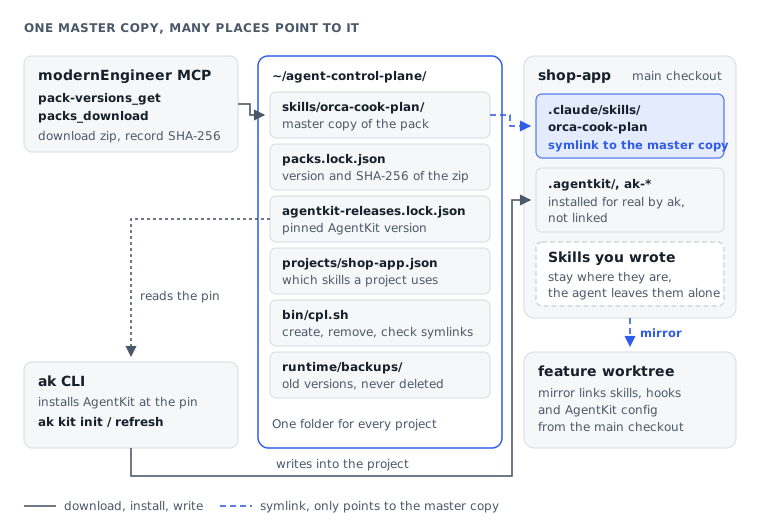
For skill packs downloaded from modernEngineer, instead of copying them into every project, you keep one master copy in a control plane folder (a shared management folder). Projects use symlinks, paths that point to that master copy. AgentKit itself is still installed for real into each project by ak.
The example used throughout: a project called shop-app and the orca-cook-plan skill pack (a skill that runs an AgentKit plan through Orca, one working session per phase). The files of orca-cook-plan live in ~/agent-control-plane/skills/orca-cook-plan, and .claude/skills/orca-cook-plan in shop-app only points there. The guide uses two test repos: the worktree measurements come from shop-app; the first run, the auto-mirror hook and the update through the agent ran on blog.
A project usually has three kinds of skills, each handled differently:
- Skill packs downloaded from modernEngineer (like
orca-cook-plan): one master copy in the control plane folder, and projects symlink to it. Update the master copy and every linked place uses the new content. - AgentKit skills and config (the
ak-*skills): theakCLI installs them for real into each project at the pinned version (a version fixed in place that does not move to newer releases by itself), with no symlinks. According to the help forak kit init,akrefuses to write through a skills folder that is a symlink. It also needs to manage its own files (a snapshot before writing, spotting files you edited by hand). - Skills you wrote yourself or got elsewhere: the
agent-control-plane1.0.0 skill leaves them alone. They stay where they are.
What does the agent do, and what do you do?
You set up access once and decide whether anything gets written. The agent does the rest.
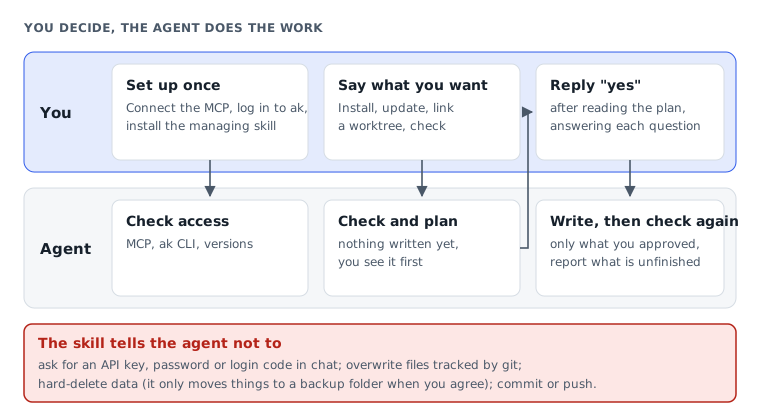
MCP is a protocol that lets an agent call outside tools. The modernEngineer MCP helps the agent find packs, check versions and download them; the agent uses the command tool built into Claude Code or Codex to work on your machine. The agent-control-plane 1.0.0 skill is a procedure the agent follows, not a background service: it does nothing until you ask.
The agent-control-plane 1.0.0 skill sets hard limits: the agent does not ask you to paste an API key (an access key issued by a service), password or login code into chat. It also does not overwrite files tracked by git on its own, does not hard-delete data (it only moves things into a backup folder when you agree) and does not commit or push. When something conflicts, the agent stops and asks; you should still read the plan before agreeing.
What do you need before the first run?
Three steps, done once, each with a default path: connect the modernEngineer MCP, log in to AgentKit, install the agent-control-plane skill for all projects. After that, you don't type install or update commands yourself for the rest of this guide. The symlink part works on macOS, Linux and WSL2.
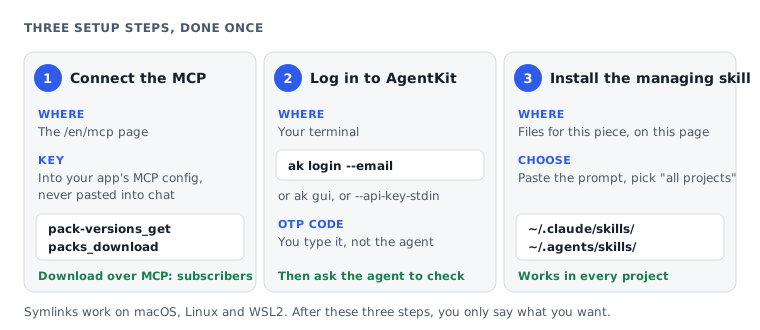
1. Connect the modernEngineer MCP
Open the modernEngineer MCP connection page and follow the steps for your app. The guide is free to read, but skill packs need a subscription, both over MCP and the agent-control-plane skill in the Files for this piece section: see the Subscriber plan. If you use an API key, enter it in your app's MCP settings, not in the conversation.
This guide uses two MCP tools:
pack-versions_get: reports the latest version of a skill pack, no key needed.packs_download: issues a short-lived download link (15 minutes) for a pack your account can access.
If the agent sees neither tool, check the connection first; installing the agent-control-plane skill does not replace this step.
2. Log in to AgentKit
No AgentKit yet? Start with Getting started with AgentKit for Claude Code: setup and first commands. Once you have the CLI, log in yourself in the terminal:
~~~bash ak login --email <your email> ~~~
The command emails you an OTP code to type into the terminal. Don't give the OTP to the agent; log in first, then ask the agent to check. If you already know AgentKit, you can also log in through the desktop app (ak gui) or with an API key (ak login --api-key-stdin).
If AgentKit is already installed globally for all projects in ~/.claude, don't remove it. The agent will notice and ask you before the first install into a project.
3. Install the agent-control-plane skill
Scroll down to Files for this piece on this page, copy the install prompt and paste it into a conversation with Claude Code or Codex. The prompt tells the agent to fetch the files itself, so you don't download a zip. When the agent asks whether to install "for this project or for all projects", choose all projects: the skill goes into ~/.claude/skills/agent-control-plane/ (Claude Code) or ~/.agents/skills/agent-control-plane/ (Codex), so any project can use it. Once it's installed, open a new session so the agent sees the skill.
From here on, you only say what you want.
How do you give the first task, and what does the agent do?
Start with a concrete request: which project and which skill pack. For example, open Claude Code in shop-app and say:
Set up the control plane for this shop-app project. I want to install AgentKit and the orca-cook-plan skill pack from modernEngineer. Check the machine, suggest a suitable AgentKit version, show me the plan before writing anything, and only proceed after I agree.
If the machine has both Claude Code and Codex and you only use one, say so in the request and the agent won't need to ask.

First turn: check, write nothing
I ran the agent on the blog repo on November 1, 2026, with Claude Code 2.1.316. In the first turn, the agent made 16 tool calls in about 43 seconds to check git, Claude Code, the ak CLI, the login state, access to orca-cook-plan and the paths that would be touched. No file changed.
Its opening report:
I'm checking the machine and the read-only part is done. I haven't written anything, and I'm stopping to wait for your approval.
The agent asked two things. The first was the global AgentKit install: the test machine already had AgentKit in ~/.claude. Installing another copy into the project means every Claude Code session there loads the hooks and rules of both. The agent didn't touch ~/.claude; it only asked whether you want the project install. The second: the machine has both Claude Code and Codex, so install for one or both?
With it came a six-step plan (create the control plane folder, register the project, pin AgentKit, install the kit, download and link orca-cook-plan, verify) and the current state: ak 3.0.0 logged in, the latest stable is 3.0.0, orca-cook-plan at 1.2.3. That was the state on the test day, not a promise of the latest version. The agent also said up front it would not commit or push.
You reply briefly, as in the test:
Yes, install it into the project and follow the plan. Claude Code only.
Second turn: AgentKit into the project, skill packs into the shared folder
After the yes, the agent creates the control plane folder and records three things: which projects are managed, the AgentKit version chosen and the versions of the downloaded packs. That way the next update knows which channel and version each project follows instead of grabbing the newest one. The agent runs the AgentKit install itself; you don't type it. In the test, the command was:
~~~bash ak kit init engineer \ --channel stable \ --version 3.0.0 \ --target claude-code \ --yes \ --no-interactive ~~~
Before writing, ak saves the previous state (a snapshot); if it meets a file you edited by hand, it stops instead of overwriting it. On the blog repo, this command took about 18 seconds. For more on running ak safely, see ak-agentkit: pick skills, chain the work, run ak commands safely.
Skill packs work differently: the agent calls packs_download, saves the zip to a temporary folder, computes its SHA-256 (a hash that shows when a file has changed), reads pack.json, then copies the pack into the shared folder and symlinks it into the project. For shop-app, the layout after install looks like this (trimmed for illustration):
~~~text ~/agent-control-plane/ ├── skills/ │ └── orca-cook-plan/ ├── projects/ │ └── shop-app.json ├── projects.local.json ├── agentkit-releases.lock.json ├── packs.lock.json ├── runtime/ │ ├── backups/ │ └── downloads/ └── bin/ └── cpl.sh
shop-app/ ├── .agentkit/ └── .claude/ └── skills/ └── orca-cook-plan -> ~/agent-control-plane/skills/orca-cook-plan ~~~
In that tree, projects/ and projects.local.json record which projects are managed and where they live on the machine, agentkit-releases.lock.json records the pinned AgentKit version, and packs.lock.json records each pack, its version and the SHA-256 of the installed zip. The cpl.sh script creates, removes and checks symlinks, keeps a ledger of the links it made, and adds them to .git/info/exclude (a machine-local ignore list shared by every worktree) so git status shows no new files. Claude Code and Codex both read skill folders that are symlinks, according to the Claude Code skills docs and the Codex Skills docs.
Final report: both parts done, plus what to know
In the test, the agent made 12 tool calls in about 84 seconds and finished both parts. AgentKit engineer 3.0.0 went into the project, for Claude Code only. orca-cook-plan 1.2.3 went into skills/ in the control plane folder, and the project only keeps a symlink. The final check reported correct links, logged in, and the installed version matching the pin.
After the install, open a new Claude Code session (or type /reload-skills), because the running session does not see the new skill yet. The agent says so in its report:
You need to restart after the install: this Claude Code session doesn't see the new skill yet. Open a new session or type
/reload-skillsand it's ready.
I checked the actual files on the machine and they matched the report: packs.lock.json records orca-cook-plan 1.2.3, the temporary download folder is gone, ~/.claude/settings.json is unchanged. The report also raised two points: orca-cook-plan needs Orca and the orchestration skill on the machine to run; ak doctor shows a few old warnings this install did not cause. The agent mentioned them but didn't fix them, because they were outside the request.
One thing to know: after AgentKit is installed, git status shows .agentkit/ and .claude/ as new, about 1,870 files in the test repo. The control plane does not make AgentKit's files disappear from your project. Whether they go into git is your call.
Does a new worktree get all the skills and hooks?
Not necessarily. A new worktree can see the skills yet miss the AgentKit hooks and config of the original project. The agent-control-plane skill uses a mirror step to link the missing parts: the agent shows you the list first and writes only after you agree.
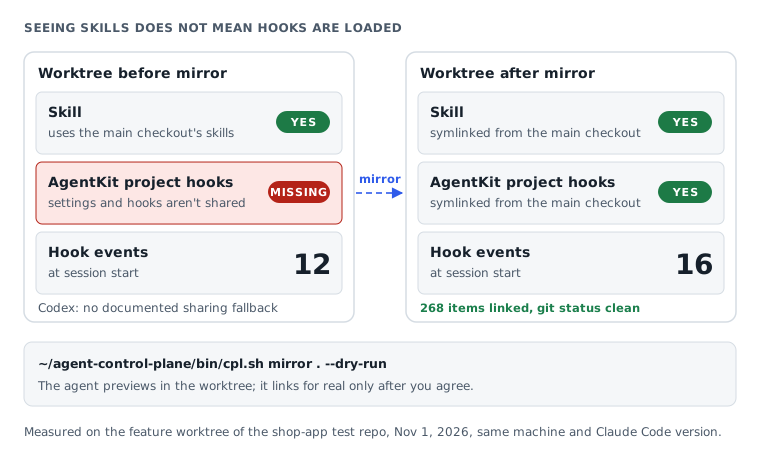
Call the main checkout the original project folder, where you create worktrees. If you don't commit them to the repo, skills, hooks and AgentKit config are untracked by git, so they only exist in the main checkout. According to the Claude Code docs, a worktree without its own .claude/skills uses the main checkout's skills. I checked on the feature worktree of shop-app: with no symlinks yet, it still got the skill pack and 103 ak-* skills.
That fallback does not cover settings and hooks (commands that run automatically at a set moment, such as session start). I counted hook events at session start on that worktree with claude -p --include-hook-events, same machine, same version:
| Worktree state | Hook events at session start |
|---|---|
| Not linked from the main checkout | 12 |
| Linked from the main checkout | 16 |
The four extra events are AgentKit's project hooks. Seeing the skills does not mean the hooks loaded.
The fix is the mirror step: link into the worktree the untracked items it is missing. For example, open the agent in the feature worktree of shop-app and say:
Link this feature worktree to match shop-app's setup. Show me what will be added before writing.
The agent runs a preview in the worktree folder, writing nothing:
~~~bash ~/agent-control-plane/bin/cpl.sh mirror . --dry-run ~~~
Only after you agree does the agent link and check again. On the feature worktree of shop-app, the script linked 268 items and git status stayed clean. That test also exposed a real bug: git refuses to read a .gitignore that is a symlink, so the script now skips .gitignore and .gitattributes.
Codex has no documented fallback to the main checkout's skills, so with Codex always let the agent mirror.
If you create worktrees often, you can have the agent add a hook that mirrors automatically whenever a Claude Code session opens. This step is optional: the agent offers it after the first mirror and adds it only if you agree. I tested this hook on a new worktree of the blog repo: in the very first session, it linked 136 items and git status stayed clean. The count is lower than in shop-app because each repo has a different number of files to link. The project's AgentKit hooks load from the second session, because Claude Code reads its config before the hook runs, so with a new worktree you reopen the session once.
If you create worktrees with AgentKit, see also ak-worktree: open a separate worktree for each task.
How do you update when a new version is out?
Three things update separately: the ak CLI on your machine, AgentKit in each project, and the skill packs from modernEngineer. Updating ak does not update the other two. Ask the agent to check all three in one pass, review one combined plan, then agree.
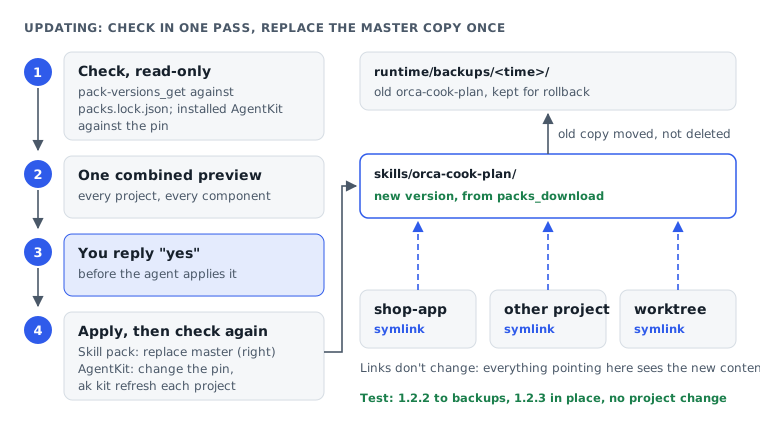
Check every project in the control plane folder. If AgentKit or a modernEngineer skill pack has a new version, list it for me. Only update after I agree.
| Component | How it's checked | How it's updated |
|---|---|---|
ak CLI | ak self-update --check --json | The agent asks first, then runs ak self-update |
| AgentKit in a project | Installed version against the pin and the channel's latest | Change the pin, then ak kit refresh each project |
| Skill packs from modernEngineer | pack-versions_get against packs.lock.json | Download, move the old copy into runtime/backups/, replace the master copy, record the new version and SHA-256 |
For a skill pack, each update only replaces the master copy in the shared folder, and every project pointing to it uses the new content; an agent session that is already open may need to be reopened to load the skill. When I tested, no pack had a new release, so I deliberately set the master copy of orca-cook-plan from the blog test back to 1.2.2 to simulate an old version. In the check turn, the agent made 14 tool calls in about 28 seconds, reported AgentKit already at the latest version and orca-cook-plan 1.2.3 available, then asked:
Do you want me to update it?
After the yes, the agent made 10 tool calls in about 37 seconds: it moved 1.2.2 into runtime/backups/<time>/, copied 1.2.3 into its place, recorded the new version in packs.lock.json and rechecked the links. The project needed no change, because the symlink still points to the master copy. For AgentKit, ak kit refresh ran successfully on the same 3.0.0 release.
If ak self-update --check cannot reach the release server, the agent compares the installed version with ak changelog. The test hit exactly this case: the changelog listed nothing newer than 3.0.0, so the agent did not propose an AgentKit upgrade. That result rests on the changelog; the release server did not confirm it.
If a project breaks after an update, ask the agent to roll back (restore the previous version), for example: "Restore orca-cook-plan to the copy in runtime/backups." For a skill pack, the agent moves the backup back into place and fixes packs.lock.json; for AgentKit, it pins the old version again and refreshes. The agent still shows you a preview and waits for your yes.
When does the agent stop and wait for you?
The agent stops when it needs your decision, instead of finding a way around. It explains the situation, the options and the files that could be affected. A plan may hold several questions, but the agent only continues once you answer clearly.
| Situation | What the agent says | What you do |
|---|---|---|
| AgentKit installed globally | AgentKit is already in ~/.claude; adding a project install loads the hooks and rules of both | Choose the global copy or a project install; the agent doesn't change the global one |
| AgentKit files edited by hand | ak stops and lists the files you edited | Keep your version, or have the agent explain what would be overwritten before you agree |
| Path tracked by git | The script refuses to write there | Drop the link for that skill in this project, or rename one of the two skills |
| A real folder in the symlink's place | It can't link without moving the folder | Look at the contents and agree to move it into runtime/backups/ if that fits |
| MCP returns 403 | Your account can't download this pack yet | Check your subscription; the agent won't ask for a key in chat |
| Download link fails | Nothing copied or linked, temporary folder cleaned | Tell modernEngineer, then ask the agent to continue |
| Codex doesn't trust the project | Codex hasn't loaded the project's .codex/ | Open Codex in the project and accept the trust prompt |
| New skill doesn't show | The session started before the link existed | Type /reload-skills or open a new session |
| Windows without WSL2 | This symlink approach doesn't work | Use WSL2, or install skills directly per each pack's guide |
At the end of every task, the agent checks everything again. If a check fails, it reports exactly what is unfinished and does not fix anything beyond what you agreed to.
To see why installing AgentKit both machine-wide and per project makes the same hook run twice, read Guardrails in Claude Code and AgentKit (1/2): the hook mechanism and config layers.
Frequently asked questions
Three questions that come up if you already manage skills by hand.
I already copied skills into .claude/skills. What happens?
The agent doesn't overwrite them. Say shop-app/.claude/skills/orca-cook-plan is a copy you made yourself: the agent reports a real folder there and asks whether to move it into runtime/backups/ and replace it with a symlink. For a single project where you just want a direct install, see Orca Cook Plan: run an AgentKit plan through Orca, one fresh worker session per phase.
Do I need to commit anything to the repo?
Not the symlinks cpl.sh creates; they are already hidden from git status. AgentKit's files maybe, since ak installs them for real into the project. What goes into git is up to you or your team; the agent doesn't commit.
Does this work with Cursor or other agents?
Not yet. Skill 1.0.0 is written for Claude Code and Codex, and I haven't tested other agent apps. The cpl.sh script only knows two places for skills: .claude/skills for Claude Code and .agents/skills for Codex. Other apps read skills and hooks from their own folders, so the links it creates sit where they don't look. According to the help for ak kit init, ak can also only check skill name collisions for Claude Code and Codex so far. Don't carry this guide's results over to other apps as they are.
When should you let the agent manage things centrally?
If you manage several projects, use worktrees often, or don't want to remember install and update commands, this is worth trying. For a single project that rarely changes and doesn't use worktrees, installing skills directly is enough.
Without the control plane you can still update: ask the agent to call pack-versions_get to see whether there's a new version, then packs_download to download it and replace the pack in each project. The agent-control-plane skill uses exactly those two tools and only adds one master copy for many projects, lock files and backups of old versions.
| Situation | What fits |
|---|---|
| One project, few skills, no worktrees | Install skills directly |
| Several projects sharing modernEngineer skill packs | One master copy in the control plane folder |
| Frequent worktrees that need all hooks | The agent-control-plane skill with the mirror step |
| Not comfortable with the terminal | The agent-control-plane skill, still reading the preview carefully |
| Each project needs a different pack version | Install per project |
| Agent apps other than Claude Code and Codex | Not yet |
The trade-off: every project points to the same master copy. When it changes, they all get the new content; skill 1.0.0 cannot keep project A on the old version while project B moves to the new one.
In the tests on November 1, 2026, the agent went through the whole cycle: check first, ask what needs deciding, install AgentKit and orca-cook-plan, link a worktree, update a skill pack while keeping the old copy. Every time, the agent stopped for your approval before writing.
If this fits you, open Files for this piece, paste the prompt that installs the agent-control-plane skill and choose "all projects". Then open a project, ask the agent to set up the control plane folder, and only agree when the list of changes is exactly what you want.
Files for this piece
Files includedThe pack is the tested part of the piece: download it, change a few lines, and run it. Pick the install route that suits you.
Download and install
- Press Download the files. Each press makes a fresh link that expires after 15 minutes.
- Unzip it. You get one outer folder with pack.json, and inside it one or more skill folders, each holding a SKILL.md.
- Copy every one of those skill folders, side by side, into .claude/skills/ (Claude Code) or .agents/skills/ (Codex), in the project or in your home folder to use them everywhere. Don't copy the outer folder that holds pack.json.
- If no folder directly inside the outer one holds a SKILL.md, install the pack by following the guide.
The guide is free to read. The files and the MCP install come with a Subscriber membership, along with every other pack.
Install over MCPSubscriber
For subscribers: paste one instruction into your agent and it downloads, unzips and installs the pack, and the same for every update.
See the Subscriber planUse this piece in your agent
Get an API keyCopy the text below and paste it into Claude Code, Codex or whichever agent you use. The agent reads the piece and checks it against the repo you have open.
Read "Let your agent install and update AgentKit and skill packs through MCP" on modernEngineer and apply it to this repo.
1. Call the content_get tool of the modernengineer MCP server with locale "en", slug "agent-control-plane-mcp-first". If MCP is not connected or access is refused, read the page https://modernengineer.dev/en/library/agent-control-plane-mcp-first instead.
2. Summarize the main steps of the piece and point out which apply to this repo.
3. Propose concrete changes and ask me before editing any file.
Connect MCP in Claude Code (once)
claude mcp add --transport http modernengineer \
  https://api.modernengineer.dev/mcp \
--header "Authorization: Bearer <API key>"This piece is open to everyone: without MCP, the agent can still read it straight from the link.
- Version
- v1.0.2
- Updated
- 02/11/2026
- Licence
- All rights reserved
- Slug
- agent-control-plane-mcp-first