Quick summary: Pi is an open source coding agent for the terminal that keeps its core small and lets you add features through extensions. Pi fits you if you want an agent you can understand end to end and you are willing to assemble what you need. Pi does not fit if you want subagents, plan mode and a built-in permission system out of the box; Claude Code fits better then, or Oh-my-pi (OMP) if you turn on its tool approval mode. MCP (Model Context Protocol) and codemode have shipped since 0.99.0, just before 1.0, while Pi Durable is still experimental.
Pi 1.0.0 shipped on October 1, 2026, and reached 1.3.0 on October 15, 2026. If you already use Claude Code or OMP, the practical question is not what Pi can do, but whether it is worth learning one more tool.
A wrong choice costs you in one of two ways. Pick Pi when you need everything built in, and you have to build, or find packages for, features other tools already have. Pick a feature-heavy tool when you need something lean, and you carry a large surface you do not fully control.
Written for Pi 1.3.0, based on the official README, docs and CHANGELOG.
I will split the decision into four questions: who should use Pi, why Pi deliberately leaves some features out, how Pi differs from OMP and Claude Code, and which parts of Pi are still experimental.
Who Pi fits, and who it doesn't
Pi fits people who want to shape their own tool. It does not fit people who want the tool to come shaped for them. The first line of Pi's README says exactly that: "Adapt Pi to your workflows, not the other way around."
| If you | Pi | Why |
|---|---|---|
| Want to know what the agent is doing | Fits | By default Pi enables only four tools, read, bash, edit and write (CLI docs). Others such as grep, find, ls or codemode are yours to turn on, for example pi --tools +codemode. |
| Want the workflow your way | Fits | Customize through TypeScript extensions, skills, prompt templates and themes, bundled as Pi packages and shared through npm or git. |
| Use several model providers | Fits | /login accepts existing subscriptions (Claude Pro or Max, ChatGPT, GitHub Copilot) or an API (Application Programming Interface) key (pi-ai README), and Pi runs local models through llama.cpp (Models). |
| Want to call the agent from a script, CI (continuous integration) or another app | Fits | Print mode, JSON mode, RPC (Remote Procedure Call) and a TypeScript SDK (Software Development Kit) all run on the same agent and session machinery. |
| Need the agent to ask before it runs a command | Does not fit | Pi has no built-in permission system, runs with the permissions of the user who started it, and does not ask before each tool call (Security). The permission-gate and protected-paths example extensions exist, but they do not run by default and do not replace isolating the environment. |
| Want subagents or plan mode ready to use | Does not fit | Pi deliberately keeps both out of the core; there are only the plan-mode and subagent example extensions in the examples folder. |
| Don't want to write or install anything | Does not fit | Anything beyond the core means installing a package, enabling an existing extension or writing your own. |
| Are new to vibe coding and not used to running agents in a container | Does not fit | Isolating the environment is your job, not the tool's. |
Why Pi deliberately leaves out subagents and plan mode
Because Pi wants to be a small harness that you extend yourself. A harness is all the code around the model: the system prompt, the tool list, how sessions are kept, how commands run. The same model inside two different harnesses works in two different ways.
Pi's README states the choice plainly: "Pi ships with powerful defaults but skips features like sub-agents and plan mode. Ask Pi to build what you want, or install a package that does it your way." In other words, Pi keeps the core small, and any feature beyond the core is yours to build or to install from someone else's package.
Take plan mode as an example. In Claude Code, plan mode is built in: the agent reads code, drafts a plan and does not edit your source files until you approve, unless the session has bypass permissions available. In Pi, you write an extension that turns off the file-writing tools and limits bash to read-only commands until you accept the plan, ask Pi itself to write that extension, or start from the plan-mode example extension in the repo. Part 4 of this series will build such an extension step by step.
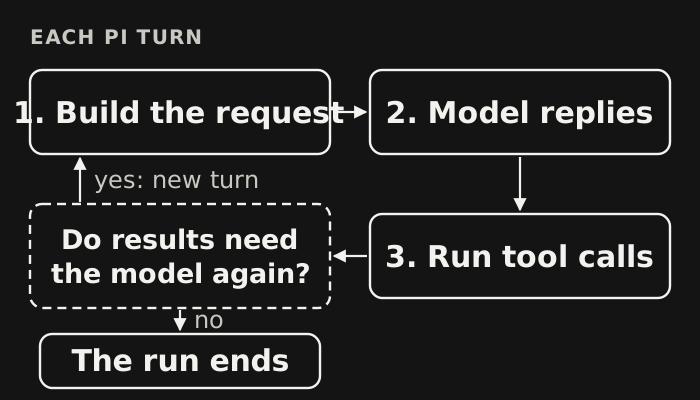
A small core also lets you follow how a session runs. According to How Pi works, each turn goes like this:
- Pi builds a request from the system prompt, the active session branch, the tool list and the model settings.
- The model returns text and tool calls.
- Pi runs each tool call and records the result in the session.
- If the tool results need another model request, Pi starts a new turn; otherwise it stops.
Sessions are stored as tree-shaped JSONL (JSON Lines, one record per line) files, so you can branch from an earlier point without losing history. When context fills up, compaction inserts a summary in place of older messages for later requests, while the originals stay in the tree. Part 3 of the series will cover this in depth.
The price of a small core is that responsibility moves to you. Less running in the background makes the agent easier to follow. In exchange, what other tools handle for you, such as asking for permission or splitting work across subagents, you either handle yourself or accept that you don't have.
How Pi, OMP and Claude Code differ
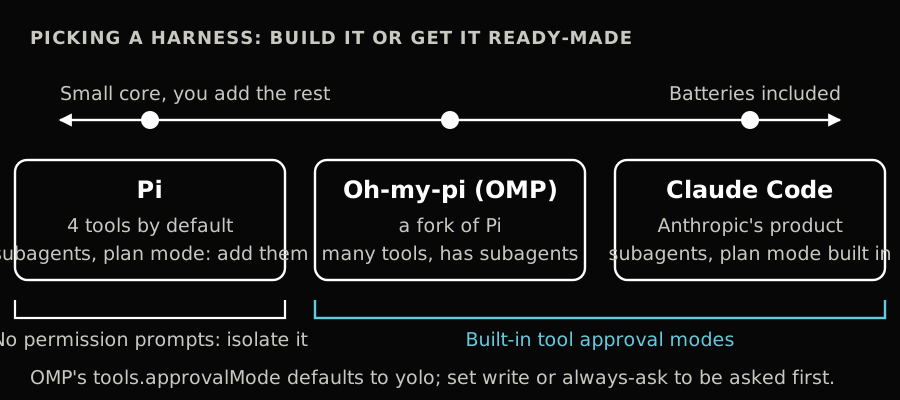
All three are coding agents that run in a terminal, but each draws the line in a different place. I compare them on the criteria that affect the choice: minimalism, customization, models, permissions and cost. The table is based on each tool's README and official documentation as read on October 18, 2026. It is not a benchmark.
| Criterion | Pi | Oh-my-pi (OMP) | Claude Code |
|---|---|---|---|
| Approach | Small core you assemble | Fork of Pi with many features built in | Complete product from Anthropic |
| Built-in tools | read, bash, edit, write; MCP built in (add servers), codemode on request | Many built-in tools: LSP (Language Server Protocol), debugger, browser, search | Full tool set for reading, editing, running commands, searching |
| Subagents and plan mode | Not in the core; example extensions, or install a package | Subagents, plus a plan role for plan mode | Both built in |
| Permission prompts | No permission system; isolate all of Pi in a container, virtual machine or sandbox | Tool approval mode (tools.approvalMode); the default yolo auto-approves writes and commands, write prompts before commands, always-ask prompts before file writes too; tool or user policies can still override | Permission system driven by modes and rules: Manual mode asks before file edits and commands (except a built-in set of read-only commands), auto mode approves with background safety checks; the starting mode depends on version, how you run it and configuration |
| Models | Many providers, subscriptions, API keys, local models | Many providers, model routing by role | Anthropic's Claude models |
| Customization | TypeScript extensions, skills, prompt templates, themes, packages | Extensions, hooks, skills and role configuration | Skills, hooks, subagents, plugins, MCP |
| Cost | MIT licensed, free; you pay for the model | MIT licensed, free; you pay for the model | Needs a Claude plan, an Anthropic Console account or a cloud platform (Amazon Bedrock, Google Cloud Agent Platform, Microsoft Foundry) |
Sources: Pi README and docs, the OMP README and its approval mode docs, the Claude Code docs, its subagents page, its permissions and permission modes pages, and its third-party providers page.
The relationship between Pi and OMP is worth spelling out, because the names invite confusion. The OMP README describes OMP as "a fork of pi-mono by Mario Zechner, extended with a batteries-included coding workflow", built by Stencil Labs. Pi was written by Mario Zechner and is now developed under the earendil-works organization. OMP is not a set of extensions installed on Pi; it is a separate harness with its own releases. If you like how Pi thinks but want everything on day one, OMP is the middle option. The Inside OMP series on this site, starting with OMP model routing, takes OMP apart the same way.
Claude Code differs at the root: an Anthropic product tied to Claude models, with subagents, plan mode and a permission system built in. You can change its behavior through skills, hooks, subagents and plugins, while the core stays Anthropic's call. If you only use Claude models and want a permission layer built in, Claude Code is less work than Pi.
One note on cost: Pi is free, the model is not. When you sign in to Pi with an Anthropic subscription, the warnings.anthropicExtraUsage setting (on by default) warns you when usage may count toward paid extra usage (Settings). Routing models to cut cost will be the topic of part 6.
What Pi includes, and what is still experimental
The part you use every day is the coding agent in the terminal. The README does not label it experimental. That label sits on Pi Durable, the package for building long-running agent products, and on a few individual features the docs mark explicitly.
According to the CHANGELOG, the biggest changes around 1.0:
| Version | Date | Main changes |
|---|---|---|
| 0.99.0 | September 29, 2026 | MCP as a built-in extension (pi mcp add, stdio, streamable HTTP (Hypertext Transfer Protocol), OAuth sign-in) (MCP). Codemode: the model writes JavaScript that calls other tools in a QuickJS sandbox, and only the output returns to context (Codemode). Virtual models arrive as experimental. |
| 1.0.0 | October 1, 2026 | Fullscreen terminal UI by default (set tuiMode to "regular" for normal scrollback), fewer codemode prompt tokens, and codemode scripts can call image generation models. |
| 1.1.0 | October 7, 2026 | --tools takes +name and -name entries to add or remove tools from the default set. |
| 1.2.0 | October 12, 2026 | Removed the unreleased experimental server layer; pi-server, pi-protocol and pi-client are no longer released. |
| 1.3.0 | October 15, 2026 | Resuming a session keeps the tools you activated; switching models mid-session drops the old model's thinking; /share gained sessionShareDestination (release notes). |
Earendil has a post, You said no MCP, on the decision to bring MCP into Pi. Part 5 of the series will cover that and how codemode keeps context lean when calling many MCP tools.
Still experimental: Pi Durable (
@earendil-works/pi-durable), a runtime for conversations, tasks and documents that survive a crash. Its README says: "Experimental. The API changes without notice between releases." Most of what you run in the terminal carries no such label, apart from a few features the docs mark explicitly, such as virtual models. If you plan to build a product on Pi Durable, expect the API to change between releases. Part 8 will be dedicated to Pi Durable.
Frequently asked questions
These three are worth knowing before you install Pi for the first time.
Is it safe to run Pi?
Pi is as safe as the environment you run it in. The Security docs advise treating every command and piece of code the model generates as untrusted. They also say that running all of Pi inside a container, virtual machine or sandbox is usually the strongest practical option. Project trust only decides whether Pi loads a folder's settings and extensions; it does not block tool calls. The Containerization docs walk through the isolation methods: plain Docker, Docker Sandboxes, OpenShell and the Gondolin extension.
Do I need to know TypeScript to use Pi?
No. To use Pi you only need a terminal. TypeScript matters only when you write an extension, and even then the README suggests asking Pi to write it for you. Read the code before you turn it on, because an extension runs with the same permissions as Pi.
Does Pi run on Windows?
Yes. Pi has installers for macOS, Linux and Windows and needs Node.js 22.19 or newer; the installers can install Node.js if it is missing (README).
What to read next
If you remember one thing from this post: choose Pi when you want to decide your harness yourself, and choose OMP or Claude Code when you want the harness decided for you. If you choose Pi, what to read next depends on what you need:
- Want to try Pi now: part 2, from installing and signing in to a real task in your repo, with how to run Pi safely.
- Long sessions and an agent that starts forgetting: part 3 (coming soon), on sessions and compaction.
These parts are being written and will come out in turn:
- Want plan mode or permission prompts: part 4, built with an extension.
- Using many MCP tools: part 5, on codemode and MCP.
- Cutting cost or splitting models by task: part 6, on routing, virtual models and caching.
- Calling Pi from a script, CI or another app: part 7, on print mode, JSON mode, RPC and the SDK.
- Building a long-running agent product: part 8, on Pi Durable.
If you use OMP and want Pi and OMP side by side on one machine, running several Pi and OMP profiles on one machine shows how to keep their configuration from colliding. The first two parts of Inside Pi are public; from part 3 on they are for Subscribers.
Use this piece in your agent
Get an API keyCopy the text below and paste it into Claude Code, Codex or whichever agent you use. The agent reads the piece and checks it against the repo you have open.
Read "Is Pi right for you? Pi compared with Oh-my-pi and Claude Code" on modernEngineer and apply it to this repo.
1. Call the content_get tool of the modernengineer MCP server with locale "en", slug "pi-coding-agent-is-it-for-you". If MCP is not connected or access is refused, read the page https://modernengineer.dev/en/library/pi-coding-agent-is-it-for-you instead.
2. Summarize the main steps of the piece and point out which apply to this repo.
3. Propose concrete changes and ask me before editing any file.
Connect MCP in Claude Code (once)
claude mcp add --transport http modernengineer \
  https://api.modernengineer.dev/mcp \
--header "Authorization: Bearer <API key>"This piece is open to everyone: without MCP, the agent can still read it straight from the link.
- Version
- v1.0.0
- Updated
- 07/10/2026
- Licence
- All rights reserved
- Slug
- pi-coding-agent-is-it-for-you