Quick summary: When AgentKit v3 stops the agent from reading
.env, that prompt comes from theprivacy-blockhook, not from Claude Code's ordinary file read permission. To get fewer prompts, move secrets into the vault, use.akignorefor files that are blocked for no good reason, and add allow rules for the commands you run often. Switching the permission mode toautoorbypassPermissionsdoes not turn the hook off. There is a separate command to turnprivacy-blockoff entirely, but you lose one layer of secret protection.
You ask Claude Code to fix a feature. The agent runs a few commands, then stops because it needs to read .env. You approve, the agent tries again, and Claude Code asks once more for that same command. Switching to a mode that asks less does not make it go away.
The problem is that Claude Code and AgentKit have two different control mechanisms. Claude Code decides which tool calls need approval. AgentKit also installs hooks that block operations that might touch secrets, even when Claude Code has already allowed them.
I will separate these two mechanisms, show how to handle each source of prompts, and spell out the protection you give up if you want the agent to run with fewer interruptions.
Disclosure: I maintain AgentKit and have an affiliate relationship with it. The AgentKit link in this post is an affiliate link; buying through it gets you 30% off.

Why does AgentKit v3 ask for permission so often?
Two sources make the agent stop: Claude Code's permission system and AgentKit's privacy-block hook. To get fewer prompts, you first need to know which source blocked the operation.
In Claude Code, a tool call is when the agent calls a tool to read a file, edit code or run a command. In the default permission mode, also called Manual, Claude Code allows reading files in the working directory without approval. Operations such as running Bash (except a built-in group of read-only commands), editing files, WebFetch and WebSearch need approval.
That is the default behavior described in Claude Code's permissions docs.
AgentKit adds a guardrail layer through hooks, programs that are called at specific points while the agent uses tools. For privacy-block, the goal is to control access to sensitive files before the tool call runs.
What happens during one AgentKit prompt?
In AgentKit ak 3.1.0, the hook code and test results show that privacy-block handles a blocked operation in this order:
- The agent calls a tool to access a sensitive file, such as
.env. privacy-blockdenies the first call with exit code2.- The hook records a one-time approval tied to the session, the path and the operation. This approval expires after 15 minutes.
- The hook's denial message goes to the agent and is not shown to you directly. The agent reads it, then asks you through a choice box titled "File Access" with two options, "Yes, approve once" and "No, skip this file". After you agree, the agent calls the tool again with the
APPROVED:prefix. - The hook strips the prefix and returns
permissionDecision: "ask"so Claude Code handles the permission prompt.
The approval can only be used once. After it has been used, a further retry is still blocked. If the agent adds APPROVED: on its own without a valid denial before it, the hook blocks the operation too.
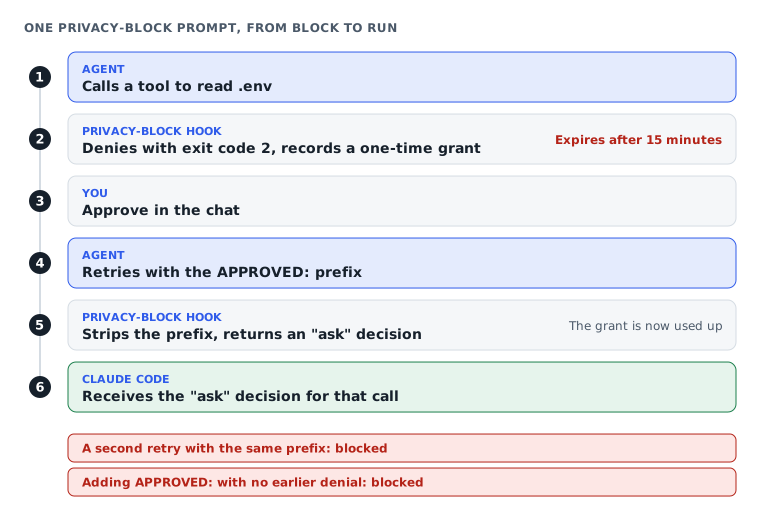
The consequence is that you are asked twice for one file. After you approve in the "File Access" box, Claude Code shows its own permission prompt for the retry, with the line Hook PreToolUse:Bash requires confirmation for this command and the question "Do you want to proceed?". This second prompt appears even when the session is in auto mode.
I went through this whole flow in a real Claude Code session (version 2.1.323, auto mode), in a test project whose .env file holds fake values.
If you leave the defaults on, what do you do at each prompt?
You do not need to configure anything to work with privacy-block. In return, each time the agent touches a sensitive file, you go through these steps:
- The agent stops and shows a "File Access" choice box that names the file and says whether the operation is a read or a write.
- You pick "Yes, approve once" if the agent really needs that file. If you pick "No, skip this file", the hook's message tells the agent to carry on without the file and not to reach it through another tool or command.
- The agent repeats the exact operation that was blocked. Claude Code shows its own permission prompt for this call, and you pick "Yes" once more.
- The operation runs, and the approval is used up.
One approval has a narrow scope: one file, one operation, one use, in that session only, and it expires after 15 minutes if the agent does not retry. The agent reading the same file again is a new prompt. The agent writing to a file it was approved to read is also a new prompt, because the approval is tied to the operation.
There is one case where you approve and the agent is still blocked. In my test session (Claude Code 2.1.323 with the hooks from the AgentKit 3.1.0 kit), when the agent retried with the Read tool the retry was denied again, and approving once more gave the same result. Retrying with the Bash command wc -l ran. If you hit this loop, tell the agent to read the file with a Bash command such as cat instead of the Read tool.
Two other situations have their own flow when you leave the defaults on:
- A command with
${secret:NAME}that has no grant yet: The agent reports "SECRETS BLOCK". You open a separate terminal, runak secrets approve, then tell the agent to retry the command. - A Bash command, a file edit, web access: Claude Code shows its own permission prompt. You approve once, or for a Bash command pick "Yes, and don't ask again" so it does not ask next time.
For one or two files this flow is fine. It becomes a nuisance when the agent has to touch .env many times in a session, because each touch is a full approval round. The next sections go through ways to cut the number of rounds while keeping the hook.
Not just reading .env with the file read tool
privacy-block does not only block direct file reads. In the test environment, the hook also recognized shell commands such as:
cat .env | grep KEYbash -c "cat .env"Blocking reads through the shell is a v3 change. The AgentKit blog dates it to v3.0.0, and the guard rails article I wrote in June records the old behavior, when privacy-block let Bash commands through with only a warning.
Direct testing also showed that the hook blocks writes to sensitive files, not just reads.
So if the agent is denied when it touches .env, think of privacy-block before you change Claude Code's permission settings. If Claude Code shows an ordinary permission prompt for a Bash command, the cause may be the permission rules or the mode.
You can read more about the hook mechanism and the settings layers in Claude Code and AgentKit to see why both systems act on the same tool call.
But for .env, the better fix is at the source: do not make the agent read the file that holds your secrets every time it needs a value.
How do you stop the agent from needing to read .env?
Move secrets into the AgentKit vault, then hand the value to the program that needs it instead of letting the agent open .env. You keep privacy-block, but remove one common reason the hook blocks operations.
AgentKit has the ak secrets command group for storing, importing and using secrets.
Move secrets from .env into the vault
If the project already has .env files, you can start by previewing the import plan from the current directory:
ak secrets import-env . --dry-runWith ak 3.1.0, --dry-run only applies when you import from a directory. The command prints the file names, key names, line numbers and how many keys it would import, replace or skip. It does not store secrets and does not print secret values.
After checking the plan, run:
ak secrets import-env .To import only a single .env file, use:
ak secrets import-env .envImporting a single file has no --dry-run preview step.
By default, the import does not overwrite keys already in the vault. To overwrite them, you have to use --force.
The import does not edit or delete the original .env file (the help states that the command never modifies the path you pass in). If the file is still there with real keys, the agent still has a reason to open it and privacy-block still blocks as before. Once you have switched how variables are loaded to ak secrets run or ${secret:NAME}, remove the real keys from .env, or remove the file from the working directory entirely.
Given a directory, AgentKit merges the .env and .env.* files and skips example files, template files and backups. If the same key appears in more than one file, that key is skipped entirely; AgentKit does not pick a value from one of the files on its own.
So review the import plan before running it, especially when the project has several .env files.
According to the ak 3.1.0 help, the vault uses the operating system keychain by default. There is also --backend=file for an age-encrypted vault with a passphrase, and --backend=memory for development or testing.
I imported into a file vault to check: the two keys in the fake .env were stored in an encrypted vault.age, ak secrets list showed only the key names and a short hint, and no value was readable anywhere in the vault folder. The original .env file was still in place after the import.
Since late October 2026, I have used ak secrets set and ak secrets run many times on my work machine.
Pass secrets to the program that needs them
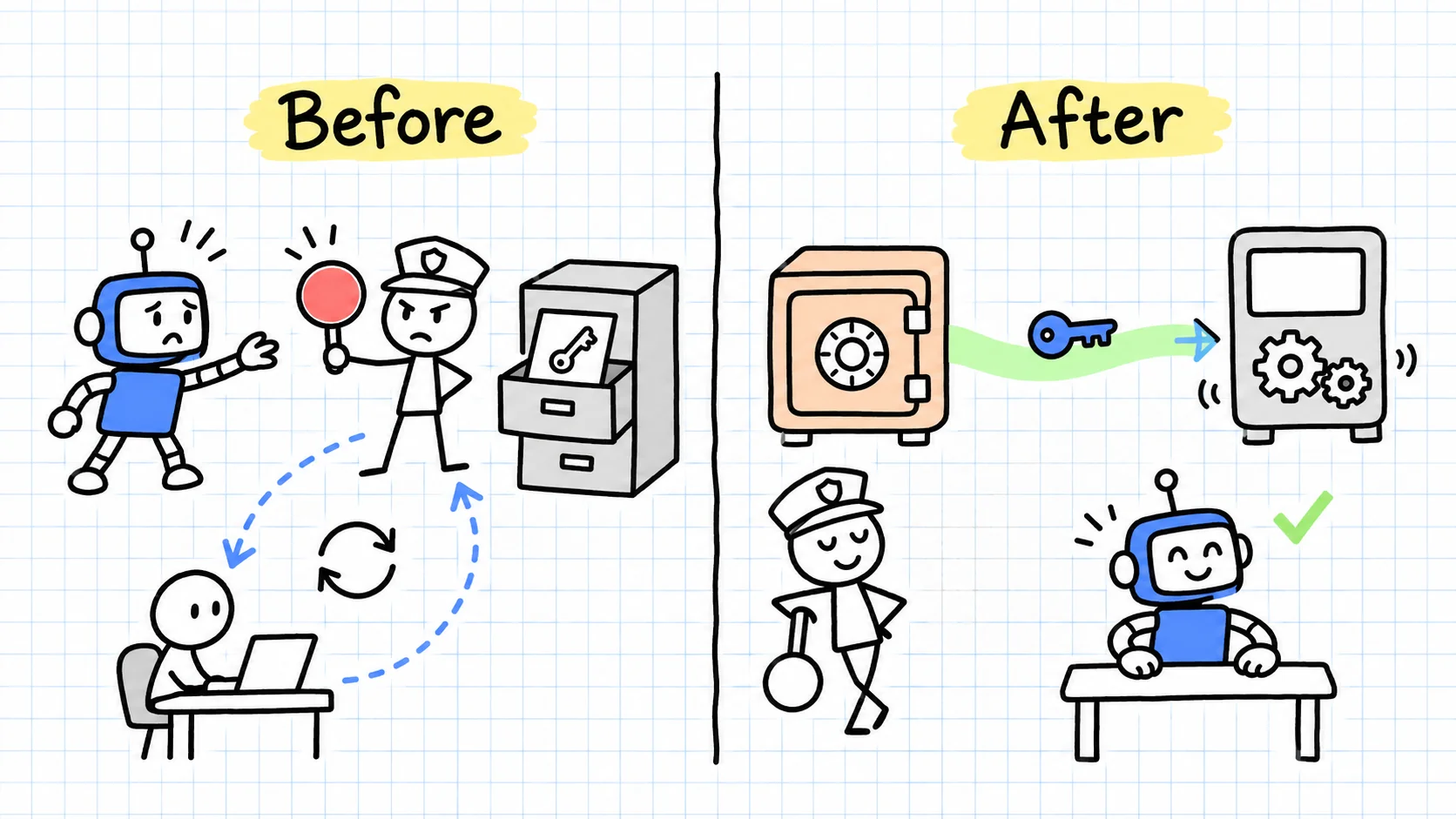
Once the secret is in the vault, you do not have to hand the value to the agent to read.
AgentKit provides this syntax:
ak secrets run --env VAR=REF -- <program>Here, VAR is the name of the environment variable the program expects, and REF is the name of the secret stored in the vault.
An example following the pattern in the ak 3.1.0 help (general vault usage is covered in the AgentKit vault guide):
ak secrets run --env GH_TOKEN=GH_TOKEN --purpose release -- gh release listIn this command, the GH_TOKEN to the left of the = sign is the environment variable passed to the program. The GH_TOKEN on the right is the secret name in the vault. The program being run is gh release list. --purpose release is a purpose label: the approval must record exactly this label for the command to match.
The program must be an executable that runs directly. Commands that go through a shell or an intermediate launcher are refused.
This command puts the secret value into the program's environment variable and masks it in the output. In my test session, printenv run through ak secrets run printed [redacted:secret:FAKE_TOKEN] in place of the real value.
ak secrets run is a command for the agent to run, not one you type yourself in a terminal outside the agent session: AgentKit walks the parent process chain to find which agent is calling. That agent has to be pinned first. Without a pin the command exits with code 6 and reports no pinned adapter above the wrapper processes that spawned ak.
Each VAR=REF pair also needs an exec approval tied to the exact program being run. The first-time sequence:
- You pin the agent with
ak secrets trust claude --refreshand answery. The command pins theclaudebinary currently on PATH, so the agent session has to run that same version. You only repeat this when Claude Code changes version. - The agent runs the
ak secrets runcommand. It stops with exit code8, reportswaiting for an operator to approve this scope, and the request is filed. - You open a terminal application outside the Claude app and run
ak secrets approveto answer that request. - You tell the agent to run the command again. The original command does not resume after you approve. Once the agent is pinned and the request is approved, the command exits with code
0.
If you want to grant it in advance, the help gives the pattern ak secrets grant REF --agent sha256:HASH --exec PROGRAM --env VAR. The --agent flag is required; show the agent hash with ak secrets trust claude. If the run command has --purpose, the approval has to carry that exact label too. Like approve, the grant command has to be run by you in your own terminal; the agent cannot run it. AgentKit refuses to run a shell or an intermediate launcher this way.
The agent does not need to open .env to get the value. The program receives the secret through an environment variable in the approved run.
This does not mean every place the secret passes through is fully protected. You still need to review the program that receives the secret and how it uses the value.
When the agent needs to reference a secret directly
AgentKit also supports a direct reference syntax:
${secret:NAME}Here, NAME is the secret name in the vault. The agent can put this reference in the input of a shell command or a WebFetch URL instead of reading the value from .env itself.
When the tool call runs, the secrets-inject hook can replace the reference with the secret value. This only applies to the supported fields, which are shell commands and WebFetch URLs; content inside files is not replaced automatically.
Without an approval, the command is blocked with a "SECRETS BLOCK" message and the request is filed. You approve it in a terminal outside the Claude app with:
ak secrets approveOnce you have approved, go back and tell the agent to retry the command; the blocked tool call does not rerun by itself. When the agent retries, Claude Code shows one more permission prompt for that command, and that prompt displays the command with the real secret value filled in. The command runs only after you pick "Yes". The agent sees just the reference: in my test session it could not tell what had turned ${secret:FAKE_TOKEN} into a 29-byte string.
This is the important difference between secrets-inject and ak secrets run. With ak secrets run, the value only goes into the program's environment variable and is masked in the output. With ${secret:NAME}, the value appears on your screen in the confirmation prompt, and after the test session I found it in the session history file Claude Code keeps on disk. So prefer ak secrets run, and use ${secret:NAME} only for a secret you accept being exposed on your own machine.
Why approve in a separate terminal, and re-pin when Claude Code changes version?
ak secrets approve and ak secrets grant are where a person confirms, so AgentKit does not let the agent run them. ak secrets trust claude --refresh needs an interactive terminal. The two rules below explain why you can think you have approved and the agent is still refused.
Approval has to happen in a terminal outside the Claude app. ak secrets approve refuses to run when an agent sits above it in the process tree, and records the attempt in the audit ledger. Asking the agent to run it for you, or typing it after ! inside Claude Code, does not work. The integrated terminal in the Claude desktop app does not work either: I tried it there and got an agent adapter is running above this process, and an agent may not answer its own request; run this in a terminal you opened yourself. In Terminal, iTerm or another standalone terminal application the command runs normally. The pin command ak secrets trust claude --refresh does run in the integrated terminal.
A grant is tied to the exact binary of the agent. AgentKit identifies the agent by walking the parent process chain and hashing that binary. The hash is pinned in ~/.agentkit/trust.json, one pin per agent, with its path and version. Show the current pin with:
ak secrets trust claudeWhen Claude Code upgrades, the binary changes and so does the hash. Re-pin with the command below, also in your own terminal, because it needs you to confirm in person. Run somewhere without an interactive terminal, it exits with code 2.
ak secrets trust claude --refreshOn my machine several Claude Code versions sit side by side. The claude command in the terminal points to the newest downloaded version, while the desktop app runs its own bundled one. Two different binaries, so two different hashes. I called ${secret:NAME} from a desktop app session in two cases:
- No pin recorded: The request is filed as usual and carries the hash of the binary running that session. This is where
${secret:NAME}differs fromak secrets run: theruncommand requires a pin first. - A pin exists, but for another version: The command is refused outright. The message lumps three causes together: you deliberately blocked this scope, the process could not be identified as a trusted agent, or the destination is not on the allowed hosts list. No request is filed, and the message says retrying will not change the result.
The second case is the most confusing one: ak secrets approve has nothing to approve, and the agent is still refused. If you hit it, compare the version recorded in the pin with the Claude Code version that session is running.
I ran --refresh in a terminal to see what it does. It prints the current pin, prints the binary about to replace it with its path and a shortened hash, then asks Trust this binary as "claude"? [y/N]:. The binary it proposes is the claude currently on PATH. On the day I tried it, that was still the already pinned 2.1.322, so confirming changed nothing.
The consequence is that --refresh does not help a session running a different version from the one on PATH, such as the desktop app above: after re-pinning, the trusted hash is still the terminal version's. trust.json keeps a single hash per agent, and the command has no flag to name a different binary.
Claude Code updates itself often, so this happens fast. In the three days I spent on this article, the claude command on my machine went from 2.1.322 to 2.1.323 to 2.1.325. The last update happened overnight while a test session was open on 2.1.323 with the agent pinned at that same version: the next morning ak secrets run in that session exited with code 6 again, even though the request had been approved. When I opened a new session with 2.1.323 first on PATH, the command ran. I am reporting what I saw, not claiming the mechanism behind it. An approval is tied to the agent hash, so a new Claude Code version needs approving again.
The habit I took from this when using the vault through an agent: after every Claude Code upgrade, open a new session, re-pin, then re-approve.
Each command for storing, finding and rotating secrets is in the ak-vault guide: store and use secrets without exposing their values, an article for Subscribers.
The vault covers using secrets without reading files. Still, there are cases where privacy-block flags a file as sensitive even though it holds no real secret.
Where do you declare sensitive files that do not need a prompt?
Use .akignore to declare exceptions for files you have confirmed do not need privacy-block protection. This handles files that match a sensitive pattern but hold no secret you need to keep private, instead of turning off the hook for the whole machine.
In ak 3.1.0, .akignore uses gitignore syntax. The hook reads the files in this order:
<AGENTKIT_HOME>/.akignore, by default~/.agentkit/.akignore<project>/.akignore<project>/.agentkit/.akignore
For example, if a .env file holds only non-sensitive sample data and you have checked its contents, an exception line could be:
.envDo not add this line just because the file name is a nuisance. If .env holds real keys, letting the agent read the file defeats the purpose of privacy-block. Move the secrets into the vault first.
Where you put the file makes a difference:
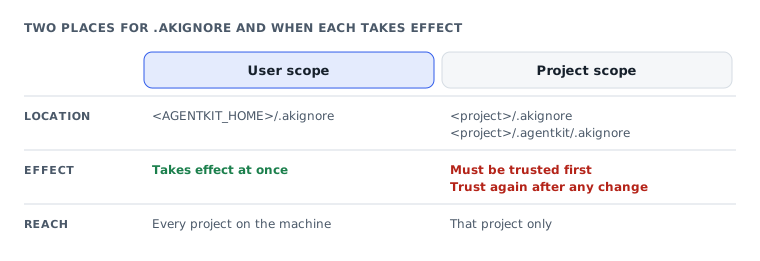
- User level: The
.akignorefile inAGENTKIT_HOMEtakes effect immediately. - Project level: The
.akignorefile must be trusted before it is used. When its contents change, you need to trust it again.
For a project file that is not yet trusted, the hook still blocks the operation, and the box changes its first option to "Yes, approve and trust". Picking it approves this read and also trusts the content of the project .akignore until that file changes.
I ran this step in a real session. After I picked "Yes, approve and trust" and confirmed Claude Code's own prompt, the next read ran straight away, with the notice Privacy guard skipped .env because a trusted project .akignore allows it.
If you want to declare an exception at the user level without going through the project trust step, you can use:
<AGENTKIT_HOME>/.akignoreThis is a user-scoped file, so any line you add applies to every project on the machine; it is not an exception for a single project.
One limit, according to the hook code: for shell commands, an .akignore exception only applies when the whole command is a simple read command such as cat, head, tail, less or wc. For a command with a pipe, a redirection, &&, a variable or a wildcard, the hook still asks as usual, even if the file is in .akignore.
If you have no need for exceptions, leave .akignore empty or do not create it. Not every project needs this extra configuration layer.
Once sensitive files are handled, the prompts Claude Code shows for Bash, file edits and other tools have to be handled in Claude Code's own permission system.
How do you cut Claude Code's own prompts?
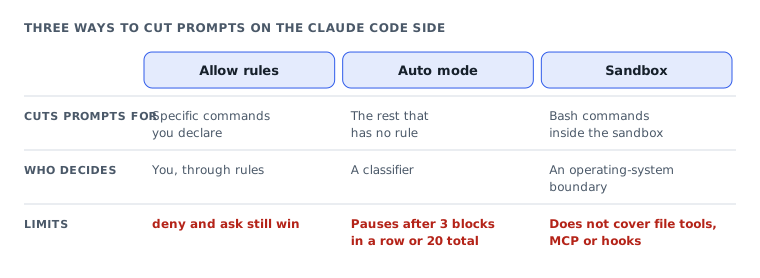
Use allow rules for specific commands, auto to let Claude Code judge the rest, and the sandbox if you want an extra boundary enforced by the operating system. These three handle different kinds of operations; they are not three levels you have to turn on together.
I prefer narrow rules for repetitive work. For operations that have no rule yet, you can let auto decide or keep approving by hand.
Add allow rules for the commands you run every day
If Claude Code keeps asking for permission to run the same check command, you can add an allow rule for exactly that command.
For example, in .claude/settings.json:
{
  "permissions": {
    "allow": [
      "Bash(npm test)",
      "Bash(git commit *)"
    ]
  }
}
According to Claude Code's permission management docs, permission rules use the syntax Tool or Tool(specifier).
In the example above:
Bash(npm test)allows exactly thenpm testcommand.Bash(git commit *)uses the*wildcard to match the string aftergit commit, spaces included.
You may also see the form Bash(ls:*), equivalent to Bash(ls *), where :* can only go at the end of the pattern.
When you write Bash rules, put * after the subcommand, such as npm run *, to scope what is allowed clearly. However, the Bash(npm run *) rule has a catch when you use auto, explained in the next section.
Do not write overly broad rules just to avoid seeing permission prompts. A rule that allows more commands than you actually need also widens what the agent can run without you reviewing it.
Claude Code evaluates rules in this order:
deny: Deny.ask: Ask you.allow: Allow.
An allow rule cannot carve an exception out of a deny rule. If an operation matches both ask and allow, ask wins.
To see the current rules and which settings file holds each one, run this in a Claude Code session:
/permissionsRule changes take effect from the next tool call.
You can also choose "Yes, and don't ask again" when Claude Code asks for permission for a Bash command. Claude Code saves the choice per repo and command in .claude/settings.local.json. Unlike Bash, approving file edits this way only lasts until the end of the session.
If you do not know which commands to allow, Claude Code ships a bundled skill:
/fewer-permission-promptsThis skill scans your session history for read-only Bash commands and MCP (Model Context Protocol, the protocol that connects agents to external tools) tools you use often, then adds allow rules to the project's .claude/settings.json. You should still review the generated rules and their scope.
Let auto mode approve for you
If the problem is not just a few repeated commands, auto can reduce how often you have to approve each operation yourself.
Claude Code has these permission modes:
default: Manual approval.acceptEdits: Automatically approves reads, file edits and some common file commands such asmkdir,touch,mv,cpin the working directory. Other Bash commands may still need a prompt.plan: Reads and plans only, with no file edits until you approve the plan.auto: Uses a classifier (a checker that approves in place of a person) to evaluate operations and decide whether to allow them.dontAsk: Automatically denies operations that would otherwise need a prompt. Only allows reads and tools that were allowed in advance.bypassPermissions: Skips permission prompts and the usual safety checks, except in a few cases such as ask rules you set yourself.
You can switch modes with Shift+Tab, the --permission-mode flag at startup, or the permissions.defaultMode setting.
Since Claude Code v2.1.283, auto is the default startup mode for terminal and VS Code sessions. In older versions, auto was the default startup mode only on the Pro, Max, Ultra or Team plans.
In auto, Claude Code still evaluates allow, ask and deny rules first. Reads and edits in the working directory pass automatically; everything else goes to the classifier for evaluation.
According to Claude Code's permission modes docs, by default the classifier may allow reading .env and sending the credentials to the matching API (Application Programming Interface).
This is why you should not treat auto as secret protection on par with privacy-block. The two systems decide by different criteria.
There is also a point that is easy to miss: when you switch to auto, Claude Code temporarily ignores some overly broad allow rules, including:
Bash(*), the rule that allows every Bash command.- Wildcard rules for interpreters, such as
Bash(python*). - Rules for package manager run commands. The docs give no example; as I understand it,
Bash(npm run *)belongs in this group. - Rules for the
AgentandMonitortools.
Rules that name a specific command, such as:
Bash(npm test)are kept.
So a broad rule like Bash(npm run *) is likely to be ignored temporarily when you switch to auto, and the operation goes to the classifier for evaluation.
That is why I used Bash(npm test) in the configuration example in the previous section. If you use auto, write allow rules for specific commands instead of overly broad wildcards.
auto does not run indefinitely either. When the classifier blocks three times in a row or 20 times in one session, auto mode pauses and Claude Code asks you again. These thresholds cannot be changed.
On my personal machine, I use defaultMode: auto in ~/.claude/settings.json, with a short allow list and two ask rules.
{
  "permissions": {
    "defaultMode": "auto"
  }
}
This is a trimmed example that only shows where defaultMode goes, not my machine's full configuration.
Note on settings scope: According to the Claude Code docs, if you set defaultMode: auto in a project's .claude/settings.json or .claude/settings.local.json, the value has no effect. Claude Code uses its built-in default startup mode.
Likewise, if you set defaultMode: bypassPermissions in those two project files, Claude Code ignores the value and starts in Manual.
If you want either of these values as your startup mode, put it in the user-level ~/.claude/settings.json.
Turn on the sandbox for shell commands
If you want fewer Bash approvals but still want a boundary at the operating system level, consider the sandbox.
Unlike ordinary permission rules, the sandbox uses operating system mechanisms to limit operations. Claude Code applies the sandbox to Bash, PowerShell and Monitor.
Turn it on in a Claude Code session with the command below. The command opens a picker; in the Mode tab, choosing "Auto-allow" is what lets sandboxed commands run without a prompt, while "Regular permissions" still asks as before. On Linux and WSL2, the sandbox needs the bubblewrap and socat packages.
/sandboxOr use the setting:
{
  "sandbox": {
    "enabled": true
  }
}
According to Claude Code's sandbox docs, autoAllowBashIfSandboxed defaults to true. When a Bash command runs inside the sandbox, Claude Code can let it run without a prompt. Monitor commands still ask.
This is the key difference from just adding allow rules: the command skips approval because it runs inside a scope that the operating system controls.
However, the sandbox does not cover everything:
- Bash, PowerShell and Monitor are within the sandbox's scope.
- File tools, MCP and hooks run outside the sandbox.
- The sandbox is supported on macOS, Linux and WSL2, not on native Windows.
Do not assume either that turning on the sandbox means no personal file can be read.
According to the Claude Code docs, by default the sandbox still allows reading most files on the machine, including credential files such as ~/.ssh and ~/.aws/credentials.
To block reads of these sensitive paths, you need to declare them in sandbox.filesystem.denyRead.
Besides the sandbox, Claude Code also supports deny rules for the file read tool. For example:
{
  "permissions": {
    "deny": [
      "Read(./.env)"
    ]
  }
}
According to the Claude Code docs, this rule applies to the file read tool and to the file commands Claude Code recognizes in Bash, including cat, head, tail, sed, tee, and input and output redirection to files.
But deny rules do not cover every way to read a file. Commands that do not name the file directly, such as grep -r, or Python and Node programs that open files themselves, may fall outside what is recognized.
For a boundary enforced by the operating system, you need a suitable sandbox configuration. A deny rule on its own is not an absolute file isolation mechanism.
You can also compare against each guard layer, its gaps and how to use guardrails in Claude Code and AgentKit.
Whether you pick allow rules, auto or the sandbox, the agent can still stop because of a hook. That is when it is easy to think the permission settings you just changed had no effect.
Why does it still ask after you change the mode?
Because hooks run before Claude Code's permission system and permission mode. If privacy-block blocks a tool call, switching from default to auto, or even to bypassPermissions, does not automatically allow that operation.
According to Claude Code's hooks docs, the PreToolUse hook runs before the ordinary permission prompt.
There are two situations to tell apart.
The hook returns deny or exits with a blocking code: The tool call is denied before allow rules or the mode get a chance to allow it. For a deny decision, Claude Code enforces the result in every permission mode, including bypassPermissions and when started with --dangerously-skip-permissions.
The hook returns ask: Claude Code asks you to approve. The hook can supply updatedInput to show modified input before approval.
When several hooks return decisions, the precedence is:
deny > defer > ask > allowThis explains why an operation can still prompt even after you wrote an allow rule or switched to auto.
The privacy-block case with the APPROVED: prefix deserves particular attention: the hook can return ask after it has already processed an approval. So do not assume that agreeing in the conversation gets you past every approval step.
There is one more limit when running Claude Code unattended with -p: if a hook returns ask and nobody answers, the operation is denied. auto does not turn an approval request from a hook into a yes.
These rules are enforced by Claude Code, not just advice for the model. Writing more instructions in CLAUDE.md does not change the actual permissions Claude Code grants to tools.
So what if you no longer want the agent to stop because of privacy-block? You can turn the hook off, but that is a separate security decision, not a permission mode tweak.
YOLO mode: how to turn it all off, and what you lose
Warning: The Claude Code docs say to use
bypassPermissionsonly in isolated environments such as a container, VM or dev container without internet access; this mode does not protect against prompt injection. If you turn offprivacy-block, you remove AgentKit's blocking layer and the agent can read.envwithout asking this hook for permission. Do not combine the two changes on a personal machine that holds real secrets.
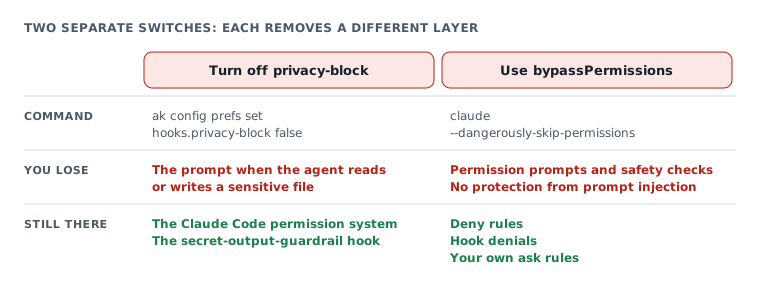
There are two independent switches if you want to skip most permission prompts: turning off AgentKit's privacy-block and using Claude Code's bypassPermissions. You need to understand exactly which protection layer each one removes.
Turn off AgentKit's privacy-block
On ak 3.1.0, this command turns the hook off:
ak config prefs set hooks.privacy-block falseThe command writes the setting to config.yaml, at user scope by default, which turns the hook off for the whole machine. To turn it off only for the project you have open, add --scope project; the command then writes to the project's .agentkit/config.yaml.
To turn it back on:
ak config prefs unset hooks.privacy-blockI tried turning it off and on in a separate install used for testing. On the machine I use every day, I keep privacy-block on; I have only turned off the reminder hooks.
The difference between these two kinds of hooks is worth keeping in mind.
According to the AgentKit blog on privacy and hooks, you should keep privacy-block and secret-output-guardrail on, while the reminder hooks can be treated as optional.
Here, privacy-block controls reads and writes of sensitive files. secret-output-guardrail does something different from what its name suggests: according to the hook code, it runs when you send a prompt, and if the prompt contains secret-related keywords, it injects a reminder telling the model not to print secret values into the conversation. It does not scan output, does not block tool calls and does not cause any permission prompt. The AgentKit blog sums up this hook as checking output for leaked secrets; the source code shows it is only a reminder.
But do not treat privacy-block as an absolute security boundary either.
According to comments in the hook code and the explanation on the AgentKit blog, privacy-block is a control layer that relies on the model's cooperation. After a denial, the model can insert the APPROVED: prefix into its next call on its own.
So this mechanism is not equivalent to the operating system blocking a process from reading a file.
In other words, keeping privacy-block helps control the operations the agent performs through hooks, but it does not replace isolating the environment and managing secrets properly.
If you turn the hook off, this control layer no longer blocks or prompts when the agent accesses sensitive files. Claude Code's other permission mechanisms are a separate matter.
Skip Claude Code's permission system
Claude Code lets you start with:
claude --dangerously-skip-permissionsAccording to the permission modes docs, this flag is equivalent to bypassPermissions.
With bypassPermissions, Claude Code skips permission prompts and the usual safety checks. A few things still ask, such as ask rules you set yourself and delete commands on critical paths. Allow rules no longer matter, but deny rules are still enforced.
This mode has clear limits:
- You cannot switch into
bypassPermissionsfrom a session that was not started in this mode. - Claude Code refuses to run as root or with sudo in this mode.
- A hook that returns
denycan still block a tool call. - The mode does not protect against prompt injection.
Since late 2025, I have run --dangerously-skip-permissions many times. The fact that I have run it says nothing about how safe this mode is on your machine.
To lock out the bypass mode, Claude Code supports:
{
  "permissions": {
    "disableBypassPermissionsMode": "disable"
  }
}
According to the Claude Code docs, this setting takes effect at any scope, so you can put it in your own settings to lock yourself out of this mode.
If you still want to run without approvals
For people who accept the risk, I will not equate "fewer prompts" with "safer". Cutting interruptions by removing checks has a direct cost: the agent can do more without you confirming it.
If you still choose this route, limit the damage that could happen:
- Run in an isolated container or VM: This is the environment the Claude Code docs recommend for
bypassPermissions, rather than a personal machine with real data. - Keep
secret-output-guardrail: This hook only injects a reminder not to print secret values and causes no permission prompts, so turning it off does not get you fewer prompts. - Put secrets in the vault: Do not make the agent read
.envto get credentials. - Add deny rules for what must not be touched: Deny rules still apply in
bypassPermissions, although what they recognize does not replace an operating system boundary. - Turn
privacy-blockback on when you are done: Useak config prefs unset hooks.privacy-blockonce you no longer need the experimental setup.
You can also use ak-security to check secrets, dependencies and code vulnerabilities, an article for Subscribers. That check is a different job and does not replace the permission layers while the agent runs commands.
Not everyone who uses AgentKit needs to run with permissions skipped. If you are only annoyed by a few Bash commands prompting over and over, a narrow allow rule or auto fits better. Turning off the whole control layer to deal with a handful of common commands is a disproportionate trade.
Which level should you pick for your machine?
If your machine holds real secrets, keep privacy-block and cut prompts with the vault, selective .akignore entries and narrow allow rules. Only consider skipping permissions in an environment that is already isolated and holds no data that needs protecting.
The table below is how I suggest choosing a configuration by situation. These are selection criteria based on the mechanisms analyzed above, not measurements of safety or of actual prompt counts.
| Situation | Turn on or use | Turn off or avoid | Why |
|---|---|---|---|
| Personal machine with real secrets | Keep privacy-block, secret-output-guardrail, the vault and narrow allow rules; consider auto and the sandbox | Do not use bypassPermissions; avoid .akignore exceptions for files that hold real secrets | Fewer prompts on common operations while keeping control over sensitive files |
| Test project with no secrets | Use auto and allow rules for repeated commands; .akignore for files confirmed not sensitive | No need to turn off privacy-block entirely | Handles unnecessary prompts without changing the protection layer across the whole machine |
| Disposable container or VM | Isolate the environment, keep secret-output-guardrail, the vault and suitable deny rules; you can consider bypassPermissions | Only consider turning off privacy-block if you accept losing that blocking layer; do not bring real secrets into the test environment | Accepts broader permissions within a limited scope, but the prompt injection risk remains |
Unattended runs (claude -p) | Keep privacy-block, set up the vault and the allow rules you need; consider the sandbox | Avoid flows that depend on someone answering ask; do not assume auto will approve hooks | A hook that returns ask with nobody to approve gets the operation denied |
No single configuration fits every machine. For daily work, you can start with three things: import secrets into the vault, check which files really need an .akignore exception, and review your permission rules with /permissions. Only then decide whether you need auto, the sandbox or a less controlled environment.
Quick reference
This section collects what to remember, organized by situation, so you can look up what to do the moment you get a prompt. The two strings "PRIVACY BLOCK" and "SECRETS BLOCK" open the messages the two hooks send to the agent; on your side you see the "File Access" box or the agent relaying it.
| What you see | Prompt source | What to do |
|---|---|---|
| A "File Access" box asking for one-time approval, or the agent reports "PRIVACY BLOCK" | AgentKit's privacy-block hook | Move secrets into the vault, then clear the real keys out of .env |
| You approved in the "File Access" box and the agent says it is still blocked | The hook does not accept the retry made with the Read tool | Tell the agent to read the file with a Bash command such as cat instead of the Read tool |
| Blocked on a file with a sensitive name that holds no secret | AgentKit's privacy-block hook | Add the path to .akignore |
The agent reports "SECRETS BLOCK" when a command contains ${secret:NAME} | AgentKit's secrets-inject hook | Run ak secrets approve in a terminal outside the Claude app, then tell the agent to retry |
| The agent reports a secret refused and says retrying will not help | The AgentKit pin does not match the Claude Code version that is running, the scope is blocked, or the destination host is not allowed | Compare versions with ak secrets trust claude; if they differ, run ak secrets trust claude --refresh in your own terminal and start the agent session from the same claude that is on PATH |
| A permission prompt for a repeated Bash command | Claude Code's permission system | Add a narrow allow rule, or run /fewer-permission-prompts |
| Scattered prompts across many kinds of operations | Claude Code's permission system | Use auto mode, and consider turning on /sandbox |
You changed the mode but .env is still blocked | The hook runs before every mode | Handle it on the AgentKit side; changing the mode has no effect |
The commands used most in this article:
ak secrets import-env . --dry-run            # Preview the import plan, stores nothing
ak secrets import-env .                      # Import secrets from .env files into the vault
ak secrets run --env VAR=REF -- <program>    # Run a program with secrets in its environment variables
ak secrets approve                           # Approve pending secret use requests
ak secrets trust claude --refresh            # Re-pin after Claude Code upgrades, run it in your own terminal
ak config prefs set hooks.privacy-block false   # Turn the hook off, only if you accept the risk
ak config prefs unset hooks.privacy-block       # Turn the hook back on
Three things hold whichever level you pick:
- Hooks beat modes: neither
autonorbypassPermissionsturns offprivacy-block. - Deny rules beat allow rules, and still apply in
bypassPermissions. bypassPermissionsis only for isolated containers or VMs, not for machines with real secrets.
If you use AgentKit and want to review the basics before changing settings, see the AgentKit install guide and first commands.
The goal is not to make Claude Code never ask. The goal is that operations you have already allowed stop asking for no reason, while operations that could touch secrets or go beyond the scope of the work stay under control.
Use this piece in your agent
Get an API keyCopy the text below and paste it into Claude Code, Codex or whichever agent you use. The agent reads the piece and checks it against the repo you have open.
Read "AgentKit v3 keeps asking for permission: how to get fewer prompts without turning off protection" on modernEngineer and apply it to this repo.
1. Call the content_get tool of the modernengineer MCP server with locale "en", slug "agentkit-v3-giam-hoi-quyen-claude-code". If MCP is not connected or access is refused, read the page https://modernengineer.dev/en/library/agentkit-v3-giam-hoi-quyen-claude-code instead.
2. Summarize the main steps of the piece and point out which apply to this repo.
3. Propose concrete changes and ask me before editing any file.
Connect MCP in Claude Code (once)
claude mcp add --transport http modernengineer \
  https://api.modernengineer.dev/mcp \
--header "Authorization: Bearer <API key>"This piece is open to everyone: without MCP, the agent can still read it straight from the link.
- Version
- v1.0.0
- Updated
- 14/11/2026
- Licence
- All rights reserved
- Slug
- agentkit-v3-giam-hoi-quyen-claude-code